ProRealCode - Trading & Coding with ProRealTime™
Hello All,
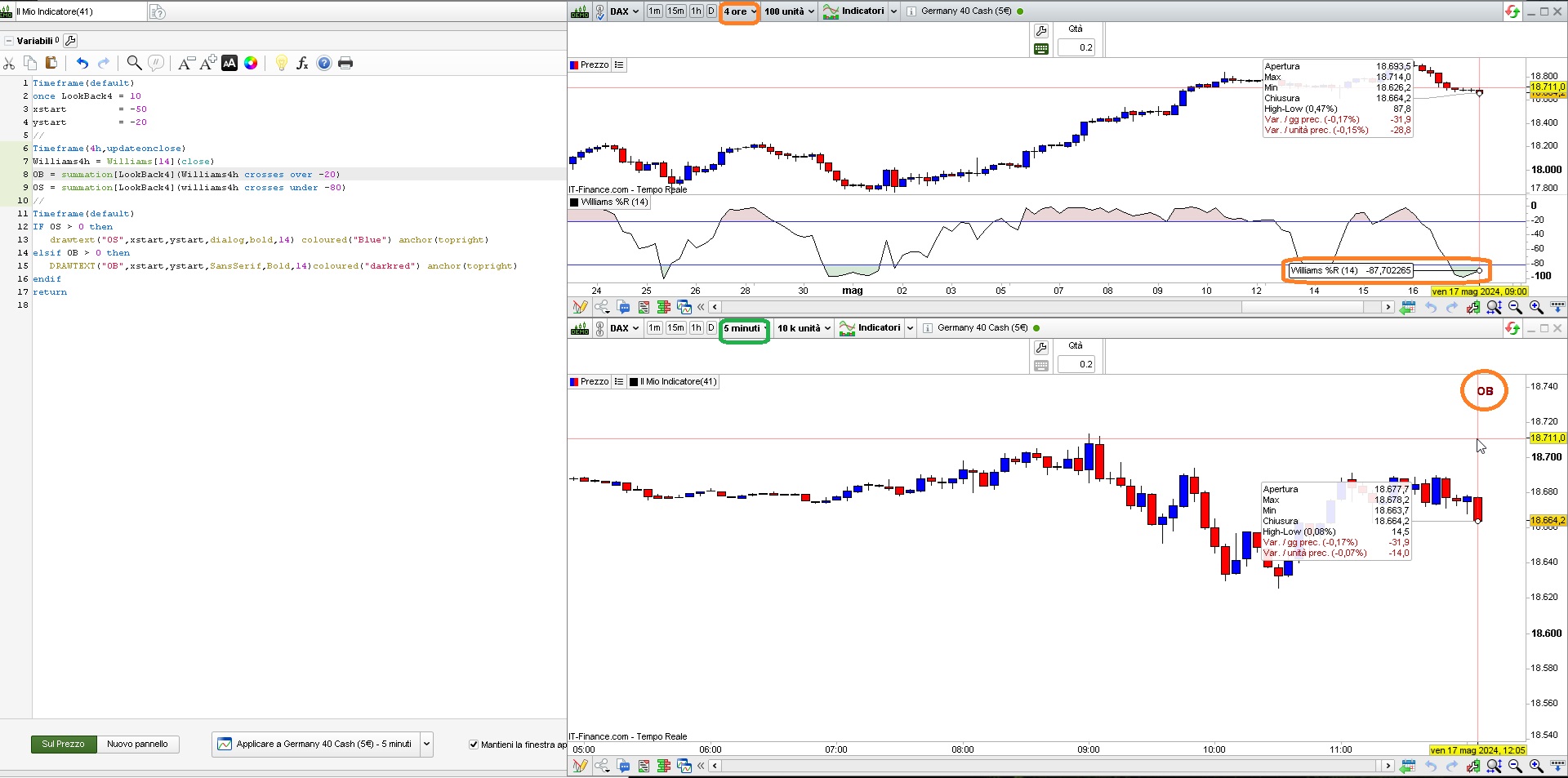
Looking for a bit of feedback on WR% lookback. 4hr TF.
I put together a little bit of code (it’s very basic) and while it does look back well enough, it’ll ‘print’ the very first flavour of OB/S that it finds w/in the lookback period rather than the last one it’s seen that meets the OB/S criteria. Has annoyed me, won’t lie, because it’s a good example of my own short comings and how I landed in the ‘oh that worked’ zone for a few weeks now and have been going WOT printing all and sundry to screen, not quite but you know the gist …. 🙂
OB = summation[LookBack4](Williams4h crosses over -20)
OS = summation[LookBack4](williams4h crosses over -80)
IF OS then
drawtext("OS",xstart-70,ystart-200,dialog,bold,14) coloured("Blue") anchor(topright,xshift,yshift)
elsif OB then
DRAWTEXT("OB",xstart-70,ystart-200,SansSerif,Bold,14)coloured("darkred")anchor(topright,xshift,yshift)
Ideally the code could live in an auto-trader as part of metric-build-up.
Roberto’s Cowabunga and Nonetheless’s template has been very good at steering the ship, so many thanks to both for the posts.
I also see a bit of indifference when using ‘or Williams4h > -20″ / ‘or Williams4h < -80’ along with the above statements – they have no effect to the print. For example when then we have an OB scenario on 4h and the following criteria is met:
= summation[LookBack4](Williams4h crosses over -20 or Williams4h > -20)
there’s nothing printed when we have Williams4h > -20 in there alone for example.
All this lives on 5min TF chart and is a good basis for getting it across the line first.
I guess what I was after was, that during the past periods (any), say 10 periods (on a WR% 4hr) and the conditions are met, we print the last condition met through that period. Printing the last two conditions would be great too but I’d take the last!
I’m using the following to clean up the remainder in the event conditions aren’t met. But if we could print the last two that could eliminate it maybe.
else
DRAWTEXT("WIP...",xstart-80,ystart-200,SansSerif,Bold,14)coloured(64,64,0)anchor(topright,xshift,yshift)
Many thanks,
inv
This code seems to work as you expect:
Timeframe(default)
once LookBack4 = 10
xstart = -50
ystart = -20
//
Timeframe(4h,updateonclose)
Williams4h = Williams[14](close)
OB = summation[LookBack4](Williams4h crosses over -20)
OS = summation[LookBack4](williams4h crosses under -80)
//
Timeframe(default)
IF OS > 0 then
drawtext("OS",xstart,ystart,dialog,bold,14) coloured("Blue") anchor(topright)
elsif OB > 0 then
DRAWTEXT("OB",xstart,ystart,SansSerif,Bold,14)coloured("darkred") anchor(topright)
endif
return
I just replaced OVER by UNDER in line 9, if that’s not what you want you may restore OVER.
Many thanks there Rob.
I’m starting to wonder what’s going on, on my end *cough* …..
Thanks for again for the help, it’s appreciated.
I’ll have a look over it all and post back, no doubt it was a me thing.
Looking good over here Roberto. (apologies for not getting back sooner).
Thanks for the assistance, you’ve sparked further creative thinking in other areas too .. 🙂
Hi Roberto,
Just revisiting this one and all good on the summation front but I have a few questions.
Is there a way to use something like following to determine when – prior conditions – existed. Could serve as a dynamic lookback variable of sorts or could be useful for a learner piecing together swings based on WR% (our intended use case).
The initial summation does a great job but just wondering there’s another avenue to reference ‘historical’ events. Define the crossover/under a bit differently.
a = (williams4h crosses under -80)
testa = barssince (a,1)
testb = barssince (a)
a1 = (williams4h crosses over -20)
testa1 = barssince (a1,1)
testb1b = barssince (a1)
For some reason I can’t seem to get my head around how to output the barrsince events to screen. I can ‘print’ them and wow, that was intense but I can’t reconcile w/in my mind how I can move forward from ‘returning’ them as an indicator to ‘drawtext’.
The idea here is to drawtext and define not only the current OBS conditions but also the preceding historical condition based on what barrsince can determine. There’s an argument that once we know the current periods condition the previous would be the opposite but knowing that it is is much nicer.
Thanks for your help.
Had another look and came up with the following, not sure tbh.
if testb > testb1 then // the last OB further away than the last OS = OS most recent
DRAWTEXT("OS",xstart-80,ystart-240,SansSerif,Bold,14)coloured("blue")anchor(topright,xshift,yshift)
elsif testb1 > testb then // the last OS further away than the last OB = OB most recent
DRAWTEXT("OB",xstart-80,ystart-240,SansSerif,Bold,14)coloured("darkred")anchor(topright,xshift,yshift)
endif
Logic could be a bit bad on my part, aside my understanding in general and intended use of barssince may not be as I’ve employed it!
Other thing is, when swinging between 1k bars and 5k bars the results are opposite.
It’s very slow and another reason I tried lowering the bar count, as opposed to using defparam calculateonlastbars.
Hi,
This is an example of how I indicate the different “Crossings” on the graph…
(In this case, the “Crossings” between a fast and slow average)
DefParam DrawOnLastBarOnly=True
FastMA=Average[10,0](Close)
SlowMA=Average[20,0](Close)
If FastMA Crosses Over SlowMA then
COBarIndex=BarIndex //Value of the crossover BarIndex
COValue=High //Value of the crossover Price
EndIf
If FastMA Crosses Under SlowMA then
CUBarIndex=BarIndex //Value of the crossunder BarIndex
CUValue=Low //Value of the crossover Price
EndIf
DrawArrowUp(COBarIndex,COValue)Coloured("Green")
DrawArrowDown(CUBarIndex,CUValue)Coloured("Red")
LastCO=BarsSince(FastMA Crosses Over SlowMA)
DrawText("Bars Since Last CrossOver=#LASTCO#",0,50,SanSSerif,Bold,24)Anchor(Bottom) Coloured("Green")
LastCU=BarsSince(FastMA Crosses Under SlowMA)
DrawText("Bars Since Last CrossUnder=#LASTCU#",0,100,SansSerif,Bold,24)Anchor(Bottom) Coloured("Red")
Return FastMA as "FastMA" Coloured("Red"), SlowMA as "SlowMA" Coloured("Blue")
Hi,
It is indeed tricky… I don’t know if it’s of any use to you, but I’ve written down a few things that I think are important in PRT… reading is optional 😉
ProRealCode is a relatively simple language to learn, but this simplicity is also the weak point of the language. The language has been made “simpler” by being less strict with certain procedures (e.g. not having to declare variables) but this also means that you immediately miss a certain structure in the code…
I think it’s important to first understand the (basic) workings of the code, things like:
A graph is loaded from left to right, bar by bar (candle by candle) and during this loading the code is executed after each bar (Close) up to the most recent bar/candle after which the code is executed during each new “tick”…
The index (bar index) of the loaded data (OHLC) also runs from left to right (bar index starts “left” with 0) but when you want to refer to certain data, it happens from right to left (for example, the far right is Close[0])…
The code roughly consists of three modules:
ProScreener (screeners), ProBuilder (indicators) and ProBackTest/ProOrder (trading systems)…
ProBuilder is the basis (calculations, drawings, colours, texts)
ProOrder have a number of specific commands/instructions, for example buy and sell instructions, which cannot be used in ProScreener or ProBuilder…etc…
Furthermore, I would structure your code a bit, for example:
Defining the parameters => Input values for e.g. indicators => Conditions and calculations => Possibly MM => Buy/Sell instruction => Any trailing stops / stop loss / take profit
LastCO=BarsSince(williams1h Crosses Over -20)
LastCU=BarsSince(williams1h Crosses Under -80)
LLX=LastCO+LastCU
DrawText("Total LB=#LLX#",xstart-80,ystart-10,SansSerif,Bold,14)coloured("darkred")anchor(topright,xshift,yshift)
Quick qu., what’s the line in the sand look like re: auto-trader. A quick poke about shows that anything that requires
a retrospective go-over might be unsuitable aka what we discussed in the other thread (macd hh-ll stored in an array).
Can for example what’s seen above (LLX), if stored in an array (single number or multiples) be called upon in an auto-trader setup for use as a summation lookback. Can it be stored in another manner perhaps? Just trying to get a feel for limitations before I start thinking or going to far only to realise most of what I’ve pre-canned is unsuitable for an auto-trader and although not the end of the world because it’s a guide first and foremost, a little bit of synergy goes a long way and for me it’s about middle ground so any feedback would be appreciated.
Hi @inverse,
Totally simplified so as not to scare you off… 😉
*The main ideas to know in the ProBuilder language are:
A variable in PRT can be compared to an “empty box” in which you put a certain value. The “box” has a certain name (e.g. “x”) and you use the symbol “=” to assign a value to the variable, for example x=10…
*Documentation ProBuilder Fundamentals
So, in your last code, for example, “LastCO” and “LastCU” and “LLX” are variables with a certain value. The values of the variables are determined by the conditions behind the “equal sign”…
Variables are related to the “BarIndex” (the independent variable) and are thus historicized. You can find previous values by using brackets [ ] for example: x[3]
Arrays are (special) variables that can contain more than one value at the same time, arrays are not related to the BarIndex and therefore not historicized BUT arrays use an “index (number)” with which you can recall a value for example: $x[3]… The number (integer) between the brackets is the index (place number) of the values searched for in the array list…
Unless you keep it very simple, I wouldn’t recommend starting with arrays yet… keeping the indexing straight can drive you crazy… 😉
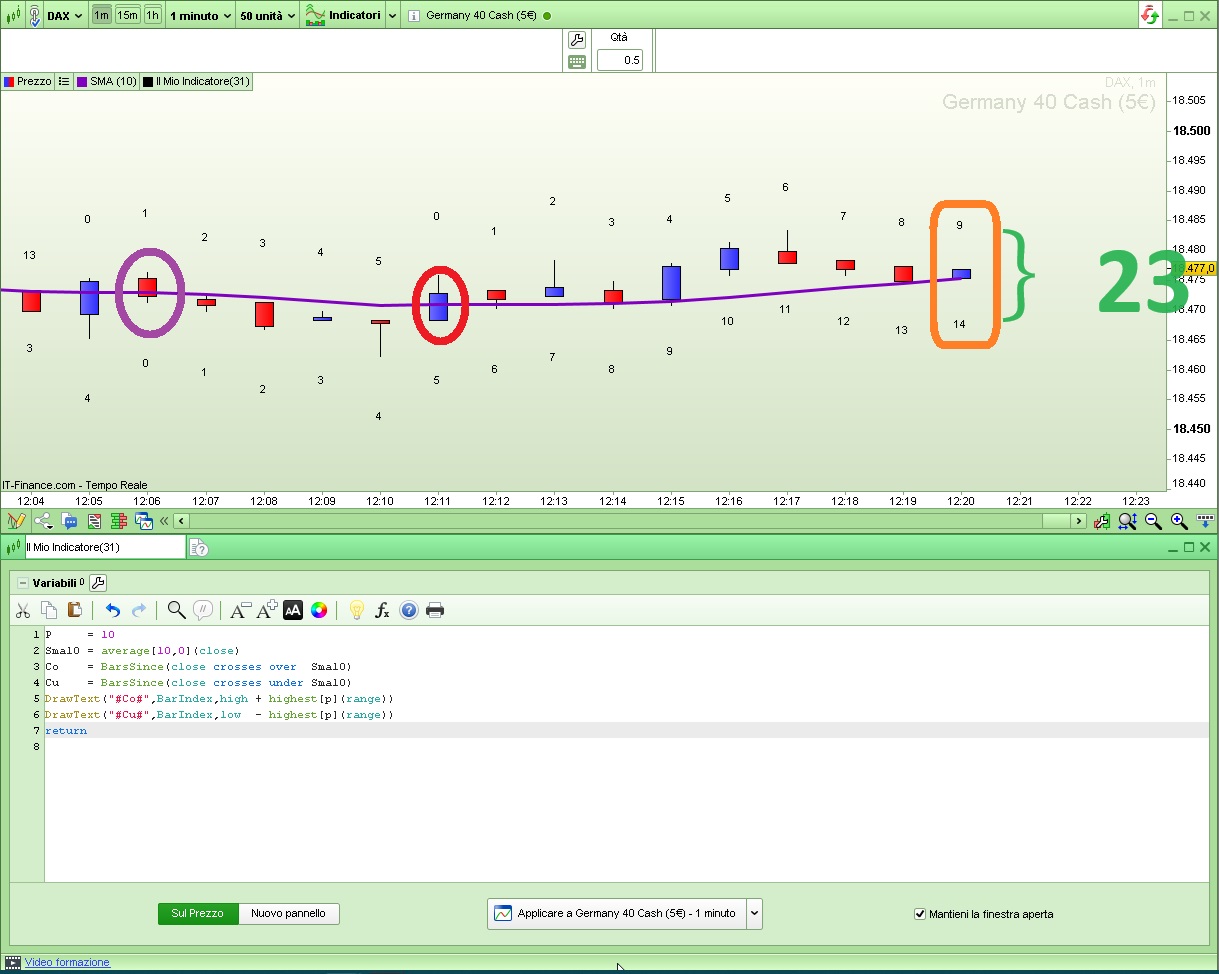
LLX=LastCO+LastCU
apparently to know how many lookback bars have elapsed to accomodate the two crossovers. If this was your goal, well… it’s not correct, as you can see from my attached pic X, for which I used this code:
P = 10
Sma10 = average[10,0](close)
Co = BarsSince(close crosses over Sma10)
Cu = BarsSince(close crosses under Sma10)
DrawText("#Co#",BarIndex,high + highest[p](range))
DrawText("#Cu#",BarIndex,low - highest[p](range))
return
as adding the two values would return an incorrect value, just take note of the leftmost one of the two (the greatest value):
LLX=max(LastCO,LastCU)
and if you need to know how many bars have elapsed in between the two, subtract them (using ABS to always get positive results):
DIFF=abs(LastCO - LastCU)
LastCU80=BarsSince(williams1h Crosses Under -80)
DrawText("Bars Since XU-80=#LASTCU80#",0,-80,SansSerif,Bold,14)Anchor(top) Coloured("Blue")
What I was wanting to do was, was to use the value stored in LastCO80 (as printed to screen) and use it for a lookback period.
Apologies for my awkwardness in how I approach things.
WR% Lookback on 4hr TF printing last condition met.
This topic contains 21 replies,
has 3 voices, and was last updated by inverse

1 year, 9 months ago.
| Forum: | ProBuilder: Indicators & Custom Tools |
| Language: | English |
| Started: | 05/17/2024 |
| Status: | Active |
| Attachments: | 3 files |

The information collected on this form is stored in a computer file by ProRealCode to create and access your ProRealCode profile. This data is kept in a secure database for the duration of the member's membership. They will be kept as long as you use our services and will be automatically deleted after 3 years of inactivity. Your personal data is used to create your private profile on ProRealCode. This data is maintained by SAS ProRealCode, 407 rue Freycinet, 59151 Arleux, France. If you subscribe to our newsletters, your email address is provided to our service provider "MailChimp" located in the United States, with whom we have signed a confidentiality agreement. This company is also compliant with the EU/Swiss Privacy Shield, and the GDPR. For any request for correction or deletion concerning your data, you can directly contact the ProRealCode team by email at privacy@prorealcode.com If you would like to lodge a complaint regarding the use of your personal data, you can contact your data protection supervisory authority.