Why I can just open one indicator or screener in the editor?

Viewing 3 posts - 1 through 3 (of 3 total)
  • Author
    Posts
  • #258367 quote
    thomas2004ch
    Participant
    Average

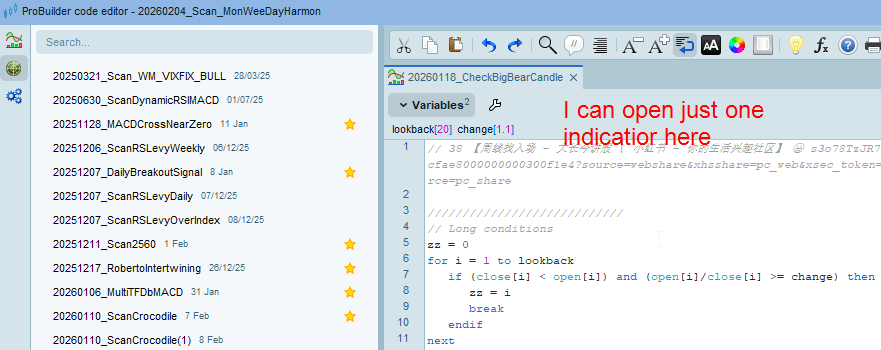
    Days ago I can open many indicators and screeners in the editior. Now, if I try to open another indicator or screener, the first one will be replaced.


    editor.png editor.png
    #258368 quote
    GraHal
    Participant
    Master

    What version PRT are you displaying on your ss?

    I need more caffeine as I can’t even find / get that view – ProBuilder Code Editor!

    I am using v12 and nearest I can get to your ss is ‘Indicators and Trading Systems’. More coffee may help as I do feel a bit sluggish this morning! 😀


    You would in any case only be able to open 1 Indicator per Tab, so can you open a new blank Tab (somehow?) and then open a new Indicator?

    #258369 quote
    Nicolas
    Keymaster
    Master

    In ProRealTime v13, the behavior for opening codes has changed, during Beta phase:

    • A simple click displays the code without opening it (we should change the title of the code window to italics to make it clearer, I will request it).
    • A double click opens the code and it remains.


    This is more typical behavior of code editors and of the file opening mechanism in general; if we are looking for a particular code in our list, a simple click should not systematically open it.

    GraHal and Iván González thanked this post
Viewing 3 posts - 1 through 3 (of 3 total)

  • You must be logged in to reply to this topic.

Why I can just open one indicator or screener in the editor?


Platform Support: Charts, Data & Broker Setup

New Reply
Author
Summary

This topic contains 2 replies,
has 3 voices, and was last updated by Nicolas

5 days, 8 hours ago.

Topic Details
Forum: Platform Support: Charts, Data & Broker Setup
Language: English
Started: 02/21/2026
Status: Active
Attachments: 1 files
Logo Logo
Loading...