Why are these stoplosses not removed?

Forums ProRealTime English forum ProOrder support Why are these stoplosses not removed?

Viewing 7 posts - 1 through 7 (of 7 total)
  • #94103

    Hi everyone:

    Am new to ProRealTime, and trying to get my head around the automated programming.

    I’ve hit this stumbling block, which is completely baffling me, so am hoping someone can help me understand why the system is doing what it’s doing.

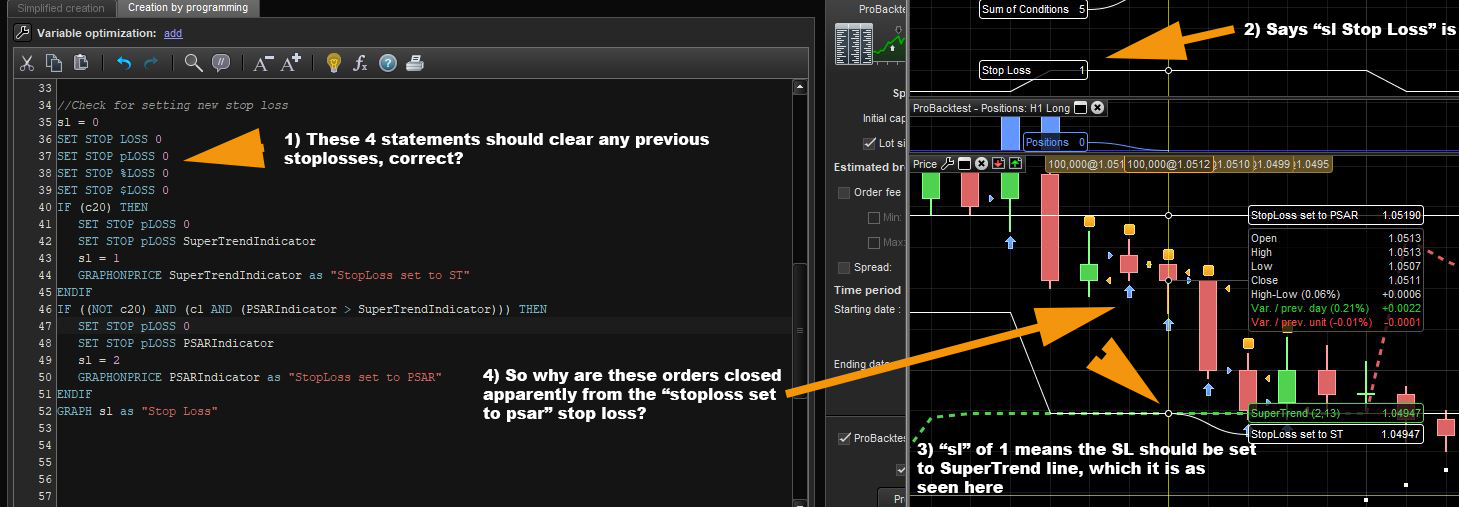
    See attached screen capture.

    I have code which is supposed to completely remove all stoplosses (point 1 on attachment)

    When graphing the value of the variable “sl”, it says the value is “1” (point 2 on attachment)

    That means, the stoploss should be set to the SuperTrend line, which it appears to be (point 3 on attachment)

    Yet, it still has a stoploss associated with the line the PSAR is on, and all new orders are cancelled out immediately by it (point 4 on attachment)

    Why is this? The 4 lines of code I purposely put in (directly from the pdf manual) should cancel out all the previously set stoplosses, correct? If so, why are the orders between the two stoploss lines being cancelled out by a stoploss? (the yellow square indicator above the bars says so 🙂 )

    Thank you

    PS: there is no trailing stoploss set anywhere in the code. Even if there was, it should be cancelled out too by the 4 lines of code highlighted in point 1, correct?

    #94121

    There is a similar discussion here:

    https://www.prorealcode.com/topic/set-value-at-zero-weird-results/

    It seems from your findings that SET STOP pLOSS 0 is still not working. I would use SET STOP %LOSS 100 instead as this should work and only ever get hit if price = zero which should never happen.

    #94122

    I’ve just read your code more closely and I think you mis-understand how SET STOP LOSS/pLOSS/%LOSS/$LOSS works. The code will only set the order for the last SET STOP instruction that is read. Usually people have it at the end of the code for this reason. Calculate the distance the stop needs to be in the code and then give one instruction at the end of the code. I assume your supertendindicator and psarindicator values are calculated as a distance in pips rather than as a price?

    #94124

    The code will only set the order for the last SET STOP instruction that is read. Usually people have it at the end of the code for this reason.

    If that’s the case, I have changed my code to the following:

    and it still doesn’t make a difference.

    The last line ‘read’ could be one of the stoploss lines in the “IF” statements. By their very construct, only 1 can be true. If neither are true, then the last line read should be the one before the “IF” statements, correct?

    If not, then how is it possible to set dynamic STOP LOSS values based on various calculations?


    I assume your supertendindicator and psarindicator values are calculated as a distance in pips rather than as a price?

    Those values are the actual value of the PSAR or SuperTrend. For example:

    Is that the correct way to go about it?

    Thank you.

    #94126

    SET STOP PLOSS is a distance in full points/pips

    SET STOP LOSS is a distance in price

    Don’t use these instructions to set a stoploss with an indicator with a price level, but only with a distance.

    1 user thanked author for this post.
    #94127

    Those values are the actual value of the PSAR or SuperTrend. For example: 1 PSARIndicator = SAR[0.02,0.02,0.2] Is that the correct way to go about it?

    No. The value must be a distance in pips, $ or % of the opening price. So SET STOP PLOSS 20 would set a stop loss 20 pips below or above the position price. Any time a new SET STOP PLOSS instruction is read with a different value the stop loss is moved to the new distance from the position price.

    1 user thanked author for this post.
    #94128

    Use SELL AT x STOP and EXITSHORT at x STOP if you want to sell at an exact price. You will have to place these orders at every bar open as they last one bar only and are cancelled at bar close.

    1 user thanked author for this post.
Viewing 7 posts - 1 through 7 (of 7 total)

Create your free account now and post your request to benefit from the help of the community
Register or Login