Hi
I have an algo thats doing well on backtesting so I have been running through some Walkforwards, but i’m unsure how to interpret the results (I dont fully understand it to be honest). From what I gather you need to add a “false” variable and run a minimun of 70/300 WF.
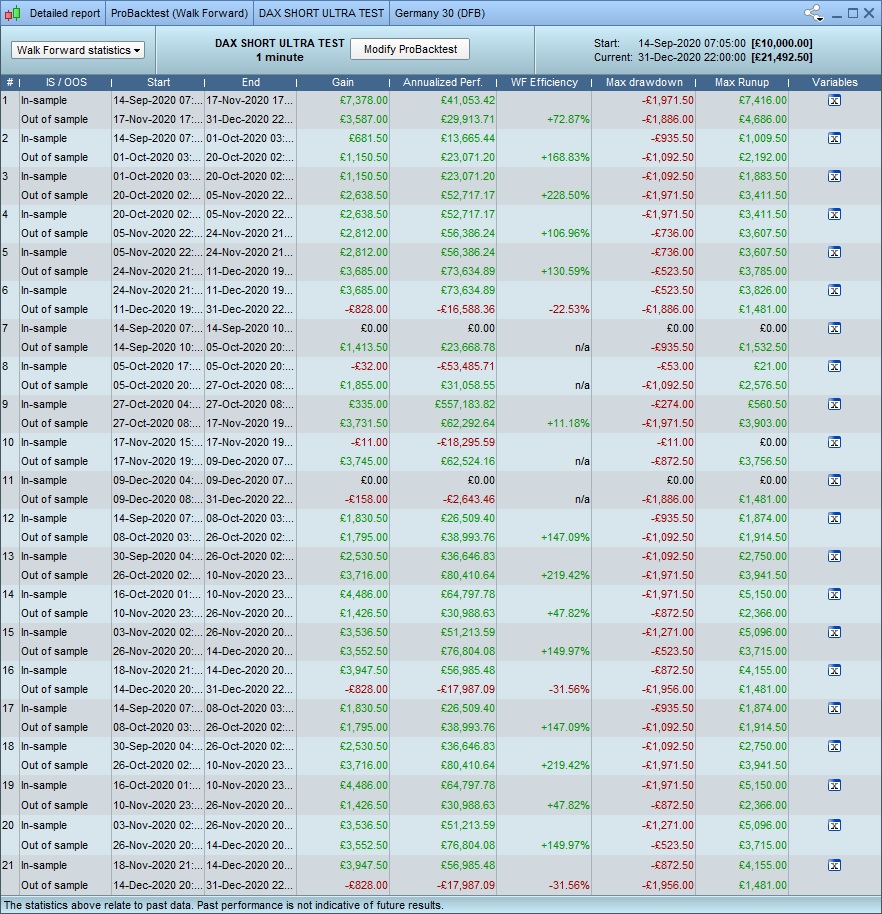
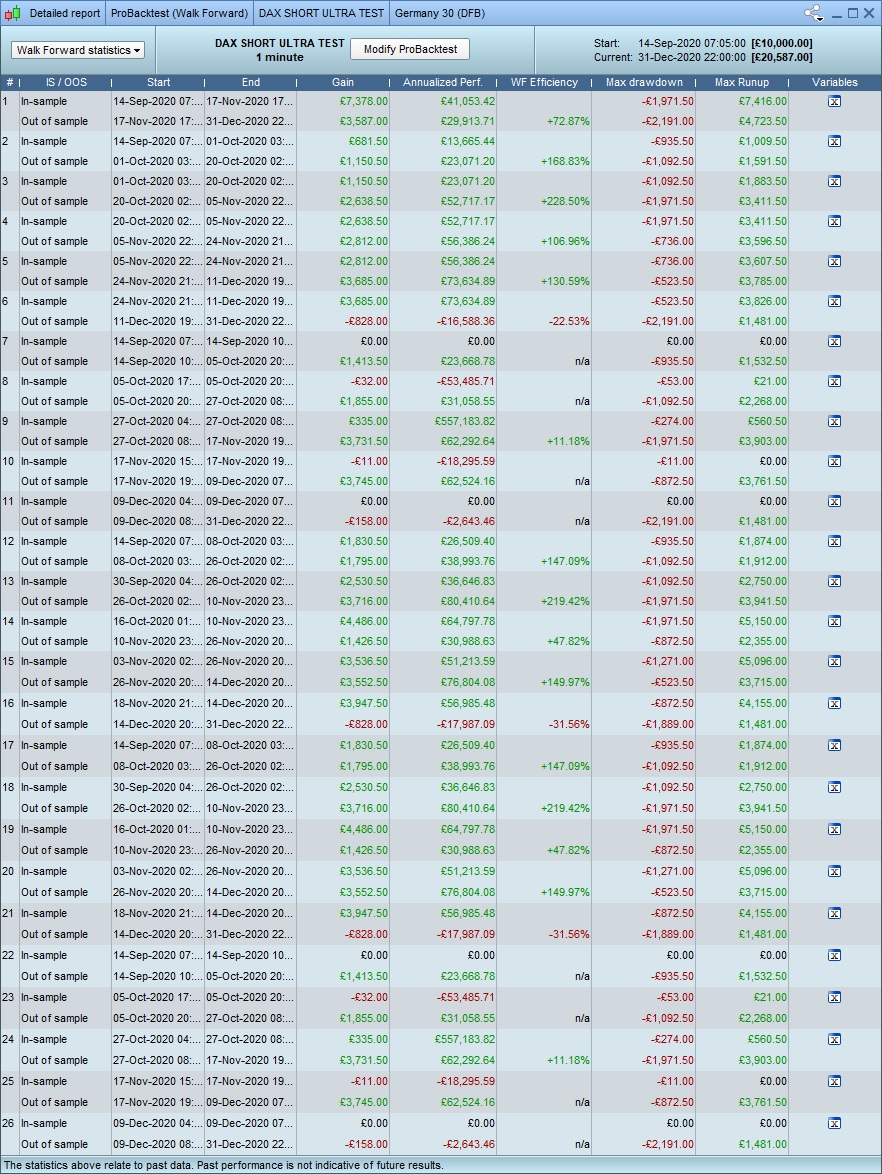
So Ive ran 2 tests with 5 iterations, one with 60/40 and one with 1/99 and these are the results. Can anyone with more experience confirm if these look good/bad/suspicious? also what is the “best” setting for WF? 70/30? 60/40?
thanks
Your images don’t show 5 iterations – they show 21 iterations.
Your images don’t show 5 iterations – they show 21 iterations.
well, like I said, its not clear to me….. maybe its due to the “false” variable? maybe something else, can you help? how are the results?
Results are confusing as they are not all in date order?
Results appear to be in some kind of order in groups of 6?
Or is it my coffee not worked through yet!? 🙂
Your images don’t show 5 iterations – they show 21 iterations.
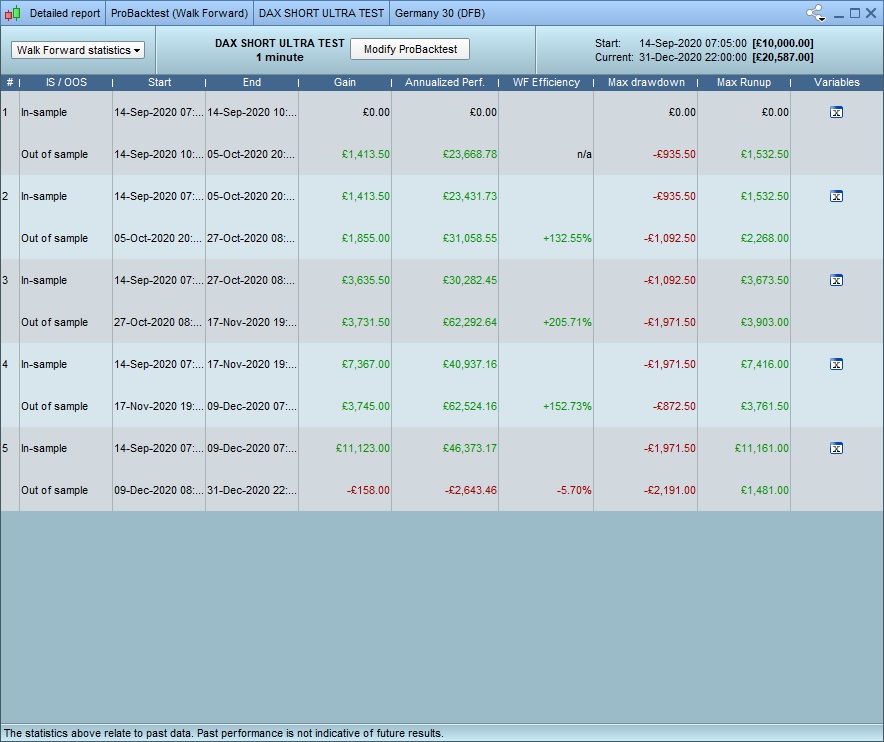
I worked out why, here is a 1/99 version with 5 iterations.
Results are confusing as they are not all in date order?
Hey, I agree!, PRT seems to have a mind of its own… sometimes I get 5 results, 16, 25…. I think its because my test algos have a ton of Variables in them. if I use the live algo with no variables and just add 1 test variable it seems to be more consistent. What do you think of the 1/99 results?
1/99 is a very strange choice of ratio. 60/40 means that your in sample is 60% and your out of sample is 40% of the section of data that is being analysed.
70/30 is a pretty standard ratio to choose.
1/99 is a very strange choice of ratio
I was merely trying to reduce the chances of curve fitting by going to the extreme.. but I guess it doesnt work like that? I will run them all with 70/30 then. is anyone interested and can offer insight to those results?
The results you’ve posted are fairly meaningless. Run it at 70/30 and it should start to tell you something. Is 4 months the max data you can access?
Run it at 70/30 and it should start to tell you something
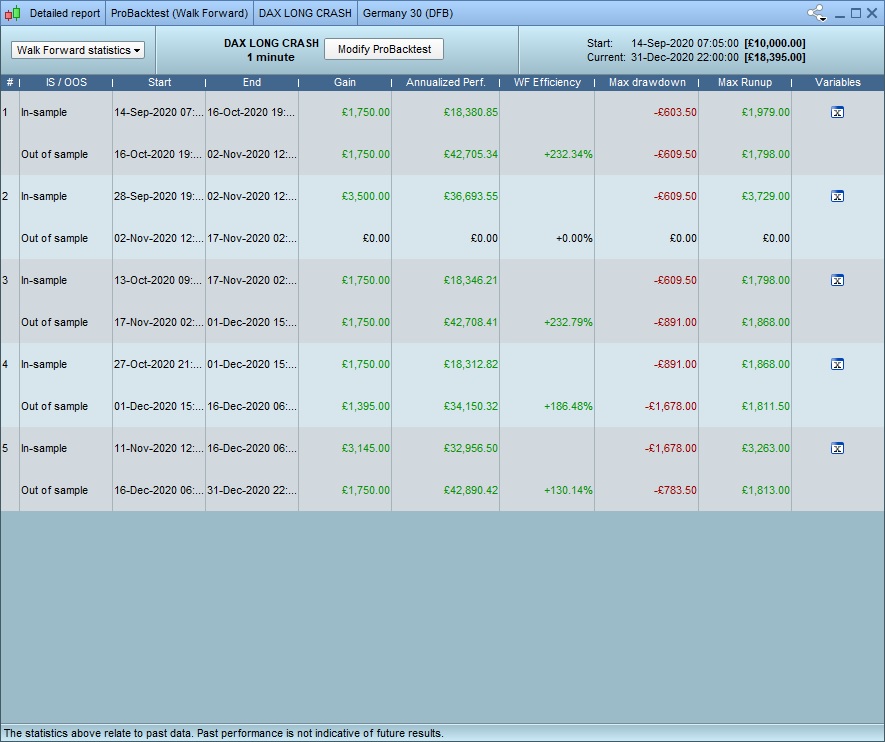
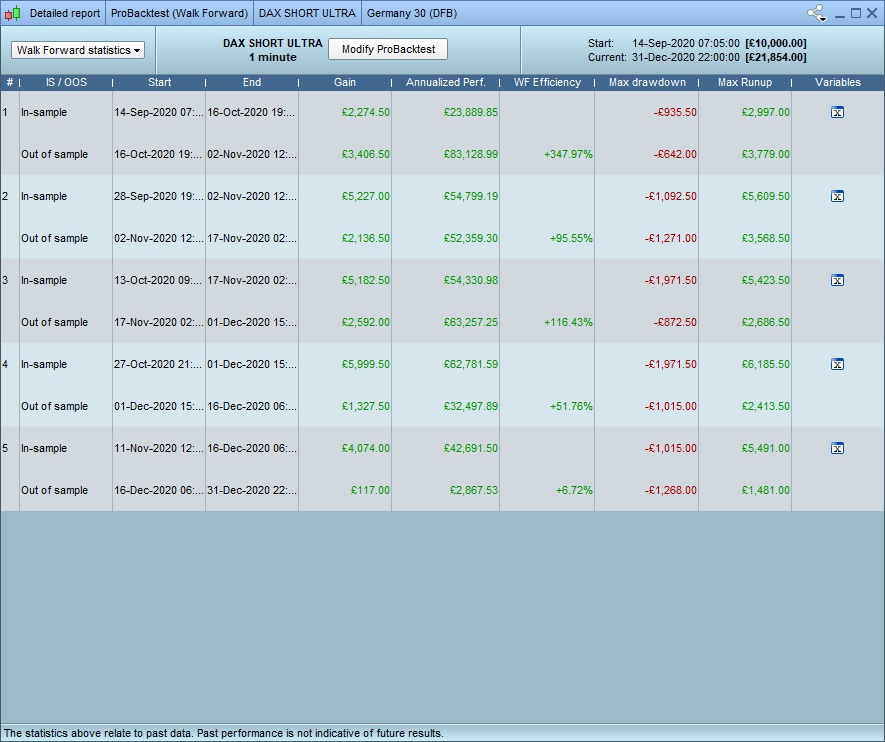
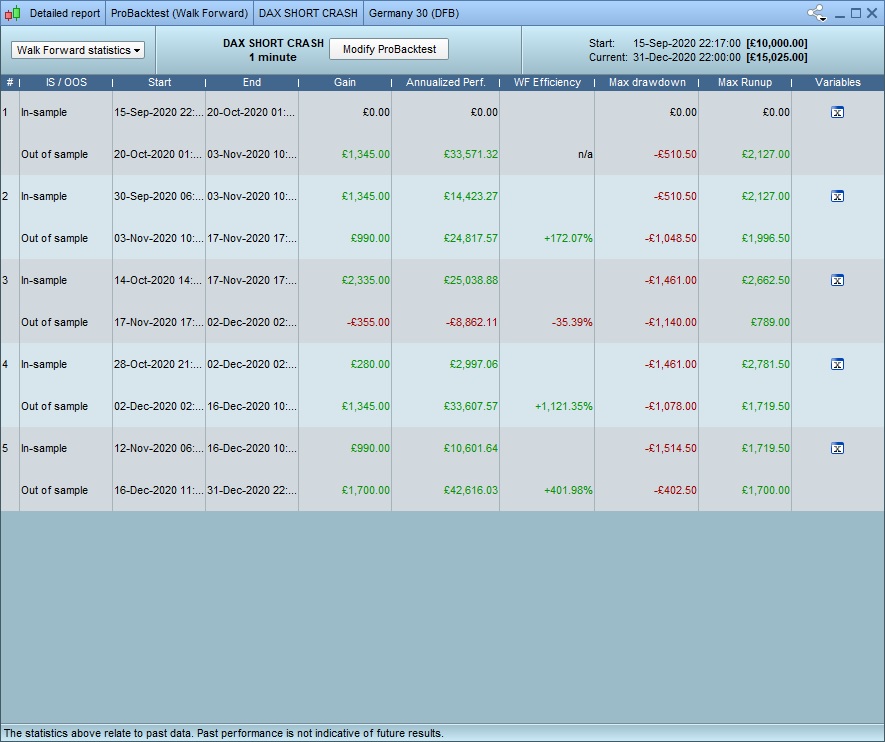
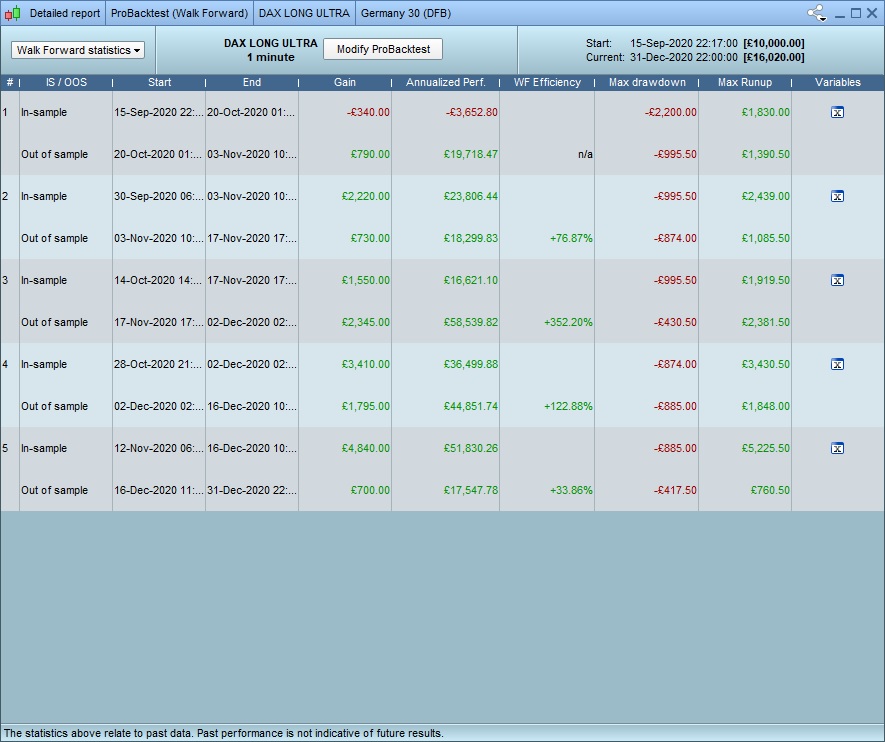
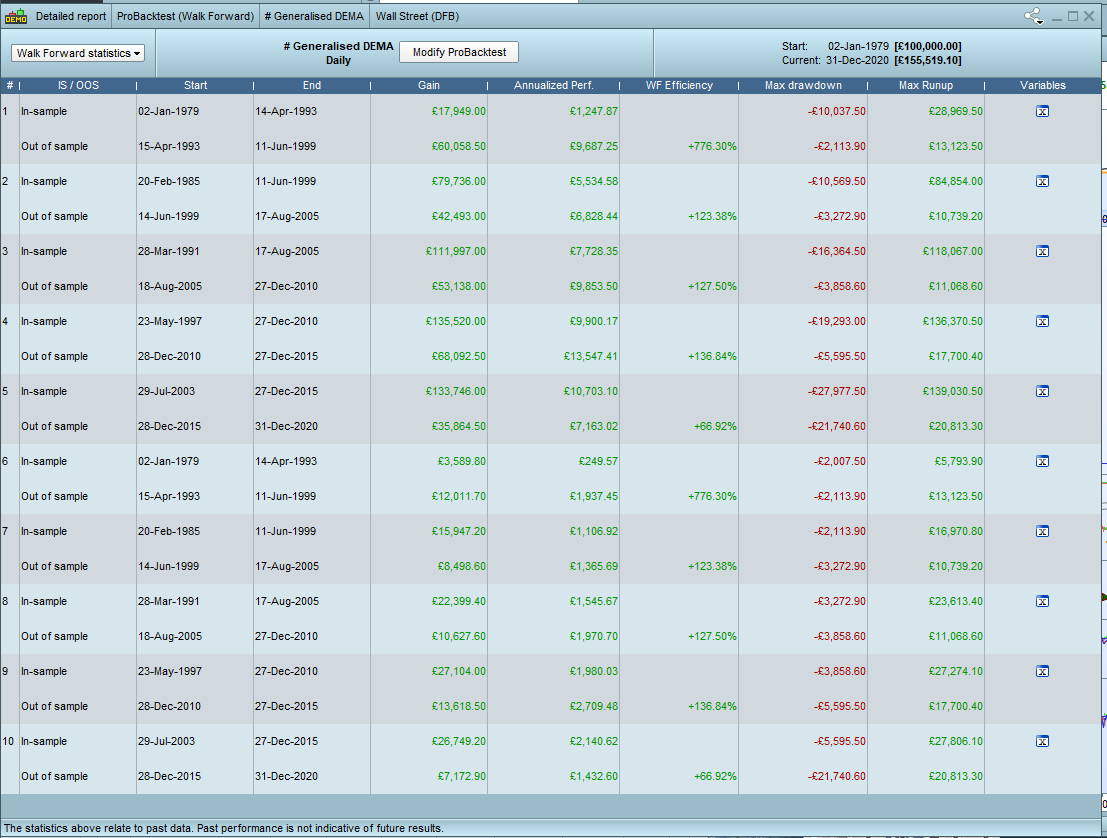
Ok Thanks. These are my 4 algos ran at 70/30 WF.
I use the IG Spreadbet market on 1 minute and use their PRT 11.1 client. I believe that this is the maximum amount of backtest I can access, as even if I upgrade to PRT premium, I will not get access to more 1m spreadbet data from IG (still, no one has yet to give me a straight answer on that, either from PRT or IG).
The results look great, too good, so really id like someone to give me some useful tips or things to try to try and get a better idea of how solid these results are. that said I appreciate its also possible no one knows that so will be turning them on anyway.
suggest as a product, we need better training / understanding of WF and what it actually does and how it helps build algos. cause if its worthless / cant be used to help improve algo dev, then dev time may aswell go elsewhere rather than it just be a gimic.
thanks.
I believe there is something wrong with the WF tool at the moment. I just ran a WF test on an old strategy using all fixed settings and a dummy variable optimised from 1 to 1 with 5 repetitions and the WF test returned 10 results!
I believe there is something wrong with the WF tool at the moment
Do you only have 1 variable (your test variable) in your walkthru? when I had more than 1 variable, even if it was fixed, it gave me very unpredictible results.
Qu.
1, Did you have Tick by Tick enabled?
2. Did you (previously) optimise over the full / same period that you now are showing results for Walk Forward?
Qu. 1, Did you have Tick by Tick enabled? 2. Did you (previously) optimise over the full / same period that you now are showing results for Walk Forward?
1. Yes, tick by tick enabled
2. im not 100% sure what you mean, but …. yes. I have backtested and manually optimised the algos to give the best results – but I have been careful not to just choose the “best value” for everything, but rather those that appear to be in the range that works well. if that makes sense? clearly creating an algo from scratch with no optimisation at all, running a walkthru and getting these results would be……. unlikely 🙂
Do you only have 1 variable (your test variable) in your walkthru?
No – a pure simple WF test of your stategy has all the setting variables fixed in the strategy and then in the optimising variables window you create a variable that is not used anywhere in the strategy and optimise it from 1 to 1 (or use one of the variables in your strategy and optimise it from 50 to 50 or whatever the fixed value would be).
With 5 repetions you should get 5 results which represent overlapping chunks of your data where the in sample is compared to the out of sample to give you your 5 results.