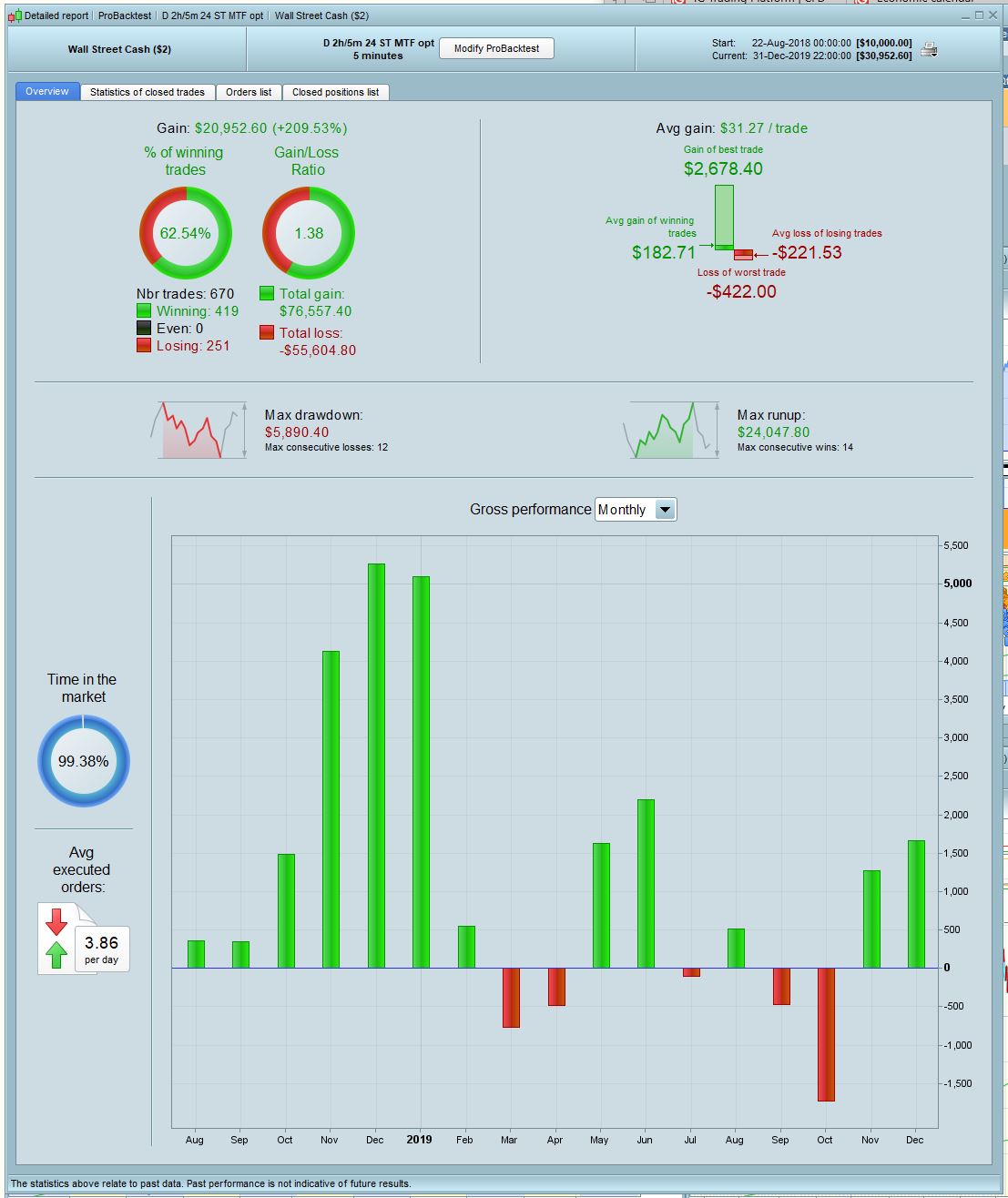
Hi, below is a simple strategy I’m working on for the DJI based on Supertrend on a 2h timeframe and the trailing stop on 5m. The optimized results look OK, but I’m having trouble with the Walk Forward; it does one rep then freezes – ie progress shows 100% of the first rep and then nothing happens, doesn’t move on to the next rep. I haven’t had this problem before, what am I doing wrong?
2nd Q: I wanted to test this with CumulateOrders = true, ie to buy another contract each 2hrs that conditions hold but simply changing ‘false’ to ‘true’ gives a nonsensical result. Is there something else that needs to be stipulated? Couldn’t find anything helpful in the manual.
Final Q: how many optimization variables need to be included in the Walk forward analysis to give a meaningful result? I’m guessing that more is better, but considering the time it takes to run, is there some kind of optimum out of the 10,000 possible?
Many thanks in advance!
// Definition of code parameters
DEFPARAM CumulateOrders = false // Cumulating positions deactivated

daysForbiddenEntry = OpenDayOfWeek = 6 OR OpenDayOfWeek = 0

TIMEFRAME(120 minutes)

indicator1 = SuperTrend[mult,nbr]

c1 = (close > indicator1)
c2 = (close < indicator1)

TIMEFRAME(5 minutes)


IF  C1 AND not daysForbiddenEntry THEN

BUY 1 CONTRACT AT MARKET
SET STOP %LOSS stl

ENDIF

// Conditions to exit long positions

IF  C2 THEN
SELL AT MARKET

ENDIF

// Conditions to enter short positions

IF  C2 AND not daysForbiddenEntry THEN

SELLSHORT 1 CONTRACT AT MARKET
SET STOP %LOSS sts

ENDIF

// Conditions to exit short positions

IF  C1 THEN
EXITSHORT AT MARKET
ENDIF


//trailing stop function
trailingstart = trstr //trailing will start @trailinstart points profit
trailingstep = trst //trailing step to move the "stoploss"

//reset the stoploss value
IF NOT ONMARKET THEN
newSL=0
ENDIF

//manage long positions
IF LONGONMARKET THEN
//first move (breakeven)
IF newSL=0 AND close-tradeprice(1)>=trailingstart*pipsize THEN
newSL = tradeprice(1)+trailingstep*pipsize
ENDIF
//next moves
IF newSL>0 AND close-newSL>=trailingstep*pipsize THEN
newSL = newSL+trailingstep*pipsize
ENDIF
ENDIF

//manage short positions
IF SHORTONMARKET THEN
//first move (breakeven)
IF newSL=0 AND tradeprice(1)-close>=trailingstart*pipsize THEN
newSL = tradeprice(1)-trailingstep*pipsize
ENDIF
//next moves
IF newSL>0 AND newSL-close>=trailingstep*pipsize THEN
newSL = newSL-trailingstep*pipsize
ENDIF
ENDIF

//stop order to exit the positions
IF newSL>0 THEN
SELL AT newSL STOP
EXITSHORT AT newSL STOP
ENDIF
//************************************************************************
progress shows 100% of the first rep and then nothing happens,
I’ve set up your code with variable values and it has gone through 5 stages of WF.
However, it would be much more useful if you posted the .itf file with the variables you set up as then I can do a WF on the same file that your WF failed on??
Thanks GraHa, here’s the itf.
how many optimization variables need to be included in the Walk forward analysis to give a meaningful result? I’m guessing that more is better
Nope: Less is more. If you want to create a completely curve fitted strategy then start with a lot of variables and optimise them with as many values as possible. There is a very good chance that you will find a set of values that gives you an acceptable equity curve. Then adjust just one variable by a value of one and the whole thing is likely to collapse around your ears.
Thanks Vonasi, I am still trying to get my head around all this. I understand that optimization gives a curve-fitted result, but I thought the whole point of WF was to step back from that to something less specifically optimized but generally more robust. For that I have to give it some variables to work with, the question is how much range to include? Is there any rule of thumb for this?
Well @nonetheless your .itf file worked fine on Walk Forward (WF) for me … 5 stages all as normal.
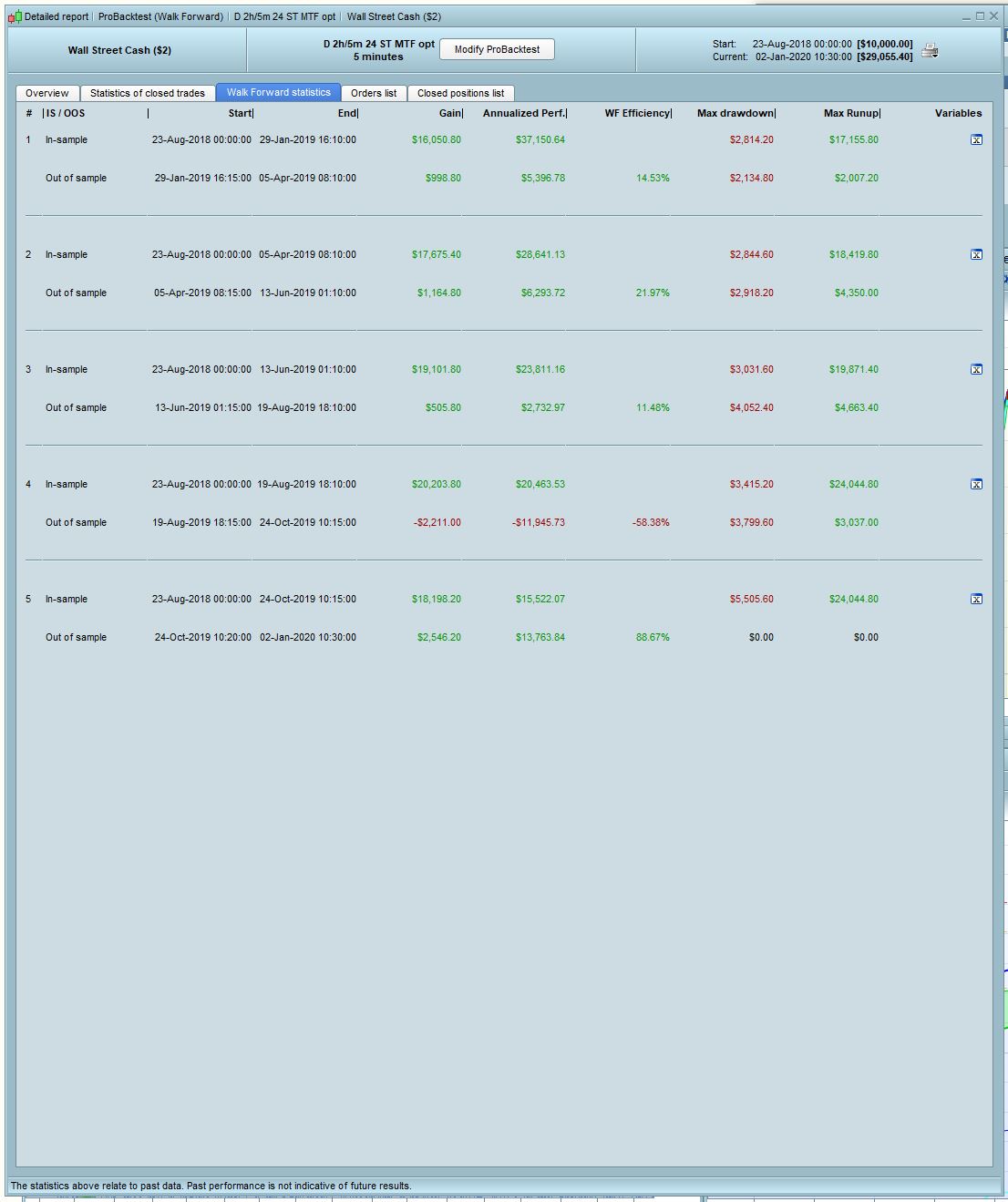
I will say though that this is the first System I have ever done a WF on where the values of 4 variables result in the same set of values (50,20,70,3) for all 5 IS stages. The ranges on your 4 variables are narrower than I normally set up, but probably the narrower range is better.
Also the result is slightly better than with the values you had which presumably you had arrived at by optimisation over the whole 10K IS period??
I’m setting the System going on Demo Forward Test tonight!!
Keep em coming, glad to help you!
There is a lot of stuff on the forums about walk forward to read. In its basic format walk forward is that you develop your system on a section of in sample data and then forward test it on a different section of different data to see if it still works or fails. Then there is walk forward with optimisation of variables and this really just shows you which set of values worked best on each set of in sample and out of sample data if you break the data that you have down into many smaller segments. If all the values are the same then ‘Bingo!’ you (might) have hit the jackpot and those same values might just work in the future too. If they vary wildly then you are most likely curve fitted.
That is a very basic description of walk forward testing!
Hi nonetheless
I ran the walk forward on your code and looking at the positions graph it seems to always have a position open, although the report will show a profit you should consider the over nighting fees which based on this back test would I think leave the system with a loss if used live
you should consider the over nighting fees which based on this back test would I think leave the system with a loss if used live
Surely overnight fees would be 0.01%? So < £3 per night, < £100 per month with Lot size = 1.
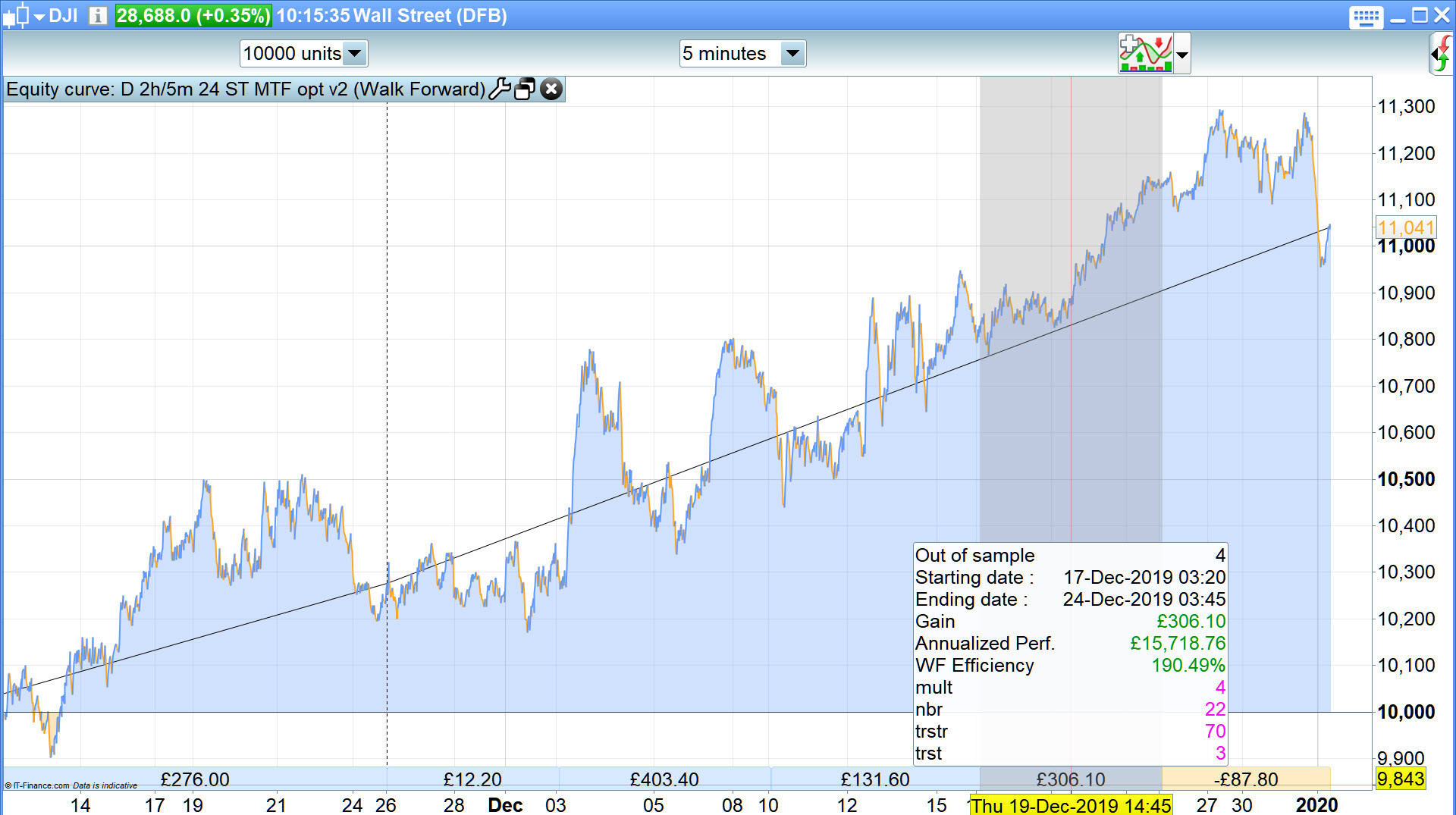
My BT results show a profit of £833 in 22 days.
In its basic format walk forward is that you develop your system on a section of in sample data and then forward test it on a different section of different data to see if it still works or fails.
So how do I run WF without optimization? If I have WF Active ticked with no variables in the upper window then I just get a normal backtest.
you should consider the over nighting fees
Yes, the overnight finance charges are hard to account for in backtest. Maybe v11 will have an option for a charge per day under Brokerage fees. But as GraHal said, for a $2 position on the DJI the fees are covered by just 2 or 3 points … not a big ask if you’re on the right side of the trend.
And just to be clear, you’re running it with Supertrend [5,20] and trailing stop 70 with step 3?
Yes it was as above last night, but it has changed slightly today … see attached
what the % efficiency reading was
I ran it again to get the above results for you, but for some weird reason when I click on the Detailed Report … nothing happens, I cannot get a Detailed Report so I can’t tell you what overall WF Efficiency is sorry.
So how do I run WF without optimization?
You don’t,
- You optimise over In Sample (IS) period … say the 1st 70k bars of the 100k bars available to us.
- Then you Walk Forward over Out of Sample (OOS) period of the remaining most recent 30K bars with variables set to optimisation.
If all variables result in the same value for OOS as they did for overall IS … then Bingo (maybe! :)) … as Vonasi described above.
At the 5th attempt the WF worked for me, see attached results. Not brilliant but worth forward testing for a bit, see if it makes money. Thanks again for your help!