volume profle

Viewing 12 posts - 1 through 12 (of 12 total)

  • Author
    Posts
  • #33825 quote
    robert123
    Participant
    Master

    In an attempt to get volume profile on the chart I have been working on the code below. It works on tick charts at the moment.

    It is work in progress.

    Any constructive are comments welcome!

    Robert

    //////////////////////////////////////////////////////////////
    
    defparam CALCULATEONLASTBARS=1000
    bi=intradaybarindex
    i=11
    //define first time factor
    factor=bi/11
    
    if bi=(i*factor) then
    
    factor=round(factor)
    endif
    if factor<>factor[1] then
    b=bi
    endif
    count=0
    while b=b[1] do
    count=count[1]+1
    break
    wend
    counter=round(count)
    ii=0
    for ii=0 to counter[10] do
    if counter>counter[1] then
    DRAWRECTANGLE(((summation[2](volume[1]+volume[0]))/1000)+barindex[0],(close[40]), barindex[counter], close[40]-.3)coloured(0,255,0)
    
    DRAWRECTANGLE(((summation[2](volume[0]+volume[1]))/1000)+barindex[0], (close[40]), barindex[counter], close[40]-.3)coloured(255,0,0)
    endif
    break
    next
    return
    Lighthouse thanked this post
    #33853 quote
    Nicolas
    Keymaster
    Master

    Very impressive! I tried do it myself and didn’t get something enough “finished” to be posted, and the infinite loop error (with nested FOR/NEXT loops), was a real problem!

    I’m looking forward for the next version 🙂

    #33860 quote
    ALE
    Moderator
    Master

    Very Interesting!

    #33892 quote
    robert123
    Participant
    Master

    Thanks Nicolas,

    I am trying to work out, how to get the singles into it, any ideas!

    R

    #33893 quote
    Nicolas
    Keymaster
    Master

    I have a cold and terrible headaches, still don’t managed to understand your code…Maybe some comments should help me and other people too. What are you calling “singles”?

    #33896 quote
    robert123
    Participant
    Master

    sorry to hear your plight, hope you feel better soon.

    The ‘singles’ are the single volume prints, normally found on the order book. They indicate stops……I think

    Have a good weekend

    R

    #34547 quote
    Nicolas
    Keymaster
    Master

    Hi Robert, any update on your side? Been quite busy here 🙁

    #34694 quote
    robert123
    Participant
    Master

    Hi Nicolas,

    Working on it!

    Will update when I have something, but might have to send it via email first as the discription might be a bit complex. But on the whole I think it could, with a bit of input from you and others, quite be interesting.

    R

    #34717 quote
    robert123
    Participant
    Master

    Nicolas,

    here is another version, I have made some notes to hopefully explain the thinking behind it.

    R

    defparam CALCULATEONLASTBARS=1800
    bi=intradaybarindex
    i=11 ///
    //define first time factor ///
    factor=bi/11
    ///
    if bi=(i*factor) then
    ///
    factor=round(factor)
    endif /////// this is the time unit i.e 11 bars
    if factor<>factor[1] then
    b=bi ///
    endif
    count=0 ///
    while b=b[1] do
    count=count[1]+1 ///
    break
    wend ///
    counter=round(count)
    ii=0
    //barlenght
    avpl=(((volume[counter])/avp)-((volume[1[counter]])/avp))
    avp=average[10](volume)
    //bardepth
    Bdp=.15
    for ii=counter[0] to counter[10] do
    if counter[0]>counter[1] then
    if close[0]>high[1] then
    DRAWRECTANGLE (avpl+barindex[0],(close[0]), barindex[counter], close[0]-bdp)coloured(0,255,0)
    
    endif
    if close[0]<high[1] then
    DRAWRECTANGLE(avpl+barindex[0], (close[0]), barindex[counter], close[0]-bdp)coloured(255,0,0)
    
    endif
    endif
    break
    next
    ///'barindex[counter]' gives the box's overall size, this is dictated by the underlying barindex counter, this warps the volume's detail, something that needs working on, below is an attempt!
    
    for ii=counter[0] to counter[10] do
    if count[0]<>count[1] then
    if volume[1]<>volume[0] and close[0]>high[1] then
    DRAWRECTANGLE (avpl+barindex[0],(close[0]), barindex[round((count/8)*1)+1], close[0]-bdp)coloured(0,255,0)
    
    endif
    if volume[1]<>volume[0] and close[0]<high[1]then
    DRAWRECTANGLE(avpl+barindex[0], (close[0]), barindex[round((count/8)*1)+1], close[0]-bdp)coloured(255,0,0)
    
    endif
    endif
    break
    next
    //'barindex[round((count/8)*1)+1]' this is the attempt! Trying to get the volume to'float in the bar'-Sometimes it comes out the back-not sure why...
    
    return close//if you want the study 'on price make this invisable.
    Nicolas, Lighthouse and bolsatrilera thanked this post
    #34751 quote
    Nicolas
    Keymaster
    Master

    Thanks Robert,

    I do not have much time now but I’ll look at your newest version next week. I subscribed to the topic, so I’ll be alerted of your next posts. Have a great week-end in the meantime!

    #34781 quote
    Lighthouse
    Participant
    Master

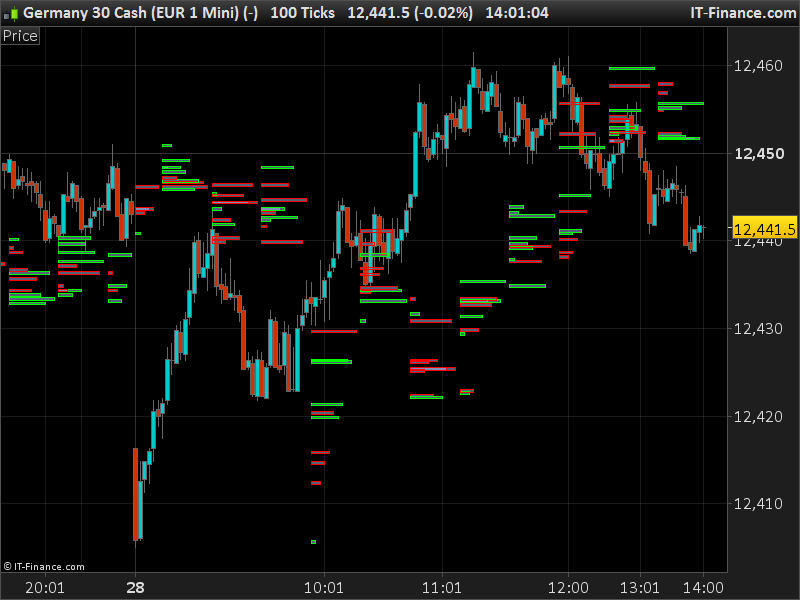
    I don’t understand what it should show… any screenshot?

    #34795 quote
    robert123
    Participant
    Master

    Ciccio,


    Please see the above screen shot provided by Nicolas.

    R

    Lighthouse thanked this post
Viewing 12 posts - 1 through 12 (of 12 total)
  • You must be logged in to reply to this topic.

volume profle


ProBuilder: Indicators & Custom Tools

New Reply
Author
author-avatar
robert123 @robert123 Participant
Summary

This topic contains 11 replies,
has 4 voices, and was last updated by robert123
8 years, 9 months ago.

Topic Details
Forum: ProBuilder: Indicators & Custom Tools
Language: English
Started: 04/28/2017
Status: Active
Attachments: 1 files
Logo Logo
Loading...