Volume Profile

Viewing 12 posts - 1 through 12 (of 12 total)

  • Author
    Posts
  • #93993 quote
    vetrader
    Participant
    Average

    Hallo,

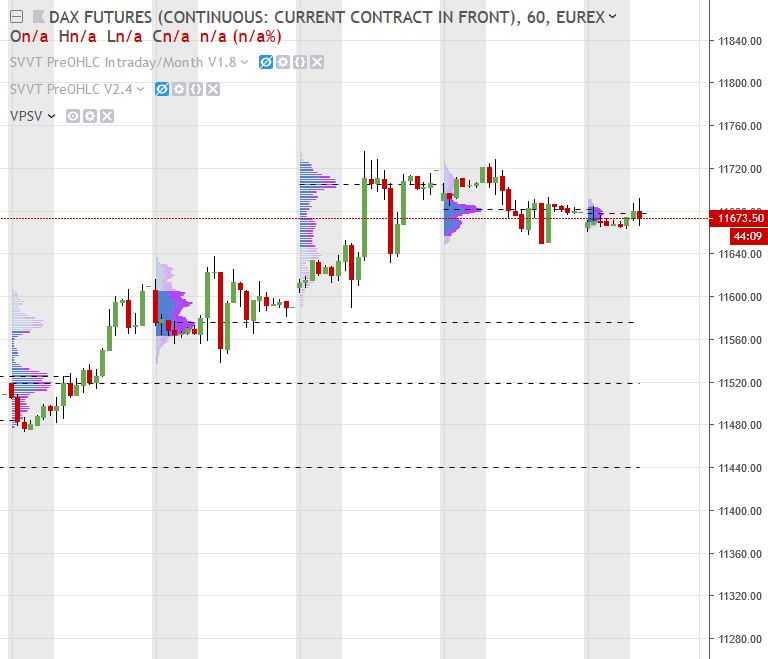
    I need a Volume Profile like in TradingView (see attachment). I searched on ProRealcode and found a few topics, but I’m not sure if these are exactly the same. Has anayone an idea or advice?

    Thanks and best regards.

    Volume-Profile.jpg Volume-Profile.jpg
    #94007 quote
    Nicolas
    Keymaster
    Master

    There are a few indicators in the library that might suit your needs.

    #94071 quote
    vetrader
    Participant
    Average

    I saw there is also a Market Profile available in PRT, but it’s not available in my chart. Maybe because of the Testversion?

    #94292 quote
    Nicolas
    Keymaster
    Master

    If you are talking about this: https://www.prorealtime.com/en/market-profile

    It is only available through a subscription with ProRealTime (and not with IG account).

    #94700 quote
    vetrader
    Participant
    Average

    Hallo Nicolas,

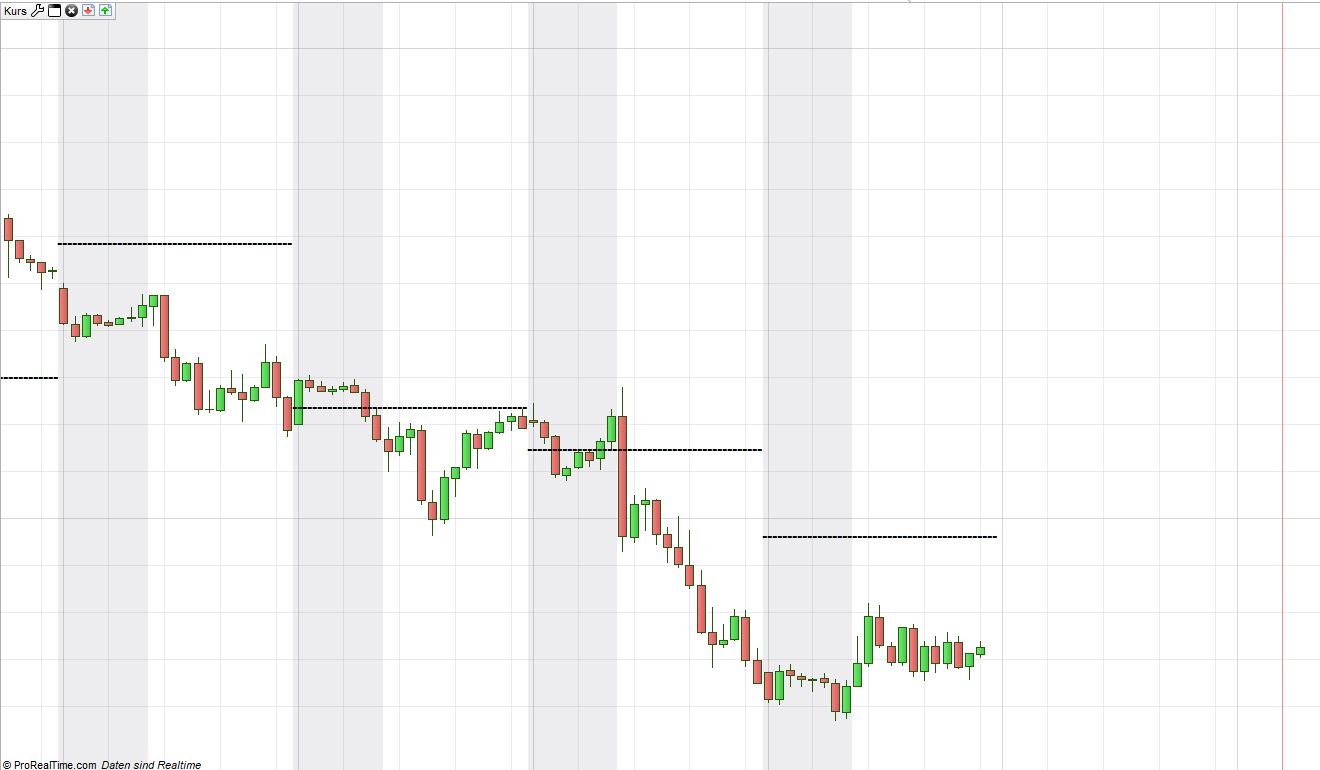
    thanks for the information. Considering the Volume Profile, I found your code/post: https://www.prorealcode.com/topic/bull-bear-volume-by-price-levels-2/. That’s exactly what I’m looking for. I also pasted the code below and in the attachment is the hourly chart with the VPOC (Yesterday) lines. I tried to add some additional functions, but it didn’t work. It would be great if you could add the following functions. Since the VPOC in the code and picture is for “yesterday”, also the following functions should be for “yesterday”. Every additional function can be a line/text like the VPOC below.

    – Range: This is the previous Day range (yesterday), which is High/Low (Dhigh/Dlow PRT function)

    – Volume Area: The Volume Area consists of the VPOC, Volume Area High and Volume Area Low. The Volume Area corresponds to 70 % (Input factor to change the percentage would be good) of the traded Volume for that day. Now, the Value Area High is calculated in relation to VPOC and 35 % of Volume above the VPOC. The Volume Area Low is also calculated in relation to VPOC and 35 % of Volume below the VPOC. TradingView provides these information about the Volume Profile – especially the information below the title “Calculation” could be useful: https://www.tradingview.com/wiki/Volume_Profile

    – Summary of lines which are of interest (yesterday): Daily High/Low, VPOC, Volume Area high and Volume Area Low

    – Also a developing VPOC for Today would be useful – The VPOC for Today starts to develop with the Exchange-Open.

    – Finally, a function to plot the lines for Yesterday during a specific time period (x-axis) – e.g. Lines for Yesterday are plotted yesterday or today during 1 am to 8 am (Input factor to change the time period for the lines). The Line for todays developing VPOC could start wit the Exchange Open or also a Time range.

    These function extensions would be very helpful and certainly a good new indicator for PRT, because this is used in a lot of other software platforms.

    Best regards


    defparam calculateonlastbars=200
     
    //Input
    ScaleFactor = 3
    NbrBars=21
    lookback=max(1, intradaybarindex)
    //
     
    hh=highest[lookback](high)
    ll=lowest[lookback](low)
    div = (hh-ll)/NbrBars
    i=0
    volsum=summation[lookback](volume)
     
    maxbar = 0
    while i<NbrBars do
    lrange=ll+div*i
    hrange=lrange+div
    volbull=0
    volbear=0
    for j = 1 to lookback do
    if close[j]>=lrange and close[j]<=hrange then
    if close[j]>open[j] then
    volbull=volbull+volume[j]
    else
    volbear=volbear+volume[j]
    endif
    endif
    next
    bullbar = round((volbull*lookback)/volsum)*scalefactor
    bearbar = round((volbear*lookback)/volsum)*scalefactor
     
    //VPOC
    if(bullbar>maxbar) then
    vpoclevel = (lrange+hrange)/2
    maxbar=bullbar
    endif
    if(bearbar>maxbar) then
    vpoclevel = (lrange+hrange)/2
    maxbar=bearbar
    endif
      
    i=i+1
    wend
    
    if intradaybarindex=1 then
    yesterdayVPOC=vpoclevel[2]
    drawtext("                                                             -----------------------------------------------",barindex[2],yesterdayVPOC,dialog,bold,15) coloured(0,0,0)
    endif
    
    return
    Gianluca thanked this post
    Vpoc.jpg Vpoc.jpg
    #94880 quote
    vetrader
    Participant
    Average

    Hallo Nicolas,

    can you provide support here or is it not possible?

    Thanks

    #96365 quote
    JOSE LUIS CAPO
    Participant
    Junior

    Hello Vetrader, did you find a solution for the Volume Profile? It is vital for me as well.

    #96472 quote
    vetrader
    Participant
    Average

    Hallo Jose,

    I tried to code value area high/low, but it was to much effort. If you have an Interactive Brokers Account you can use the Market Profile. The Market Profile contains TPOs and Volume.

    Maybe PRT could extend the functionallity of the “Volume at Price” Indicator. This indicator does exactly what we need, but without VPoc and value area high/low. I will write this to PRT and maybe you can do that also, so we are at least two ;-).

    JOSE LUIS CAPO thanked this post
    #96863 quote
    JOSE LUIS CAPO
    Participant
    Junior

    Thank you very much for your answer vetrader, it is very helpful. I see that they offer the Market Profile for 40 euros per month, so I suspect that it won’t be an easy task to code the VAH/L (they already have a free indicator for the VPOC).

    #134269 quote
    tobytarczy
    Participant
    New

    Hi Nicholas,


    I have PRT with IB should I not be able to get the “Market Profile” indicator?

    Many thanks


    Toby

    #134286 quote
    Nicolas
    Keymaster
    Master

    It’s a subscription tool that you have to subscribe through the prorealtime website,  link in above post.

    #134297 quote
    tobytarczy
    Participant
    New

    thank you Nicholas, I see that is part of the premium service package. I will investigate

Viewing 12 posts - 1 through 12 (of 12 total)
  • You must be logged in to reply to this topic.

Volume Profile


ProBuilder: Indicators & Custom Tools

New Reply
Author
author-avatar
vetrader @vetrader Participant
Summary

This topic contains 11 replies,
has 4 voices, and was last updated by tobytarczy

5 years, 8 months ago.

Topic Details
Forum: ProBuilder: Indicators & Custom Tools
Language: English
Started: 03/19/2019
Status: Active
Attachments: 2 files
Logo Logo
Loading...