


Volume issue

Viewing 3 posts - 1 through 3 (of 3 total)
  • Author
    Posts
  • #88268 quote
    GaastraGaastra
    Participant
    New

    A = Volume is not the same as the real Volume.

    MyAtr = AverageTrueRange[20](close)
    MyVolatility = 0.05 * CLOSE
    MyVol = Volume
    
    SCREENER[MyAtr >= MyVolatility] (MyVol as "MyVolume")
    

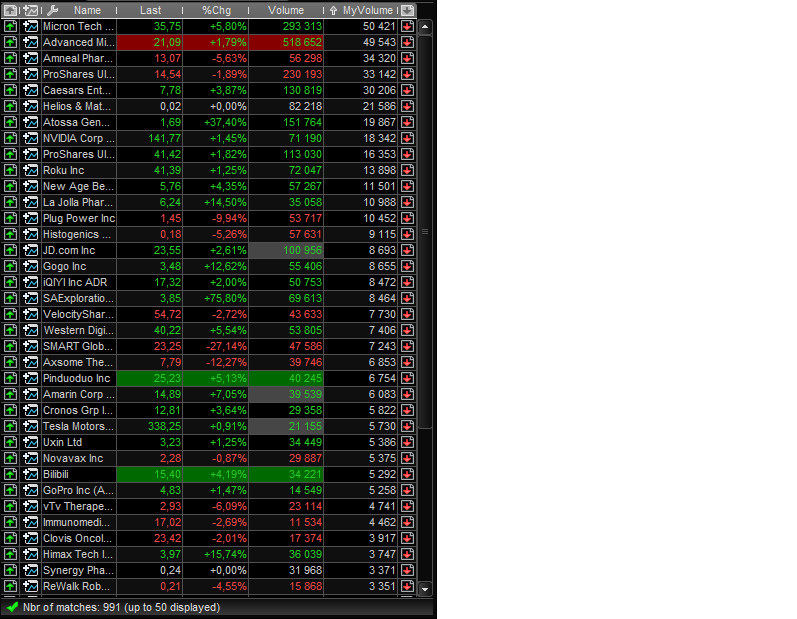
    See the list below where MyVolume gives a complete different Volume as the real Volume? What do I do wrong in the code?

    PRTScreener.png PRTScreener.png
    #88301 quote
    NicolasNicolas
    Keymaster
    Legend

    Do you have real time data or just end of day one? In that last case, you’ll always get the previous period data, that’s why you spot differences.

    #88321 quote
    GaastraGaastra
    Participant
    New

    Ah, thanks.

Viewing 3 posts - 1 through 3 (of 3 total)

  • You must be logged in to reply to this topic.
ProRealAI ProRealAI New

Stuck on this ProBuilder code?

Describe what this topic is trying to build, in plain English, and ProRealAI writes the ProRealTime™ indicator, screener or system for you.

Available in 7 languages
Try ProRealAI

Volume issue


ProScreener: Market Scanners & Detection

New Reply
Author
author-avatar
Gaastra @gaastra Participant
Summary

This topic contains 2 replies,
has 2 voices, and was last updated by GaastraGaastra

7 years, 10 months ago.

Topic Details
Forum: ProScreener: Market Scanners & Detection
Language: English
Started: 01/09/2019
Status: Active
Attachments: 1 files
ProRealCode ProRealCode
Loading...