Volume Highlight – Selling

Viewing 7 posts - 1 through 7 (of 7 total)

  • Author
    Posts
  • #216720 quote
    Tradethetrade83Tradethetrade83
    Participant
    New

    Hi Guys,

    I am hoping someone may be able to help me create an indicator that will highlight that particular volume bar in a different color like purple.

    The criteria would be as follows:

    A loss  of -0.2% or more on higher volume than the previous session. (I would be using in this on a daily time frame).

    Cheers!

    #216723 quote
    JSJS
    Participant
    Master

    Hi,

    Is this the intention…?

     
    Timeframe(Daily)
    If Volume < 0.98 * Volume[1] then
    R=128
    G=0
    B=128
    Else
    R=0
    G=255
    B=0
    EndIf
    Return Volume as "Volume" coloured(R, G, B)
    
    Scherm­afbeelding-2023-06-25-om-15.57.48.png Scherm­afbeelding-2023-06-25-om-15.57.48.png
    #216807 quote
    Tradethetrade83Tradethetrade83
    Participant
    New
    Hi, Yes that is the intention however with with the following parameters: A loss of -0.2% or more on higher volume than the previous session. (I would be using in this on a daily time frame). And 3 colors if possible – Green for up day, red for down day and purple of the days that meet the requirements…..It would be much appreciated!
    #216809 quote
    JSJS
    Participant
    Master

    Hi,

    The percentage can be changed into “0.998”…

    The purple color is already for a “down day”…

    How do you want to define a “red day”…  🙂

    Tradethetrade83 thanked this post
    #216837 quote
    Tradethetrade83Tradethetrade83
    Participant
    New
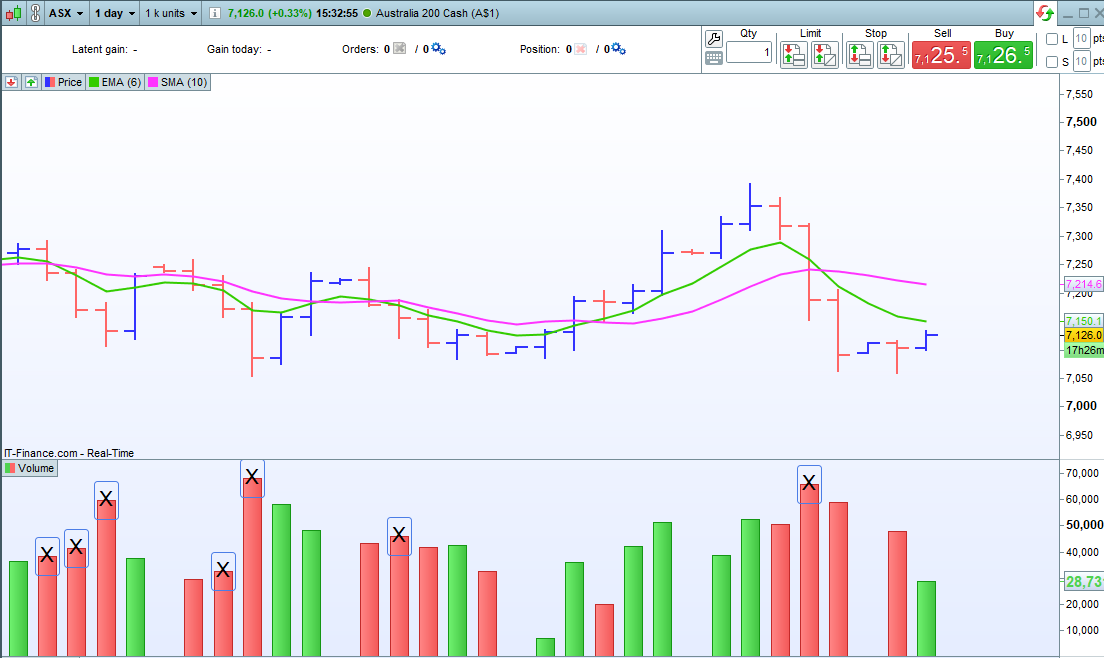
    Hi JS – I am sorry my inability to code has me completely lost when trying to make my own adjustments and I keep making a complete mess of it 🙁 ….would you be so kind as to assist? Below I have taken a screenshot – all the volume bars marked ‘X’ can be any other color of your choosing to highlight them. These bars have higher volume than the previous session and have a equal or greater loss than -0.2% in the session. Sorry to waste your time!
    Dist-day-X.png Dist-day-X.png
    #216867 quote
    JSJS
    Participant
    Master

    Hi @Tradethetrade83

    No problem, I see what you mean now…

     
    Timeframe(Daily)
    If Close<Close[1] then
    R=255
    G=0
    B=0
    ElsIf Close>Close[1] then
    R=0
    G=255
    B=0
    EndIf
    
    C1=Close[1]<Close[2]
    C2=Close<Close[1]
    C3=Volume >= 1.002 * Volume[1]
    If C1 and C2 and C3 then
    R=128
    G=0
    B=128
    EndIf
    
    Return Volume as "Volume" coloured(R, G, B)
    
    Tradethetrade83 thanked this post
    Scherm­afbeelding-2023-06-27-om-13.57.09.png Scherm­afbeelding-2023-06-27-om-13.57.09.png
    #216869 quote
    Tradethetrade83Tradethetrade83
    Participant
    New
    Perfect! Many Thanks.
    JS thanked this post
Viewing 7 posts - 1 through 7 (of 7 total)
  • You must be logged in to reply to this topic.

ProRealAI ProRealAI New

Stuck on this ProBuilder code?

Describe what this topic is trying to build, in plain English, and ProRealAI writes the ProRealTime™ indicator, screener or system for you.

Available in 7 languages
Try ProRealAI

Volume Highlight – Selling


ProBuilder: Indicators & Custom Tools

New Reply
Author
Summary

This topic contains 6 replies,
has 2 voices, and was last updated by Tradethetrade83Tradethetrade83
3 years, 2 months ago.

Topic Details
Forum: ProBuilder: Indicators & Custom Tools
Language: English
Started: 06/25/2023
Status: Active
Attachments: 3 files
ProRealCode ProRealCode
Loading...