


Drawrectangle around a bar, highlight the candles

Viewing 3 posts - 1 through 3 (of 3 total)
  • Author
    Posts
  • #149108 quote
    RobbRobb
    Participant
    Average

    Hello

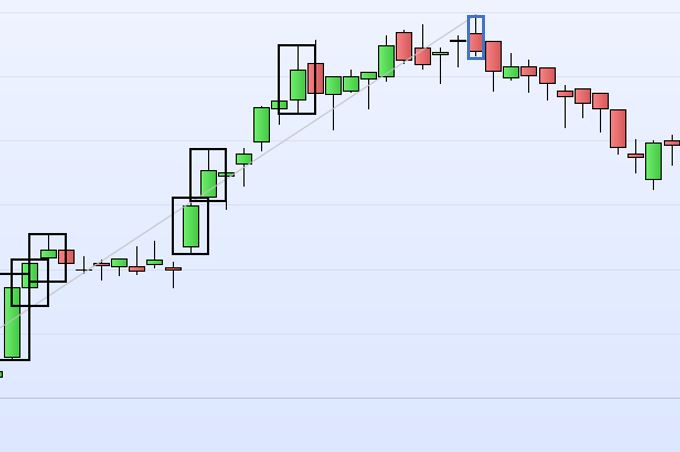
    I need to highlight the candles based on a certain rule.

    See the picture, the best way I found so far is to use the command “drawrectangle” but I am wondering whether there’s a way to get a thinner rectangle too, like the bleu one (added with paint of course).

    Unfortunately the command DRAWCANDLE cannot be used in this case since I need to define also different and specific “x” values.

    thank you

    Regards

    Capture-1.jpg Capture-1.jpg
    #149110 quote
    robertogozzirobertogozzi
    Moderator
    Legend

    The best solution is to plot an arrow above and an arrow below the candle.

    If you have v11 you can use STYLE with DrawSegment to plot an almost transparent segment over the candle (not tested):

    DRAWSEGMENT(barindex,low,barindex,high) coloured(0,0,255,16) STYLE(line,3)

    replace 16 with any number from 1 to 255 (0=invisible) and 3 with another value as large as a candle.

    #149493 quote
    RobbRobb
    Participant
    Average

    thank you!

Viewing 3 posts - 1 through 3 (of 3 total)
  • You must be logged in to reply to this topic.

ProRealAI ProRealAI New

Stuck on this ProBuilder code?

Describe what this topic is trying to build, in plain English, and ProRealAI writes the ProRealTime™ indicator, screener or system for you.

Available in 7 languages
Try ProRealAI

Drawrectangle around a bar, highlight the candles


ProBuilder: Indicators & Custom Tools

New Reply
Author
author-avatar
Robb @robb Participant
Summary

This topic contains 2 replies,
has 2 voices, and was last updated by RobbRobb

5 years, 11 months ago.

Topic Details
Forum: ProBuilder: Indicators & Custom Tools
Language: English
Started: 10/31/2020
Status: Active
Attachments: 1 files
ProRealCode ProRealCode
Loading...

