


Using Keyboard shortcuts to trade

Viewing 7 posts - 1 through 7 (of 7 total)

  • Author
    Posts
  • #237196 quote
    pdrh
    Participant
    Average

    Is it not possible to use keyboard shortcuts to open,close or reverse trades any more

    #237197 quote
    Iván González
    Moderator
    Master

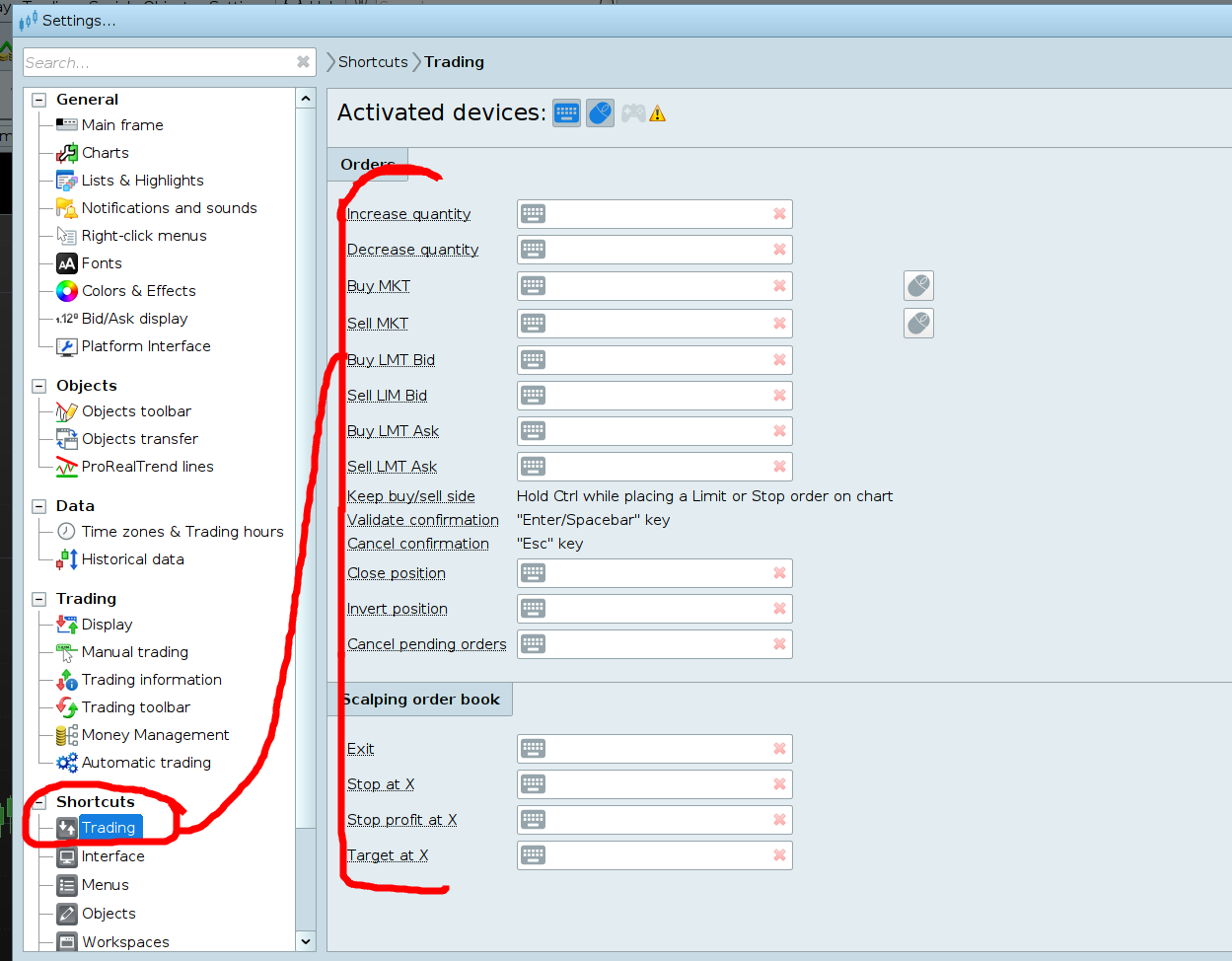
    Hi, you can configure it here

    pdrh thanked this post
    2024-09-06_07-25.png 2024-09-06_07-25.png
    #237204 quote
    pdrh
    Participant
    Average

    My “Keyboards” are greyed out . The only things I can change are the Default “+” and “-“

    #237235 quote
    JS
    Participant
    Senior

    Hi,

    I’m assuming you’re working with a keyboard and a mouse, so basically these should be activated devices…

    Have you tried clicking on the icons (keyboard and mouse) so that they might still be activated…?

    pdrh thanked this post
    Scherm­afbeelding-2024-09-06-om-17.58.08.png Scherm­afbeelding-2024-09-06-om-17.58.08.png
    #237263 quote
    pdrh
    Participant
    Average
    Yes I am using a Keyboard and mouse and they are shown as being activated . I can set a command with the mouse but i only have a basic mouse withe one button so that is not much use
    #237264 quote
    JS
    Participant
    Senior

    And aren’t the “keyboard shortcuts” an option…?

    pdrh thanked this post
    #237266 quote
    pdrh
    Participant
    Average
    I have been having a “seniors moment” and clicking on the Keyboard Icon expecting to see a Popup just as happens with the mouse instead of placing the cursor and inserting the letter I want .   Thank you for your help
    JS thanked this post
Viewing 7 posts - 1 through 7 (of 7 total)
  • You must be logged in to reply to this topic.

Using Keyboard shortcuts to trade


General Trading: Market Analysis & Manual Trading

New Reply
Author
author-avatar
pdrh @pdrh Participant
Summary

This topic contains 6 replies,
has 3 voices, and was last updated by pdrh

1 year, 5 months ago.

Topic Details
Forum: General Trading: Market Analysis & Manual Trading
Language: English
Started: 09/06/2024
Status: Active
Attachments: 2 files
Logo Logo
Loading...

