Use the configured max contracts / lots as position size (not as a limit)

Viewing 2 posts - 1 through 2 (of 2 total)
  • Author
    Posts
  • #137300 quote
    JuandeFer
    Participant
    Average

    Hi,

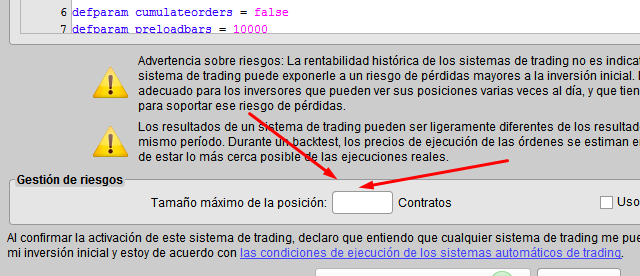
    I know different snippets or techniques to change or increase the number of lots / contracts of a strategy based on profits. In the other hand, the platform limits the max number of contracts introduced in the ‘trading system start confirmation’ window (see attached image)

    But, we can’t use the configured max contracts in this window as variable?  It can’t be used?   Could be so useful that a strategy launches the number of contracts configured here.


    Thanks in advance.

    Screenshot_2-1.png Screenshot_2-1.png
    #137303 quote
    GraHal
    Participant
    Master

    But, we can’t use the configured max contracts in this window as variable?  It can’t be used?

    No we can’t. Your statements above is correct.

    The setting / entry is there as a very useful safeguard so that if we make a mistake in the coding and then go to bed that we don’t wake up having lost all our money, house, car, rolex watch! 🙂

    Always set it to the minimum that you want to trade, i.e. usually 1 or 2?

    Nicolas thanked this post
Viewing 2 posts - 1 through 2 (of 2 total)
  • You must be logged in to reply to this topic.

Use the configured max contracts / lots as position size (not as a limit)


ProOrder: Automated Strategies & Backtesting

New Reply
Author
author-avatar
JuandeFer @juandefer Participant
Summary

This topic contains 1 reply,
has 2 voices, and was last updated by GraHal

5 years, 8 months ago.

Topic Details
Forum: ProOrder: Automated Strategies & Backtesting
Language: English
Started: 06/27/2020
Status: Active
Attachments: 1 files
Logo Logo
Loading...