


Use of Automatic Trend Lines in code

Viewing 3 posts - 1 through 3 (of 3 total)

  • Author
    Posts
  • #237737 quote
    MishapMishap
    Participant
    Junior

    Hi Guys, Apologies as i am a little stuck here & i fear i know the answer already.

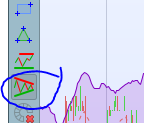
    As the title suggests is it possible to get the level of the auto trend line and input that into pro real code? i am hoping to get a trend line level from the auto trend lines and then use that as a variable in my code.

    Capture.png Capture.png
    #237742 quote
    GraHalGraHal
    Participant
    Master

    No. but there are codes for trend lines in the library on this website.

    #237756 quote
    Iván GonzálezIván González
    Moderator
    Legend

    Exactly. You have enough information in the forum to create a trend line based on pivot points, for example.
    Here you have an example on RSI: https://www.prorealcode.com/topic/lneas-de-tendencia-con-breakouts-en-rsi/

Viewing 3 posts - 1 through 3 (of 3 total)
  • You must be logged in to reply to this topic.

ProRealAI ProRealAI New

Stuck on this ProBuilder code?

Describe what this topic is trying to build, in plain English, and ProRealAI writes the ProRealTime™ indicator, screener or system for you.

Available in 7 languages
Try ProRealAI

Use of Automatic Trend Lines in code


ProOrder: Automated Strategies & Backtesting

New Reply
Author
author-avatar
Mishap @mishap Participant
Summary

This topic contains 2 replies,
has 3 voices, and was last updated by Iván GonzálezIván González

1 year, 12 months ago.

Topic Details
Forum: ProOrder: Automated Strategies & Backtesting
Language: English
Started: 09/18/2024
Status: Active
Attachments: 1 files
ProRealCode ProRealCode
Loading...


