Hi,
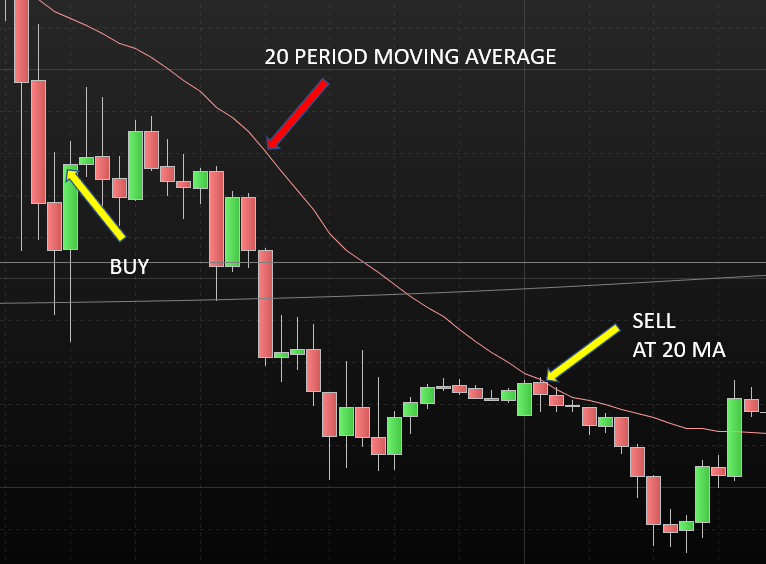
Would like to find a way to update a target price value after each candle. For example, the TP is set to be close – moving average[10]. How can I update the TP once the position is on, so if the MA drops then the TP is also lowered?
Thought there might be something in the “summation” but not had any luck yet.
Thanks
Try this:
If LongOnMarket then
   TP = Close - average[10,0](close)
   If TP > 0 then
      SELL AT average[10,0](close) STOP
   Endif
Endif
Thanks Roberto – you star!
Try this:
If LongOnMarket then
TP = Close – average[10,0](close)
If TP > 0 then
SELL AT average[10,0](close) STOP
Endif
Endif
If LongOnMarket then
TP= Close – average[10,0](close)
If TP > 0 then
SELL AT average[10,0](close) STOP
Endif
Endif
Hi robertogozzi,
Thanks for the idea. I am trying this out where the 20 period moving average is set as the Target Profit. However, this will be lower than the Entry price where the market drops, so TP would not be greater than zero. I have tried “<> 0” and other variations, but I can’t get this to work. Hope that the attached image will help explain.
Thanks very much as always
Replace line 1 with this one:
If LongOnMarket and PositionPerf > 0 then
Replace line 1 with this one:
If LongOnMarket and PositionPerf > 0 then
If LongOnMarket and PositionPerf > 0 then
Hi robertogozzi
Will PRT allow you to change the TP once the trade is on (up or down)? Thanks very much
Yes, you can.
On limited risk accounts you can only reduce it, though.
Hello!
I find this method for profit target very interesting and have been dabbling with it for a week. I’m trying to combine in with a hard stoploss, but can’t seem to make it work. Let’s say I’d like to use this code and a percentage stop loss of 0.5%. Would this be possible? I’ve tried many variations, but none seem to work. The challenge is of course that if you use this and the market instantly goes against you, the loss is theoretically higher than your solvency.
Here are two examples, neither of which work.
Any ideas?
indicator1 = MA 50
indicator2 = MA 100
c1 = if indicator1 crosses over indicator2 then
buy at market
set stop %loss 0.2
endif

If longOnMarket and PositionPerf > 0 then
TP = Close - average[50](close)
If TP > 0 then
sell AT average[50](close) STOP
Endif
Endif

//Or

indicator1 = MA 50
indicator2 = MA 100
c1 = if indicator1 crosses over indicator2 then
buy at market
endif

If longOnMarket and PositionPerf > 0 then
TP = Close - average[50](close)
If TP > 0 then
sell AT average[50](close) STOP
Endif
Endif

If longOnMarket and PositionPerf < 0 then
TP = Close - average[10](close)
If TP > 0 then
sell AT average[10](close) STOP
Endif
Endif
Line 5 is correct (then code contains many syntax and logical errors, but I think this is just an example as you would have been returned some error messages), just replace it sith 0.5.
IF…THEN must be on a line of its own and can’t be assigned to variables as it does NOT return any value, it just checks whether conditions are met or not.
Yes, it’s just an example and I noticed I wrote a completely faulty code, but was only able to edit the post once. Guess there is a limit on that? In any case, the actual code is not the issue, but I see I also explained it poorly. Optimally I would like to make it so that the profit target function is activate when the position is in profit, but that set stop loss activates if say the market moves against me and I’m down x points on my position.
Something like this,
DefParam CumulateOrders = false
positionsize = 1
indicator1 = MA 50
indicator2 = MA 100
c1 = indicator1 crosses over indicator2


If longOnMarket and PositionPerf > 0 then
TP = Close - average[50](close)
If TP > 0 then
sell AT average[50](close) STOP
Endif
Endif

If longOnMarket and PositionPerf < -50 then
TP = Close - average[10](close)
If TP > 0 then
sell AT average[10](close) STOP
Endif
Endif
Does this make sense?
You have a 5-minute time to edit your post.
PositionPerf is a factor, to make it a percentage multiply it by 100. To convert it into Pips:
Pips = PositionPrice * PositionPerf / PipSize
to get the same value in currency:
Money = PositionPrice * PositionPerf / PipSize * PipValue
Thank you, Roberto! That is very useful information. I reckon I’m getting closer, but am not quite there. I tried to do it like this, but it seems to not take effect only when I’m down x points. Have I misunderstood how this works? Any ideas for how to make it work?
Pips = PositionPrice * PositionPerf / PipSize * PipValue

If shortOnMarket and PositionPerf > 0 then
TP = Close - average[50](close)
If TP > 0 then
exitshort AT average[50](close) STOP
Elsif shortOnMarket and pips <-50 then
SL = Close - average[20](close)
If SL > 0 then
exitshort AT average[20](close) STOP
Endif
Endif
endif
Sorry, my fault, I wrote my second line incorrectly.
Now I edited it with the variable MONEY.
Use the first line with PIPS (you just need to remove the multiplication by PIPVALUE at the end of line 1 in your code).