I’m trying to start a new system but it gets stopped immediately with the following message:
“The trading system could not start because it encountered an internal error. Please send us a report to enable us to analyze the error using the “Send e-mail” button”
I’ve never come across this one before. How do I produce a report and where exactly is the “Send e-mail” button ?
I have seen this error, but I forgot what it was about in my case (and how to solve it). I even dare to say I had this the last weekend.
The “email” button is nothing more or less than sending a technical report. For PRT this ends up in an email sent to them.
There’s more oddities since the weekend. I think it was Sunday afternoon when the below shown version appeared (OK, that was the first time I noticed, and I investigate it when something unexpected happens).
thanks Peter, I did eventually find an option for technical issues in the Help Centre which seems to have generated a ‘report’ of some kind. At no point did i encounter anything called a ‘Send email button’ — can’t imagine why the error message doesn’t just say, click Help. Something got lost in translation perhaps…
Hey ho, I’m sure I’ll hear back from them by the end of the year.
I did eventually find an option for technical issues in the Help Centre which seems to have generated a ‘report’ of some kind. At no point did i encounter anything called a ‘Send email button’
For PRT this ends up in an email sent to them.
For a hopefully better clarification :
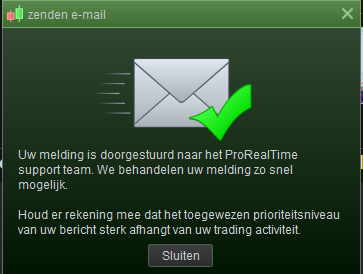
Below you see the small form which appears after sending such a Technical Report; functionally that is what you do – sending a Report. Technically this results in sending an email to PRT 2nd line support (they call themselves 1st line but 1st line would really the persons you can call by phone – the persons where these emails go you sure not can call). Also see the title of the form “Send email” (zenden e-mail).
Some times they kind of forward such an email to me (could be to you too), which contains all sorts of technical data from your system and also the running charts and such.
My previous post summarised : the developer creating that part of the program with the “Internal error” message to you, probably doesn’t know about the Technical Report functionality (he/she does not use it him/herself), but surely *is* aware about the emails he is sent regularly. And hey, you yourself sent those !
(which is what it really comes down to, but you can’t see that).
How’s that for a long-winded answer to no question eh ?
results in sending an email to PRT
If we are with IG then the Technical Report goes to IG first, If priority is high enough, IG forward the Technical Report to PRT and send confirmation (and ticket number) to the Tech Report originator.
So if we get no confirmation email from IG, then the Tech Report is likely to still be with IG.
i got a message from IG the day, but just to say that they had passed it on to PRT. no word from them, but meanwhile I managed to solve it myself …
Cant recall that specific messages, but the only time I’ve had some form of error message is with PRT 10 where PRT 11 seems to ignore some things like unused code PRT10 used to flag up errors… Of course no code posted so cant look for anything obvious there
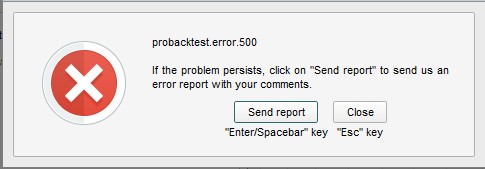
Since yesterday I’m getting Probacktest.error.500 on the US500 1m bar Historical chart – all timeframes, all strategies. All backtests fail immediately, with or without optimization.
It only happens with that chart – the same codes run fine on other instruments, and they run on US500 200k.
I’ve sent a report to PRT but not expecting much action. Most grateful if anyone else with Premium could run a quick check to see if you’re getting the same thing – thanks.
Correction, I am only getting that error with 2 minute and 3 minute TFs – 5 minute and above seems ok.
Could this impose a problem perhaps ? So no error here (Premium) but that text tells that there’s insufficient data available against what I asked for (possibly I have never seen that triangle).
But no error message. Not with my Strategy which doesn’t take Trades with this anyway (read : it could be related to trades being applied).
thanks for testing it. I just tried it again and same weird thing.
The algo has been running on demo, so I know there’s no problem with the code. I can backtest it on US 500 2min 200k, but with the 1m Histo I get the attached error.
Your problem has been solved in advance !
Probacktest Error 500
haha
Anyway, someone out there should know what to do. If they only receive your report and deal with it.
(this one was solved the same day)
good to know it’s not just me doing something dumb (at least, not this time)
I sent in the report so hopefully one of the PRT gnomes will get on to it at some point…
Hi Nonetheless,
Do you know if there is a minimum lot size on US500 (1 euro per point) with Automated Trading? I’ve half a dozen US500 (1 eur/point) Algos running in Demo, backtest on 100k works perfectly fine, but no trades taken for more than a week and I know there have been Signals over last week because I’ve plotted the system as an Indicator on a chart.
For me the minimum size for US500 is €5, but usually when you try to run a system below the minimum it gets stopped with an error message.
I’ve had that recently on the DOW which used to run with a minimum of 0.2 and now seems to want €1 pp
Not sure it this is the same for all countries ??