


Understanding Time zones

Viewing 6 posts - 1 through 6 (of 6 total)

  • Author
    Posts
  • #23260 quote
    StantonR
    Participant
    Senior

    Hi There

    I see there are a number of strategies that implement time based trading.

    I have run a number of them on my system and they dont return any results.

    I have set my time zone in the settings to run in ECT for all strategies. I am currently in South Africa UCT + 2.

    Could somebody please help me with the time issue as I have tried setting times for individual stocks and times for the system as a whole.

    Also when implementing the strategy live which time zone gets implemented.

    Thanks

    #23314 quote
    GraHal
    Participant
    Master

    Hi Stanton

    I agree we should all start / agree to a discipline that the time zone of the strategy (ATS) is stated, could be part of the ATS filename … for example Bollinger Dax 5M (GMT+1) or Bollinger Dax 5M (***)  if no times coded into the ATS?

    I adjust times coded into ATS to suit my platform timezone, but I have been caught out and assumed times are GMT … and this makes an ass out of me!! 🙂

    Cheers
    GraHal

    #23396 quote
    GraHal
    Participant
    Master

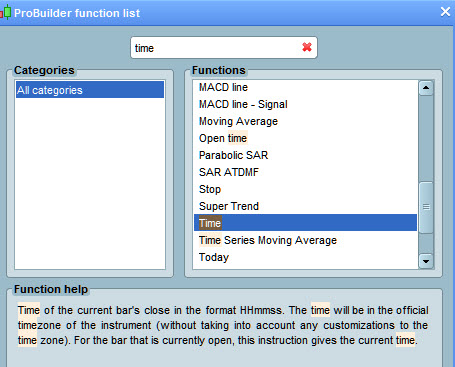
    Anybody explain what is meant by attached where it says …

    the time will be in the  official timezone of the instrument (without taking into accout any customisation to the timezone) 

    Time.jpg Time.jpg
    #23453 quote
    GraHal
    Participant
    Master

    Re mine above (re timezone & filename) easier / better if where times are used in a strategy /code then the timezone (of times) should be shown in the comments.

    @Stanton In the absence of asking the author of the Strategy what timezone are the times, then a second best is look at the flag / country of the code author and adjust times accordingly back to suit your platform setting. I’ve just done this, Code Author Flag was Germany (CET) and my platform is set to GMT so I reduced all times by 1 hour as CET = GMT+1 (currently / Feb 15).

    I generally run the ATS with original time settings, then duplicate the ATS and set to my platform timezone (as para above) then run again and if I look for an improvement in profit / equity curve. There’s always that doubt though … we do need an agreed protocol to be sure, would save a lot of messng about and confusion.

    Cheers
    GraHal

    #23593 quote
    StantonR
    Participant
    Senior

    Hi There

    Can somebody answer me this when putting a strategy live or in demo what timeframe does it use.

    The timeframe of the instrument or the timeframe set up in your platform.

    #23616 quote
    GraHal
    Participant
    Master

    The PRT Manual link below should help … open as .pdf, right click Find, enter Timezone in the Find search box, then click Next to read entries relating to Time zones

    https://www.prorealtime.com/en/pdf/probacktest.pdf

Viewing 6 posts - 1 through 6 (of 6 total)
  • You must be logged in to reply to this topic.

Understanding Time zones


ProOrder: Automated Strategies & Backtesting

New Reply
Author
author-avatar
StantonR @stantonr Participant
Summary

This topic contains 5 replies,
has 2 voices, and was last updated by GraHal

9 years, 1 month ago.

Topic Details
Forum: ProOrder: Automated Strategies & Backtesting
Language: English
Started: 01/31/2017
Status: Active
Attachments: No files
Logo Logo
Loading...
