Unable to zoom correctly (shortcuts don’t work)

Viewing 4 posts - 1 through 4 (of 4 total)

  • Author
    Posts
  • #233068 quote
    several
    Participant
    New

    Hey all, I’m new to PRT. I’m struggling with zooming and navigating charts efficiently. Currently it’s quite erratic and some behaviours don’t work as I would expect.

    In the main prefs it states that shortcuts for zooming are:

    CMD + [+/-] or mouse scroll = zoom
    Hold CMD + scroll = zoom on specific candle.

    I’m using a MBP. The trackpad zooms, albeit not accurately. However, the shortcut CMD + [+/-] does nothing. Also, holding CMD while zooming does not work either so I can’t zoom in on a specific candle. Whenever I zoom I always have to manually scroll horizontally to reposition the chart. Does anyone else have this issue?

    Screenshot-2024-05-26-at-22.11.27.png Screenshot-2024-05-26-at-22.11.27.png
    #233074 quote
    Iván González
    Moderator
    Master

    Hi!
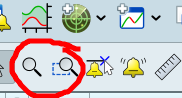
    I prefer use specific tools:
    Zoom mode
    Zoom zone mode

    2024-05-27_09-49.png 2024-05-27_09-49.png
    #233078 quote
    GraHal
    Participant
    Master

    Whenever I zoom I always have to manually scroll horizontally to reposition the chart.

    Yes I have to reposition after zooming with my mouse wheel, but I don’t use the manual scroll bar to reposition the chart, I drag the chart with my mouse; I use a PC.

    #233297 quote
    druby
    Participant
    New

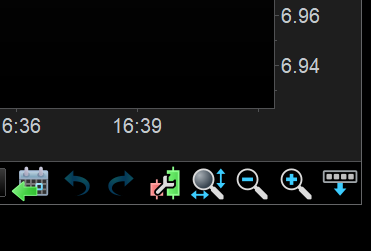
    A new chart displays a default number of bars, The number displayed, is somewhat related to the chosen units. Using the magnifying glass with vertical/horizontal arrows return back to this default.

    Zooming in and out basically uses the centre of the chart as reference point. However if the current candle is, or enters the display window, the reference point becomes the current candle , which always displays to the right.
    This is why zooming appears logical in the middle of charts data, but zoom out too far ( which your going to do with a mouse wheel), and the reference point changes to the current candle reference and you end up in a different place.

    Zooming, approximately doubles or halves the number of displayed candle of loaded historical data.
    In ‘current candle reference’, the increase or decrease of candles appear to the left of prior displayed candles.
    With ‘centre window reference’ the increase/decrease candles are split and added to the left and the right of the prior displayed candles.

    There are other variations and options but above is basics as I see them.

    Screenshot-2024-05-30-163223.png Screenshot-2024-05-30-163223.png
Viewing 4 posts - 1 through 4 (of 4 total)

  • You must be logged in to reply to this topic.

Unable to zoom correctly (shortcuts don’t work)


Platform Support: Charts, Data & Broker Setup

New Reply
Author
author-avatar
several @several Participant
Summary

This topic contains 3 replies,
has 4 voices, and was last updated by druby

1 year, 8 months ago.

Topic Details
Forum: Platform Support: Charts, Data & Broker Setup
Language: English
Started: 05/26/2024
Status: Active
Attachments: 3 files
Logo Logo
Loading...