hey all!
I have tried to add a triple moving average filter to one of my systems. The system only takes short positions on the DAX40 and I want the filter to allow trades when the moving averages are all below each other. The basic code I am trying to use is:
timeframe(5 minute, updateonclose)
ma1 = VolumeAdjustedAverage[m1](close)
ma2 = VolumeAdjustedAverage[m2](close)
ma3 = VolumeAdjustedAverage[m3](close)
trendOK = ma1 < ma2 and ma2 < ma3
The isssue is this. When I backtest the system appears to be taking orders when the moving averages are not below each other and trending downwards, as specified in the code. In fact it is placing orders when the averages are all above each other, trending upwards!
Can anyone help an idiot? Is the code not suffiecent to act as a triple moving average filter, or is something else going wrong? I can happily post the code and the backtest results if it helps.
Thanks
Jim
Is your backtest results showing this …
trendOK = ma3 > ma2 and ma2 > ma1
Put in a way different to what you say in your post … above is what your code is saying.
Hi Grahal
Thanks for the prompt reply! 🙂
The backtest results show that it takes trades anywhere, regardless of the filter. The system just doesn’t respect the filter.
Not sure what is going on. Having a few issues with V12. Maybe its a software issue? Sometimes it does strange things when backtesting… not recognising variables in the optimiser window, etc.
Jim
Jim, put this at the end of your code.
graph ma1
graph ma2
graph ma3
Then you will probably see what GraHal means. I have the same “feeling”, but it depends on your m1, m2 and m3 and which is the smallest and which is the largest.
You will see …
Hi Peter
yes, of course. These are the values, m1 the smallest always and m3 the largest always.
m1 = 25, m2 = 45, m3 = 60
not recognising variables in the optimiser window, etc.
I’ve experienced above also … well weird bug that is!
Somehow though – and I can’t even say how – I’ve found a work-around as it hasd not happened to me for a few weeks, thankfully!
strange for sure….
I just can’t figure out why the filter isn’t working and thought maybe it was a similar problem like a bug….
why the filter isn’t working
A screenshot showing the filter not working might help us to suss out why.
A snippet of code including how / where you use trendok might also help us to help you. 🙂
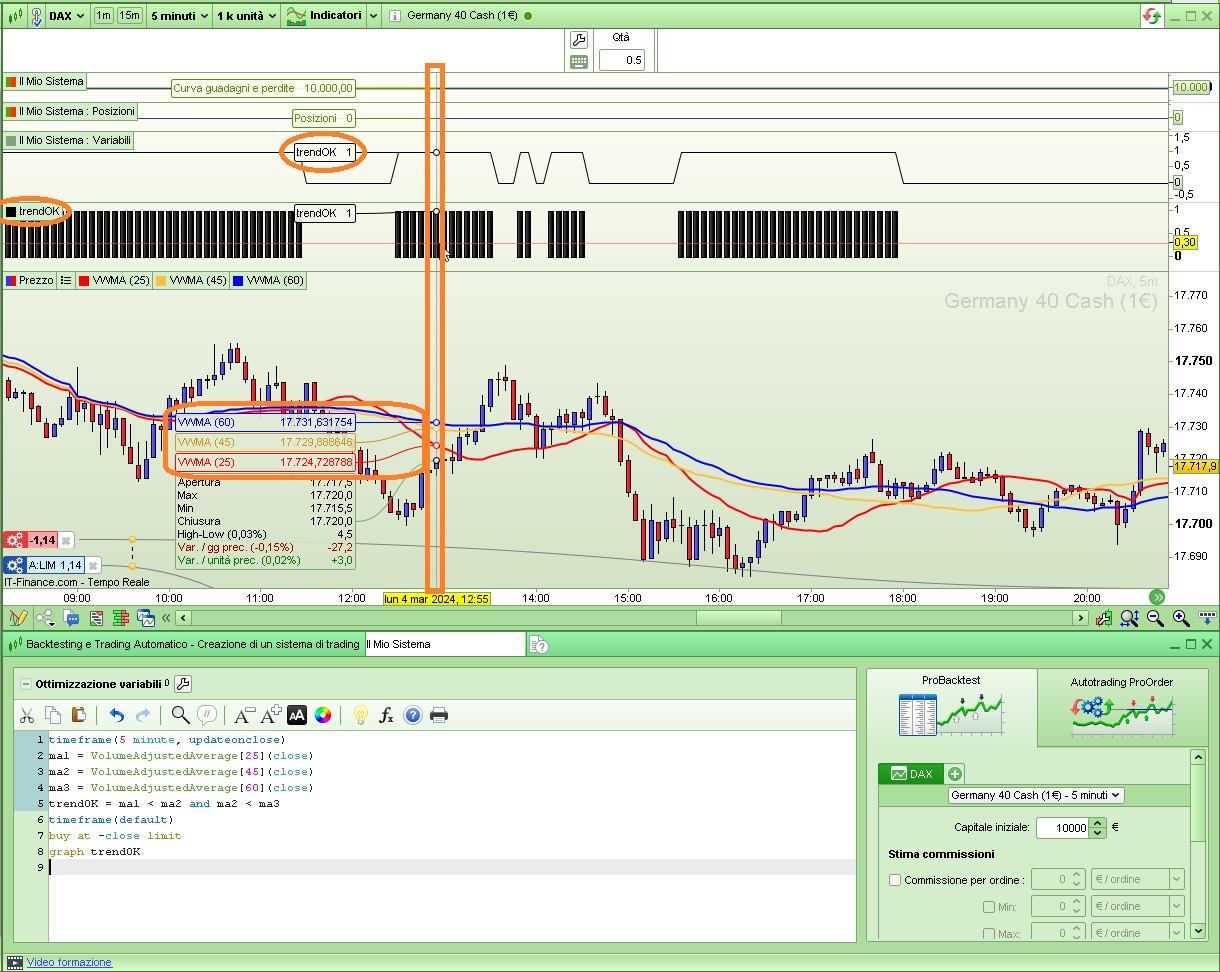
It works like a charm to me (as from attached pic), on both an indicator and a strategy.
Strategy:
timeframe(5 minute, updateonclose)
ma1 = VolumeAdjustedAverage[25](close)
ma2 = VolumeAdjustedAverage[45](close)
ma3 = VolumeAdjustedAverage[60](close)
trendOK = ma1 < ma2 and ma2 < ma3
timeframe(default)
buy at -close limit
graph trendOK
indicator:
ma1 = VolumeAdjustedAverage[25](close)
ma2 = VolumeAdjustedAverage[45](close)
ma3 = VolumeAdjustedAverage[60](close)
trendOK = ma1 < ma2 and ma2 < ma3
RETURN trendOK as "trendOK"