ProRealCode - Trading & Coding with ProRealTime™
Hallo,
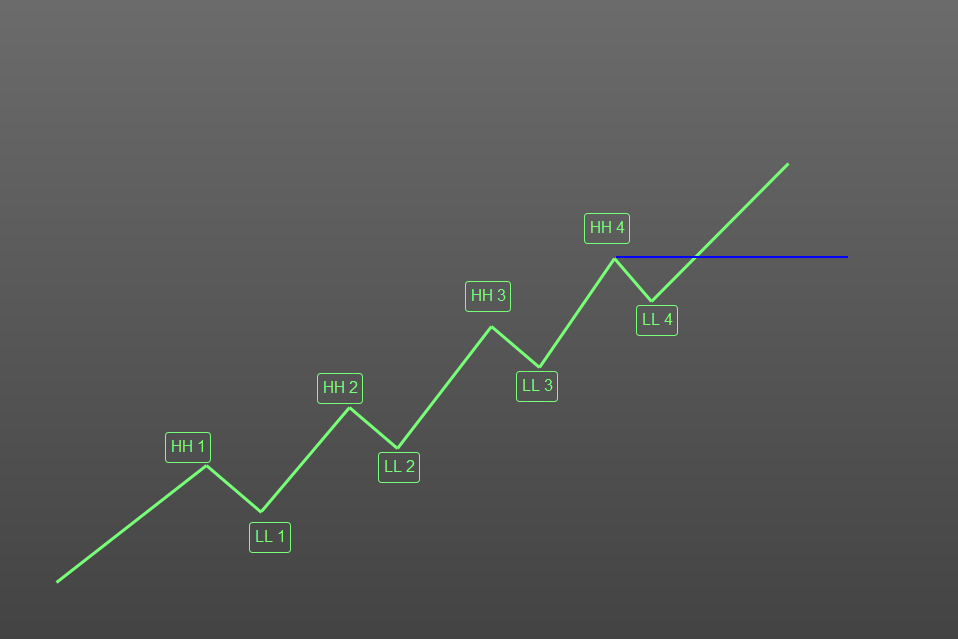
ist es möglich dieses Trendsystem so zu ändern, das der Einstieg erst dann erfolgt, wenn es 4 aufeinander folgende höhere Hochs und höhere Tiefst gegeben hat.
Der Entry soll erst an der Blauen Linie erfolgen wenn die HH und LL so angeordnet sind wie im Bild. Vielen Dank
//defparam calculateonlastbars=30000
ONCE HH = 0
ONCE HHprec = 0
ONCE LL = 0
ONCE LLprec = 0
if Not OnMarket Then
UseST = 0
ENDIF
if NOT LongOnMarket then
cp=3
LLbar=BOTx
EndIf
IF TradePrice = 0 THEN
PositionSize1 = 1
ELSE
PositionSize1 = 1000 / sp //Compute PositionSize
ENDIF
once lastpoint = 0
if high[cp] >= highest[2*cp+1](high) then
PEAK = 1
else
PEAK = 0
endif
if low[cp] <= lowest[2*cp+1](low) then
TROUGH = -1
else
TROUGH = 0
endif
if PEAK = 1 then
TOPy = high[cp]
TOPx = barindex[cp]
endif
if TROUGH = -1 then
BOTy = low[cp]
BOTx = barindex[cp]
endif
if PEAK>0 and (lastpoint=-1 or lastpoint=0) then
//DRAWSEGMENT(lastX,lastY,TOPx,TOPy) COLOURED(127,255,0,1000)
//DRAWTEXT("■",TOPx,TOPy,Dialog,Bold,10) coloured(200,0,0,255)
lastpoint = 1
lastX = TOPx
lastY = TOPy
HHprec= HH
HH = TOPy
HHbar = TOPx
endif
if TROUGH<0 and (lastpoint=1 or lastpoint=0) then
//DRAWSEGMENT(lastX,lastY,BOTx,BOTy) COLOURED(255,0,0,255)
//DRAWTEXT("■",BOTx,BOTy,Dialog,Bold,10) coloured(0,200,0,255)
lastpoint = -1
lastX = BOTx
lastY = BOTy
LLprec= LL
LL = BOTy
LLbar = BOTx
endif
//TREND ATTEMPT
atr=AverageTrueRange[14](close)
if TOPy > TOPy[1] and topy<>lasttop then
//drawarrowup(barindex,low-atr/2) coloured(0,200,0)
lasttop=topy
trendup = 1
else
trendup = 0
endif
//RETURN TOPy as "TOPy", BOTY as "BOTy", trendup as "trendup"
sp = close - 0
// Long
IF not longonmarket and (close crosses over HH) AND (HH > 0) AND (LL > LLprec) AND (LLprec > 0)and (HH > HHprec) and (HH > LL) and (HHprec > LLprec) THEN //
BUY Positionsize1 Contract at Market
//SL = abs(close - LL)
SET TARGET %PROFIT 100
set stop %loss 50
Hallo. Sie können beliebig viele zusätzliche Pivotpunkte speichern. Ich habe die vier höchsten und niedrigsten Pivotpunkte in Ihren Code eingefügt. Sie werden sehen, dass dies redundant ist.
//defparam calculateonlastbars=30000
ONCE HH = 0
ONCE HHprec = 0
ONCE LL = 0
ONCE LLprec = 0
if Not OnMarket Then
UseST = 0
ENDIF
if NOT LongOnMarket then
cp=3
LLbar=BOTx
EndIf
once lastpoint = 0
if high[cp] >= highest[2*cp+1](high) then
PEAK = 1
else
PEAK = 0
endif
if low[cp] <= lowest[2*cp+1](low) then
TROUGH = -1
else
TROUGH = 0
endif
if PEAK = 1 then
TOPy = high[cp]
TOPx = barindex[cp]
endif
if TROUGH = -1 then
BOTy = low[cp]
BOTx = barindex[cp]
endif
if PEAK>0 and (lastpoint=-1 or lastpoint=0) then
lastpoint = 1
lastX = TOPx
lastY = TOPy
HHprec= HH
HH = TOPy
HHbar = TOPx
hh1=hh2
hh1x=hh2x
hh2=hh3
hh2x=hh3x
hh3=hh4
hh3x=hh4x
hh4=TOPy
hh4x=TOPx
endif
if TROUGH<0 and (lastpoint=1 or lastpoint=0) then
lastpoint = -1
lastX = BOTx
lastY = BOTy
LLprec= LL
LL = BOTy
LLbar = BOTx
ll1=ll2
ll1x=ll2x
ll2=ll3
ll2x=ll3x
ll3=ll4
ll3x=ll4x
ll4=BOTy
ll4x=BOTx
endif
//TREND ATTEMPT
atr=AverageTrueRange[14](close)
if TOPy > TOPy[1] and topy<>lasttop then
lasttop=topy
trendup = 1
else
trendup = 0
endif
// Long
setupLong=hh4>hh3 and hh3>hh2 and hh2>hh1 and ll4>ll3 and ll3>ll2 and ll2>ll1
IF not longonmarket and (close crosses over HH) AND setuplong THEN //
BUY 1 Contract at Market
SL = abs(close - LL4)
SET TARGET price close+SL
set stop price ll4
endif
Hallo, vielen Dank!!!!
das wäre schön, dann könnte ich mit verschiedenen Trends experimentieren.
Können sie mir vielleicht in Ihrem Code markieren, was ich in welcher Zeile ändern muss, um zum Beispiel den Einstieg nach 5 aufeinander folgenden Hochs oder nur 3 aufeinander folgenden Hochs zu ändern??!!
Das wäre toll.
Vielen Dank
Hallo. Ich habe den Code so angepasst, dass Sie dies durch einfaches Ändern einer einzigen Variable erreichen können.
// --- SETTINGS ---
// Change this number to 3, 4, 5, etc. to experiment with different trend lengths
ONCE trendsRequired = 4
// --- INITIALIZATION ---
ONCE HH = 0
ONCE HHprec = 0
ONCE LL = 0
ONCE LLprec = 0
ONCE countHH = 0
ONCE countLL = 0
ONCE lastpoint = 0
// Pivot period
cp = 3
// --- PEAK AND TROUGH DETECTION ---
IF high[cp] >= highest[2 * cp + 1](high) THEN
PEAK = 1
ELSE
PEAK = 0
ENDIF
IF low[cp] <= lowest[2 * cp + 1](low) THEN
TROUGH = -1
ELSE
TROUGH = 0
ENDIF
IF PEAK = 1 THEN
TOPy = high[cp]
TOPx = barindex[cp]
ENDIF
IF TROUGH = -1 THEN
BOTy = low[cp]
BOTx = barindex[cp]
ENDIF
// --- LOGIC FOR HH (Picos) ---
IF PEAK > 0 AND (lastpoint = -1 OR lastpoint = 0) THEN
lastpoint = 1
HHprec = HH
HH = TOPy
// Check if current peak is higher than previous
IF HH > HHprec AND HHprec > 0 THEN
countHH = countHH + 1
ELSE
countHH = 1 // Reset to 1 as current is a peak
ENDIF
ENDIF
// --- LOGIC FOR LL (Valles) ---
IF TROUGH < 0 AND (lastpoint = 1 OR lastpoint = 0) THEN
lastpoint = -1
LLprec = LL
LL = BOTy
// Check if current trough is higher than previous
IF LL > LLprec AND LLprec > 0 THEN
countLL = countLL + 1
ELSE
countLL = 1 // Reset to 1 as current is a trough
ENDIF
ENDIF
// --- ENTRY LOGIC ---
// Trend is confirmed if both counters reach the required number
setupLong = countHH >= trendsRequired AND countLL >= trendsRequired
IF NOT LONGONMARKET AND (close CROSSES OVER HH) AND setupLong THEN
BUY 1 CONTRACT AT MARKET
// Risk Management
stopLossPrice = LL
SET STOP PRICE stopLossPrice
takeProfitPrice = close + (close - stopLossPrice)
SET TARGET PRICE takeProfitPrice
ENDIF
Ändern Sie diese Variable (trendsRequired)
Wow das ist toll…
Nur eine Kleine Sache ist nicht richtig, das LL soll immer größer als dass HHprec sein, siehe Bild
Hallo,
ich möchte gern verstehen was ich im Code ändern muss, um ein weiteres HH und LL hinzu zufügen. Also ein 3. HH
Können Sie bitte den Code so ändern und es im Code fett markieren, damit ich verstehe was ich ändern muss.
Vielen Dank
ONCE HH = 0
ONCE HHprec = 0
ONCE LL = 0
ONCE LLprec = 0
if Not OnMarket Then
UseST = 0
ENDIF
cp = 3
IF TradePrice = 0 THEN
PositionSize1 = 1
ELSE
PositionSize1 = 1000 / sp //Compute PositionSize
ENDIF
once lastpoint = 0
if high[cp] >= highest[2*cp+1](high) then
PEAK = 1
else
PEAK = 0
endif
if low[cp] <= lowest[2*cp+1](low) then
TROUGH = -1
else
TROUGH = 0
endif
if PEAK = 1 then
TOPy = high[cp]
TOPx = barindex[cp]
endif
if TROUGH = -1 then
BOTy = low[cp]
BOTx = barindex[cp]
endif
if PEAK>0 and (lastpoint=-1 or lastpoint=0) then
//DRAWSEGMENT(lastX,lastY,TOPx,TOPy) COLOURED(127,255,0,1000)
//DRAWTEXT(“■”,TOPx,TOPy,Dialog,Bold,10) coloured(200,0,0,255)
lastpoint = 1
lastX = TOPx
lastY = TOPy
HHprec= HH
HH = TOPy
HHbar = TOPx
endif
if TROUGH<0 and (lastpoint=1 or lastpoint=0) then
//DRAWSEGMENT(lastX,lastY,BOTx,BOTy) COLOURED(255,0,0,255)
//DRAWTEXT(“■”,BOTx,BOTy,Dialog,Bold,10) coloured(0,200,0,255)
lastpoint = -1
lastX = BOTx
lastY = BOTy
LLprec= LL
LL = BOTy
LLbar = BOTx
endif
//TREND ATTEMPT
atr=AverageTrueRange[14](close)
if TOPy > TOPy[1] and topy<>lasttop then
//drawarrowup(barindex,low-atr/2) coloured(0,200,0)
lasttop=topy
trendup = 1
else
trendup = 0
endif
//RETURN TOPy as “TOPy”, BOTY as “BOTy”, trendup as “trendup”
sp = close – 0
// Long
IF not longonmarket and close > LL and close < HH AND (HH > 0) AND (LL > LLprec) AND (LLprec > 0)and (HH > HHprec) and (HH > LL) and (HHprec > LLprec) THEN //
Um eine dritte Ebene für Maxima (HH) und Minima (LL) hinzuzufügen, müssen wir neue Variablen erstellen, um diese alten Daten zu speichern, bevor sie mit den neuen überschrieben werden.
In der Programmierung funktioniert dies wie eine Warteschlange: Bevor die neuen Daten eingelassen werden, müssen die aktuellen Daten an die “vorherige” Position verschoben werden, und die “vorherigen” Daten müssen an die “dritte” Position rücken.
// --- Variable Initialization ---
ONCE HH = 0
ONCE HHprec = 0
// CHANGE 1: Declare variable for the 3rd Higher High
ONCE HHprec2 = 0
ONCE LL = 0
ONCE LLprec = 0
// CHANGE 2: Declare variable for the 3rd Lower Low
ONCE LLprec2 = 0
// --- Initial Setup ---
IF NOT OnMarket THEN
UseST = 0
ENDIF
cp = 3
sp = close // Define sp earlier to avoid errors
// Position Size Management
IF TradePrice = 0 THEN
PositionSize1 = 1
ELSE
// Ensure sp is not 0 to avoid division by zero errors
IF sp > 0 THEN
PositionSize1 = 1000 / sp
ELSE
PositionSize1 = 1
ENDIF
ENDIF
ONCE lastpoint = 0
// --- Peak and Trough Detection ---
// Peak Detection
IF high[cp] >= highest[2*cp+1](high) THEN
PEAK = 1
ELSE
PEAK = 0
ENDIF
// Trough Detection
IF low[cp] <= lowest[2*cp+1](low) THEN
TROUGH = -1
ELSE
TROUGH = 0
ENDIF
// Store Coordinates
IF PEAK = 1 THEN
TOPy = high[cp]
TOPx = barindex[cp]
ENDIF
IF TROUGH = -1 THEN
BOTy = low[cp]
BOTx = barindex[cp]
ENDIF
// --- HH Update Logic ---
IF PEAK > 0 AND (lastpoint = -1 OR lastpoint = 0) THEN
lastpoint = 1
lastX = TOPx
lastY = TOPy
// CHANGE 3: Variable shift for the 3rd HH
// First save the previous value into the 3rd, then the current into the previous
HHprec2 = HHprec // The old previous becomes the 3rd
HHprec = HH // The old current becomes the previous
HH = TOPy // The new value is assigned to the current
HHbar = TOPx
ENDIF
// --- LL Update Logic ---
IF TROUGH < 0 AND (lastpoint = 1 OR lastpoint = 0) THEN
lastpoint = -1
lastX = BOTx
lastY = BOTy
// CHANGE 4: Variable shift for the 3rd LL
LLprec2 = LLprec // The old previous becomes the 3rd
LLprec = LL // The old current becomes the previous
LL = BOTy // The new value is assigned to the current
LLbar = BOTx
ENDIF
// --- Trend Attempt ---
atr = AverageTrueRange[14](close)
IF TOPy > TOPy[1] AND TOPy <> lasttop THEN
lasttop = TOPy
trendup = 1
ELSE
trendup = 0
ENDIF
// --- Entry Conditions ---
IF NOT LongOnMarket AND close > LL AND close < HH AND (HH > 0) AND (LL > LLprec) AND (LLprec > 0) AND (HH > HHprec) AND (HHprec > HHprec2) AND (HH > LL) AND (HHprec > LLprec) THEN
// Your buy order would go here
ENDIF
Ok vielen Dankf ür die Erklärung.
Wenn ich nun noch ein weiteres HH hinzufügen möchte, das ich HHprec3 nenne, dann muss ich es oben im code hinzufügen und unten so ändern??
HHprec3 = HHprec2 ????
HHprec2 = HHprec // The old previous becomes the 3rd
HHprec = HH // The old current becomes the previous
HH = TOPy // The new value is assigned to the current
HHbar = TOPx
Genau
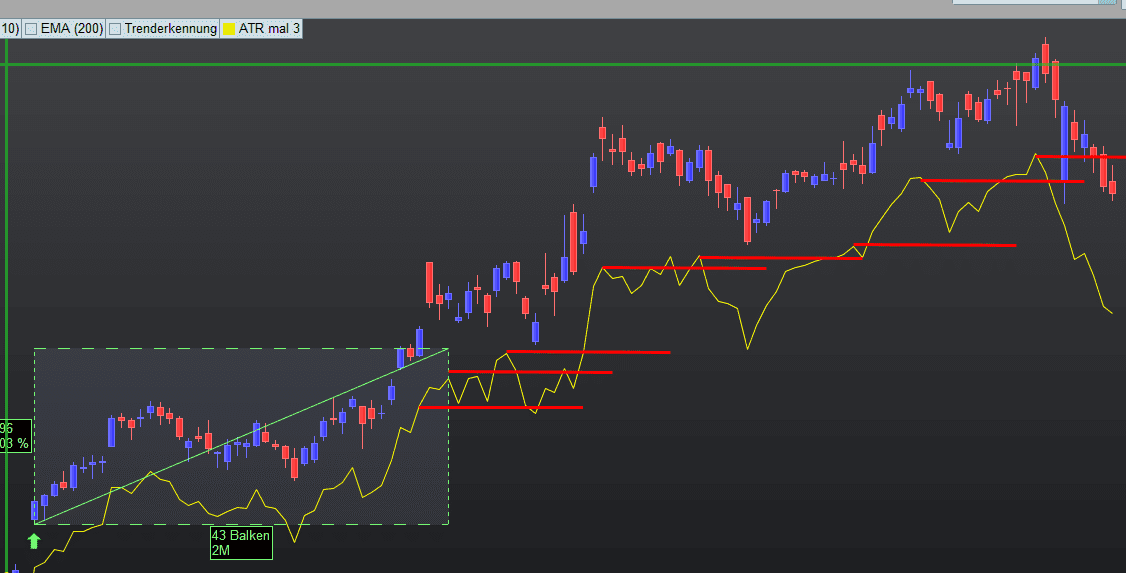
Hallo, können Sie mir bitte in diesen Trendfolge_Code einen Trailingstop einbauen.
Nach dem die Aktie gekauft wude (Bild Grüner Pfeil) , soll zunächst der SL ein ganz normaler Trailingstop von 50 % des Kaufpreises sein, also set stop %Trailing 50
Siehe Bild:
Wenn der Kurs der Aktie 30 % gestiegen ist, dann soll der ART (14) * 3 (close – averagetruerange[14](close)*3) der Trailingstop sein und mit dem Kurs mitgehen, wie die roten Linien kennzeichnen. Der Stop loss geht nicht mehr runter!!
Wenn der Kurs der Aktie dann auf 60 % gestiegen ist, dann soll der ART (14) * 3 Trailingstop auf den ART (14) * 2 geändert werden, sodass er näher am Kurs dran ist.
Der Trade soll geschlossen werden, wenn der Kurs unter dem ATR Stop schließt
Vielen Dank
Hier der Code
ONCE HH = 0
ONCE HHprec = 0
ONCE LL = 0
ONCE LLprec = 0
if Not OnMarket Then
UseST = 0
ENDIF
cp = 3
IF TradePrice = 0 THEN
PositionSize1 = 1
ELSE
PositionSize1 = 1000 / sp //Compute PositionSize
ENDIF
once lastpoint = 0
if high[cp] >= highest[2*cp+1](high) then
PEAK = 1
else
PEAK = 0
endif
if low[cp] <= lowest[2*cp+1](low) then
TROUGH = -1
else
TROUGH = 0
endif
if PEAK = 1 then
TOPy = high[cp]
TOPx = barindex[cp]
endif
if TROUGH = -1 then
BOTy = low[cp]
BOTx = barindex[cp]
endif
if PEAK>0 and (lastpoint=-1 or lastpoint=0) then
//DRAWSEGMENT(lastX,lastY,TOPx,TOPy) COLOURED(127,255,0,1000)
//DRAWTEXT(“■”,TOPx,TOPy,Dialog,Bold,10) coloured(200,0,0,255)
lastpoint = 1
lastX = TOPx
lastY = TOPy
HHprec= HH
HH = TOPy
HHbar = TOPx
endif
if TROUGH<0 and (lastpoint=1 or lastpoint=0) then
//DRAWSEGMENT(lastX,lastY,BOTx,BOTy) COLOURED(255,0,0,255)
//DRAWTEXT(“■”,BOTx,BOTy,Dialog,Bold,10) coloured(0,200,0,255)
lastpoint = -1
lastX = BOTx
lastY = BOTy
LLprec= LL
LL = BOTy
LLbar = BOTx
endif
//TREND ATTEMPT
atr=AverageTrueRange[14](close)
if TOPy > TOPy[1] and topy<>lasttop then
//drawarrowup(barindex,low-atr/2) coloured(0,200,0)
lasttop=topy
trendup = 1
else
trendup = 0
endif
//RETURN TOPy as “TOPy”, BOTY as “BOTy”, trendup as “trendup”
sp = close – 0
// Long
IF not longonmarket and close > LL and close < HH AND (HH > 0) AND (LL > LLprec) AND (LLprec > 0)and (HH > HHprec) and (HH > LL) and (HHprec > LLprec) THEN //
set stop %trailing 50
Hallo,
ist es zu kompliziert, diese Stopsystem zu codieren, dann würde auch eine andere Variante gehen?…
Vielen Dank
Sie könnten dies als Beispiel verwenden. Anstelle von ATR könnten Sie einen Prozentsatz als Referenzwert verwenden:
// ===========================
// Trail Stop steps
// ===========================
triggerDistance = 100
if not onmarket then
MoveToBreakEven=0
endif
// Example entry condition
IF NOT ONMARKET AND close CROSSES OVER Average[20](close) THEN
BUY 1 CONTRACT AT MARKET
stoploss = close-triggerDistance*pointsize
newStopLevel = close + (triggerDistance * pointsize)
set stop price stoploss
ENDIF
// Management of open position
IF LONGONMARKET THEN
// Check if profit is greater or equal to trigger distance
IF close >= newStopLevel and MoveToBreakEven=0 THEN
MoveToBreakEven=1
stoploss=positionprice //breakeven
newStopLevel = newStopLevel+triggerDistance*pointsize
set stop price stoploss
ENDIF
if close >= newStopLevel + (triggerDistance * pointsize) and MoveToBreakEven=1 then
stoploss = newStopLevel
newStopLevel = newStopLevel+triggerDistance*pointsize
set stop price stoploss
endif
ENDIF
// ===========================
// Graphic
// ===========================
// Trailing Stop and Next Level
graphonprice newStopLevel coloured(0, 0, 255) AS "NextLevel"
graphonprice stoploss coloured(255, 0, 0) AS "Trail Stop"
// Moving Average
graphonprice Average[20](close) coloured(255, 165, 0) AS "SMA"
Hallo, es sollte doch ein Trailling stop sein, der mit jedem neuen Hoch mit geht??
So habe ich es oben beschrieben:
Erst der Trailing Stop auf 50 % unter dem Aktienpreis, dann
Wenn der Kurs der Aktie 30 % gestiegen ist, dann soll der ART (14) * 3 (close – averagetruerange[14](close)*3) der Trailingstop sein und mit dem Kurs mitgehen
Hallo ist es möglich den Positionprice so berechnen zu lassen das die Anzahl auf eine gerade Zahl abgerundet oder aufgerundet wird und man dann einen Teilverkauf von der hälfte der gekauften Aktien macht, wenn der Kurs unter 25 % SL geht. Der 2. Stop loss liegt weiter bei 50%
Man hätte dann 2 Stop loss einer bei 50% und 25%
ProOrder Trendsystem mit 4 höheren Hochs/Tiefs erweitern
This topic contains 13 replies,
has 2 voices, and was last updated by axmichi

2 weeks, 6 days ago.
| Forum: | ProOrder: Automatischer Handel & Backtesting |
| Language: | German |
| Started: | 01/20/2026 |
| Status: | Active |
| Attachments: | 2 files |

The information collected on this form is stored in a computer file by ProRealCode to create and access your ProRealCode profile. This data is kept in a secure database for the duration of the member's membership. They will be kept as long as you use our services and will be automatically deleted after 3 years of inactivity. Your personal data is used to create your private profile on ProRealCode. This data is maintained by SAS ProRealCode, 407 rue Freycinet, 59151 Arleux, France. If you subscribe to our newsletters, your email address is provided to our service provider "MailChimp" located in the United States, with whom we have signed a confidentiality agreement. This company is also compliant with the EU/Swiss Privacy Shield, and the GDPR. For any request for correction or deletion concerning your data, you can directly contact the ProRealCode team by email at privacy@prorealcode.com If you would like to lodge a complaint regarding the use of your personal data, you can contact your data protection supervisory authority.