


Trend Ribbon

Viewing 4 posts - 1 through 4 (of 4 total)
  • Author
    Posts
  • #241664 quote
    patch
    Participant
    New

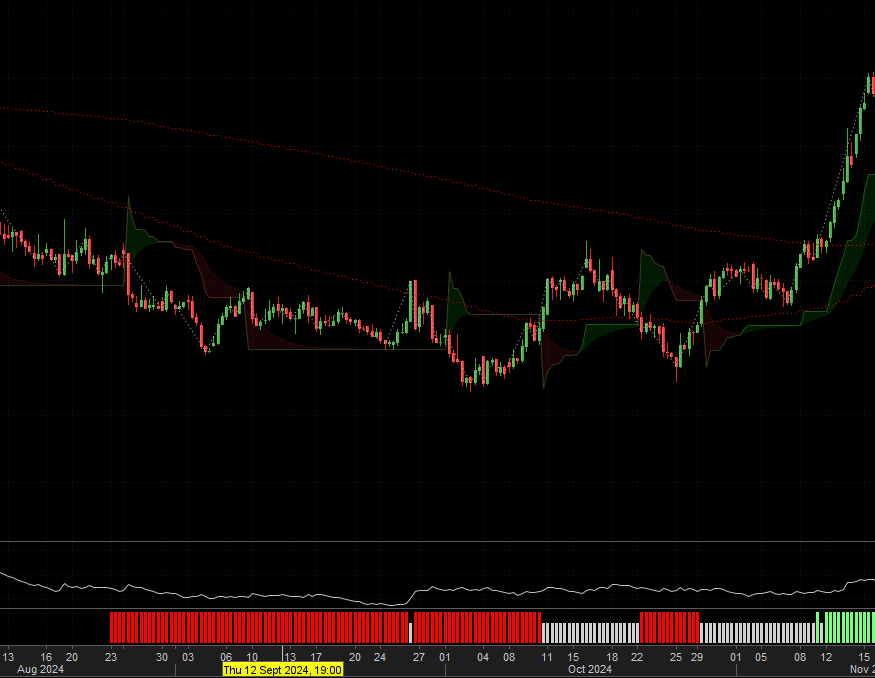
    Good day guys, new to coding and attempted to create a ribbon trend bar.

    What I am struggling is that there seem to be an overlap between the short and long with the indecision condition. Causing the bar of the indecision to be halved in appearance.

    Appreciate anyhelp I can get

    Thanks

    // Trend_Bar
    // 
    
    // Weighted Moving Average (WMA) SETTINGS
    timeframe(1 day)
    WMA50 = WeightedAverage[50](close)
    WMA150 = WeightedAverage[150](close)
    
    // CONDITIONS
    LONG = Close > WMA150  AND Close >WMA50 
    SHORT = Close < WMA150 AND Close < WMA50 
    INDECISION = close > WMA50 AND close < WMA150 OR close < WMA50 AND close > WMA150
    
    // EMA BAND COLORS
    If LONG Then
    r = 0
    g = 255
    b = 0
    Elsif SHORT THEN 
    r = 255
    g = 0
    b = 0
    ELSIF INDECISION THEN 
    r = 168
    g = 168
    b = 168
    EndIf
    
    // RETURN VALUES FOR VISUALIZATION
    RETURN r AS "Short", g AS "Long", b AS "Indecision"
    
    #241666 quote
    JS
    Participant
    Senior

    Hi,

    Do you mean something like this…?

    // Trend_Bar
    //
    
    // Weighted Moving Average (WMA) SETTINGS
    timeframe(1 day)
    WMA50 = WeightedAverage[50](close)
    WMA150 = WeightedAverage[150](close)
    
    // CONDITIONS
    LONG = Close > WMA150  AND Close >WMA50
    SHORT = Close < WMA150 AND Close < WMA50
    INDECISION = close > WMA50 AND close < WMA150 OR close < WMA50 AND close > WMA150
    
    // EMA BAND COLORS
    If LONG Then
    xLong=1
    else
    xLong=0
    EndIf
    
    if SHORT THEN
    xShort=1
    else
    xShort=0
    EndIf
    
    IF INDECISION THEN
    xIndecision=1
    else
    xIndecision=0
    EndIf
    
    //// EMA BAND COLORS
    //If LONG Then
    //r = 0
    //g = 255
    //b = 0
    //Elsif SHORT THEN
    //r = 255
    //g = 0
    //b = 0
    //ELSIF INDECISION THEN
    //r = 168
    //g = 168
    //b = 168
    //EndIf
    
    // RETURN VALUES FOR VISUALIZATION
    RETURN xLong coloured("Green")Style(Histogram),xShort coloured("Red")Style(Histogram),xIndecision coloured("White")Style(Histogram)
    patch and Iván González thanked this post
    #241668 quote
    patch
    Participant
    New

    Ok worked out my issue.

    I do however have another problem with my code.

    What I’m attempting to do is view the daily trend over the four hour chart. Am I using the MTF properly as it appear blank on some four hour charts.

    #241669 quote
    patch
    Participant
    New

    Hi JS

    Yes exactly like that. Thanks!

    JS thanked this post
Viewing 4 posts - 1 through 4 (of 4 total)

  • You must be logged in to reply to this topic.

Trend Ribbon


ProBuilder: Indicators & Custom Tools

New Reply
Author
author-avatar
patch @patch Participant
Summary

This topic contains 3 replies,
has 2 voices, and was last updated by patch

1 year, 1 month ago.

Topic Details
Forum: ProBuilder: Indicators & Custom Tools
Language: English
Started: 12/21/2024
Status: Active
Attachments: 2 files
Logo Logo
Loading...
