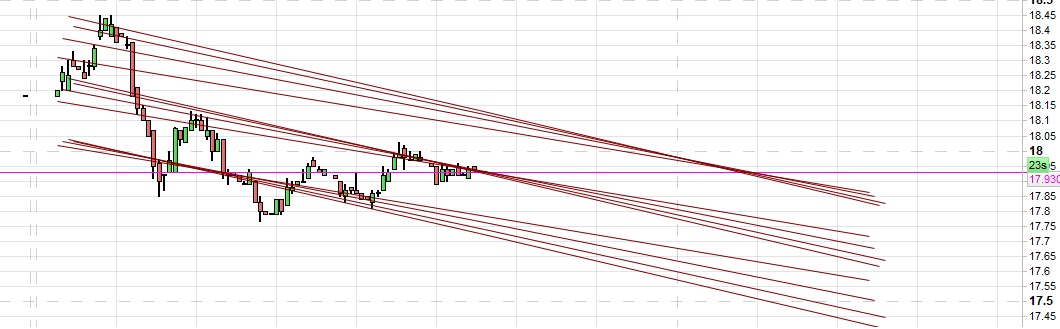
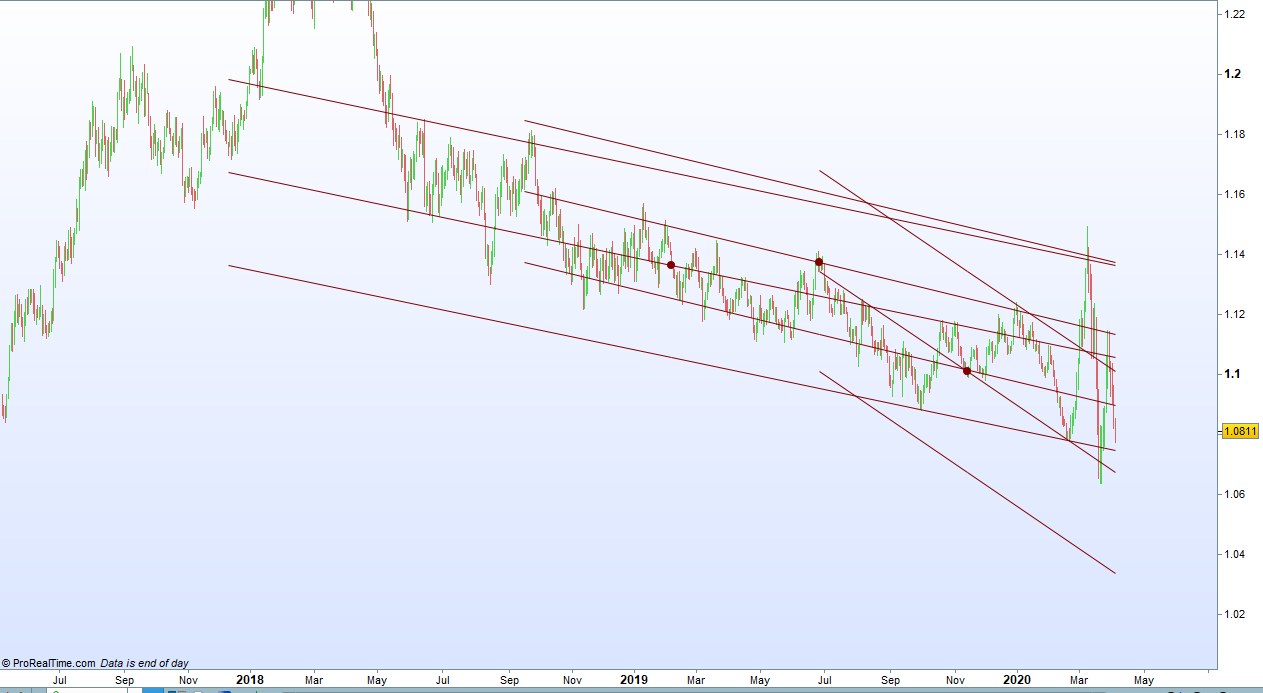
Trend Lines and Trend Channel update.

Viewing 7 posts - 1 through 7 (of 7 total)

  • Author
    Posts
  • #124811 quote
    Vonasi
    Moderator
    Master

    I have made a few improvements to my PRTv11 Trend Lines and Trend Channel indicator.

    You can now set a StartBack period. This allows you to draw the trend lines that would have been shown StartBack bars ago. So for example if you set p to 100 and StartBack also to 100 you can see what lines would have been projected forward for 100 bars from 100 bars back in history so you can see how price behaved in the last 100 bars compared to what the trend lines drew.

    There is also now the option to remove the middle trend line. this allows you to just show the upper and lower channels if you wish to.

    There is now also the option to display the pivot point at the central point of the middle line. This is useful when using the StartBack feature as it shows you exactly where in the history the lines are being drawn from.

    //Trend Lines and Trend Channel v2
    //PRT v11
    //By Vonasi
    //Date: 20200406
    
    // p = 100
    //Percentage = 1
    //Lower = 1
    //Upper = 1
    //Past = 1
    //Future = 1
    //Multiple = 1
    //StartBack = 0
    //PivotPoint = 1
    //Middle = 1
    
    if p < barindex then
    if barindex >= p-1 then
    if percentage then
    $diff[barindex] = ((close-open)/(close[1]))
    else
    $diff[barindex] = close-open
    endif
    
    if islastbarupdate then
    mydiff = 0
    for a = startback to startback+p-1
    if percentage then
    mydiff = mydiff+($diff[barindex-a]*close)
    else
    mydiff = mydiff+($diff[barindex-a])
    endif
    next
    
    r = 128
    g = 0
    if mydiff >=0 then
    r = 0
    g = 128
    endif
    
    if pivotpoint then
    drawpoint(barindex-startback,close[startback],2)coloured(r,g,0)
    endif
    
    if middle then
    if past then
    drawsegment(barindex-startback,close[startback],barindex-p-startback,close[startback] - mydiff)coloured(r,g,0)
    endif
    if future then
    drawsegment(barindex-startback,close[startback],barindex+p-startback,close[startback] + mydiff)coloured(r,g,0)
    endif
    endif
    
    if upper then
    hh = abs(mydiff)*multiple
    if past then
    drawsegment(barindex-startback,close[startback]+hh,barindex-p-startback,close[startback]-mydiff+hh)coloured(r,g,0)
    endif
    if future then
    drawsegment(barindex-startback,close[startback]+hh,barindex+p-startback,close[startback]+mydiff+hh)coloured(r,g,0)
    endif
    endif
    
    if lower then
    ll = abs(mydiff)*multiple
    if past then
    drawsegment(barindex-startback,close[startback]-ll,barindex-p-startback,close[startback]-mydiff-ll)coloured(r,g,0)
    endif
    if future then
    drawsegment(barindex-startback,close[startback]-ll,barindex+p-startback,close[startback]+mydiff-ll)coloured(r,g,0)
    endif
    endif
    endif
    endif
    endif
    
    return
    
    jebus89 thanked this post
    TL-and-TC.png TL-and-TC.png Trend-Lines-and-Trend-Channel-v2.itf
    #125069 quote
    jebus89
    Participant
    Master

    Yo Vonasi, this looks amazing. Can you explain like im 5 years old how it works?

    ive been looking for something like this 🙂

    #125073 quote
    Vonasi
    Moderator
    Master

    It quite simply looks back p bars and adds up the close-open (or the percentage of price that (close-open) is if you are using the percentage option) and stores that value in an array for every bar on the chart. Green bars will be a positive value and red bars a negative value. So then it can go back p bars from any point and add up all the values in the array for those p bars.  Our result is the value ‘diff’. If red candles have been bigger or more plentiful than green ones then this will add up to a negative number and if green candles have been bigger or more plentiful than red ones then this will add up to a positive number.

    It then draws a segment from p bars back to the start bar and another segment p bars forward from the start bar. The line slopes down if our result was negative and up if it was positive.

    The channels are simply a line drawn parallel but ‘diff’ higher and ‘diff’ lower (actually diff*multiple). Hence the shallower the slope the narrower the bands because our ‘diff’ value is low and the steeper the slope the wider the bands because our ‘diff’ value is high.

    Then there is just some jiggery pokery with drawing instructions to draw everything in the right place on the chart.

    #135546 quote
    GotlandTrading
    Participant
    New

    Hi!

    There is a fault in the attachment.

    At least if you run it on 10.3


    Best Regards

    #135549 quote
    Vonasi
    Moderator
    Master

    I have made a few improvements to my PRTv11 Trend Lines and Trend Channel indicator.

    The clue as to why it does not work on v10.3 can clearly be found in the very first line of my opening post.

    The indicator uses arrays which are not available for use in v10.3

    #188963 quote
    ThePenntChemist
    Participant
    Average

    Can anyone assist? I added the indicator it keep showing up multiple trends/channels in the chart.

    The old trend/channels will show on the chart, and new one keeps on printing/ I was hoping it will auto repaint it self or is there a setting to do auto repaint?

    Wayne.

    Trend-and-Channel.jpg Trend-and-Channel.jpg
    #189002 quote
    Nicolas
    Keymaster
    Master

    Add this line at the top of the code:

    defparam drawonlastbaronly=true
    ThePenntChemist thanked this post
Viewing 7 posts - 1 through 7 (of 7 total)
  • You must be logged in to reply to this topic.

Trend Lines and Trend Channel update.


ProBuilder: Indicators & Custom Tools

New Reply
Author
author-avatar
Vonasi @vonasi Moderator
Summary

This topic contains 6 replies,
has 2 voices, and was last updated by Nicolas

3 years, 11 months ago.

Topic Details
Forum: ProBuilder: Indicators & Custom Tools
Language: English
Started: 04/06/2020
Status: Active
Attachments: 3 files
Logo Logo
Loading...