TREND LINE through Peaks and Troughs

Viewing 9 posts - 16 through 24 (of 24 total)
  • Author
    Posts
  • #144084 quote
    parthapersonal
    Participant
    Average

    Many thanks Vonasi and Nicolas. I define Trend Lines in 3 different categories: 1. Invalid Trend Line, 2. Tentative Trend Line and 3. Valid Trend Line.

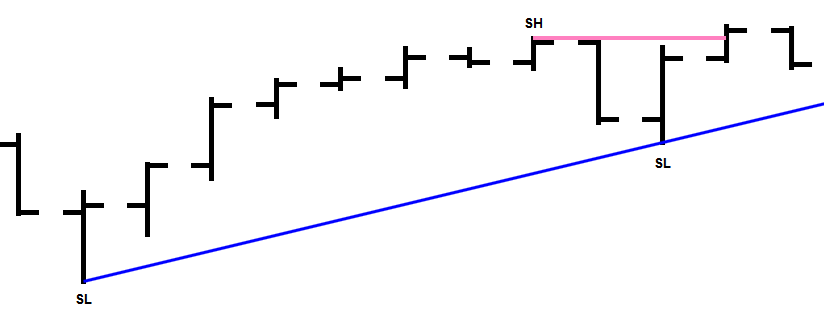
    I join 2 Swing Lows (2nd swing low higher than 1st) with an Up Trend line, provided there is a Swing High (SH) in-between those 2 swing lows. This is a Valid Up trend line.

    If there is no in-between swing high, we can not join 2 Swing Lows (2nd swing low higher than the 1st) with an up trend line. This will be an INVALID up trend line.

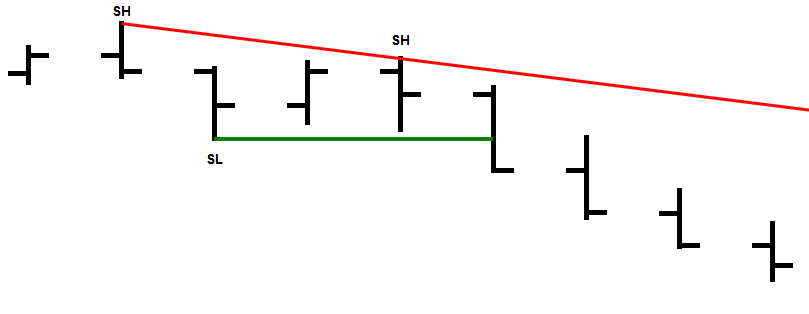
    Similarly, I join 2 Swing highs (2nd swing high lower than the 1st) with an Down Trend line, provided there is a Swing Low (SL) in-between those 2 swing highs. This is a Valid Down trend line.

    If there is no in-between swing low, we can not join 2 Swing highs (2nd swing high lower than the 1st) with an down trend line. This will be an INVALID down trend line. These are all shown in the 2 enclosed chart.

    Now the question is how to incorporate this concept of valid Trend Line in our previous program as attached please.

    Many thanks for your would be response.

    //90000 160000 205 0 0 0 151 51 for ASX
    //90000 240000 205 0 0 0 151 51 for GBP
    H2=high[2]
    H1=HIGH[1]
    H0=HIGH[0]
    L2=LOW[2]
    L1=LOW[1]
    L0=LOW[0]
    
    A=H2
    B=H1
    C=H0
    D=L2
    E=L1
    F=L0
    
    iF B>=A AND B>C THEN
    T=-3
    else
    t=0
    endif
    IF E<=D AND E<F THEN
    T1=3
    ELSE
    T1=0
    ENDIF
    if t=-3 AND T1=0 then
    sh=b
    ELSif t=-3 AND T1=8 then
    sh=b
    ELSE
    SH=0
    ENDIF
    If t1=3 AND T=0 then
    sl=e
    elsif t1=3 AND T=3 then
    sl=e
    else
    sl=0
    endif
    
    //PEAK or Swing High
    iF SH=B THEN//H1>=H2 and L1>=L2 and H0<H1 AND L0<=L1 THEN//AND CLOSE<H1 then
    IF TIME>ST AND TIME<ET and date=today THEN
    lasthtt = htt
    lasthttbar = httbar
    htt=H1
    httbar = barindex[1]
    
    if lasthttbar <> lasthttbar[1] then
    IF TIME>ST AND TIME<ET and date=today THEN
    IF htt<Htt[1] THEN
    DRAWLINE(lasthttbar,lasthtt,httbar,htt) COLOURED(X,Y,Z)//(205,0,0)
    endif
    ENDIF
    endif
    ENDIF
    ENDIF
    //TROUGH  or Swing Low
    iF SL=E THEN //H1<H2 and L1<L2 and H0>=H1 AND L0>=L1 THEN//anD CLOSE>L1 then
    IF TIME>ST AND TIME<ET and date=today THEN
    lastltt = ltt
    lastlttbar = lttbar
    ltt=L1
    lttbar = barindex[1]
    
    if lastlttbar <> lastlttbar[1] then
    IF TIME>ST AND TIME<ET and date=today THEN
    IF Ltt>Ltt[1] THEN
    DRAWLINE(lastlttbar,lastltt,lttbar,ltt) COLOURED(U,V,W)//(0,205,0)
    endif
    ENDIF
    endif
    ENDIF
    ENDIF
    return
    Valid-Up-Trend-Line.png Valid-Up-Trend-Line.png Valid-Down-Trend-Line.png Valid-Down-Trend-Line.png
    #144192 quote
    Nicolas
    Keymaster
    Master

    Compare the BARINDEX between each of the points to be sure there is a low swing between 2 high swings, something like:

    BARINDEXhigh1< BARINDEXlow < BARINDEXhigh2

    #144485 quote
    parthapersonal
    Participant
    Average
    //VARIABLES
    //90000 160000 205 0 0 0 151 51 for ASX
    //90000 240000 205 0 0 0 151 51 for GBP
    H2=high[2]
    H1=HIGH[1]
    H0=HIGH[0]
    L2=LOW[2]
    L1=LOW[1]
    L0=LOW[0]
    
    // Swong High and Swing Low separation
    iF h1>=h2 AND h1>h0 THEN
    T=-3
    else
    t=0
    endif
    IF l1<=l2 AND l1<l0 THEN
    T1=3
    ELSE
    T1=0
    ENDIF
    
    // Swong High
    if t=-3 AND T1=0 then
    sh=h1
    ELSif t=-3 AND T1=8 then
    sh=h1
    ELSE
    SH=0
    ENDIF
    
    // Swong Low
    If t1=3 AND T=0 then
    sl=l1
    elsif t1=3 AND T=3 then
    sl=l1
    else
    sl=0
    endif
    
    //Down trend segment/ line
    iF SH=h1 THEN
    IF TIME>ST AND TIME<ET and date=today THEN
    lasthtt = htt
    lasthttbar = httbar
    htt=H1
    httbar = barindex[1]
    
    if lasthttbar <> lasthttbar[1] then
    IF TIME>ST AND TIME<ET and date=today THEN
    IF htt<Htt[1] and ltt<htt and ltt<htt[1] THEN
    DRAWsegment(lasthttbar,lasthtt,httbar,htt) COLOURED(X,Y,Z)//(205,0,0)
    endif
    ENDIF
    endif
    ENDIF
    ENDIF
    
    //Up trend segment/ line
    iF SL=l1 THEN 
    IF TIME>ST AND TIME<ET and date=today THEN
    lastltt = ltt
    lastlttbar = lttbar
    ltt=L1
    lttbar = barindex[1]
    
    if lastlttbar <> lastlttbar[1] then
    IF TIME>ST AND TIME<ET and date=today THEN
    IF Ltt>Ltt[1] and htt>ltt and htt>ltt[1] THEN
    DRAWsegment(lastlttbar,lastltt,lttbar,ltt) COLOURED(U,V,W)//(0,205,0)
    endif
    ENDIF
    endif
    ENDIF
    ENDIF
    return

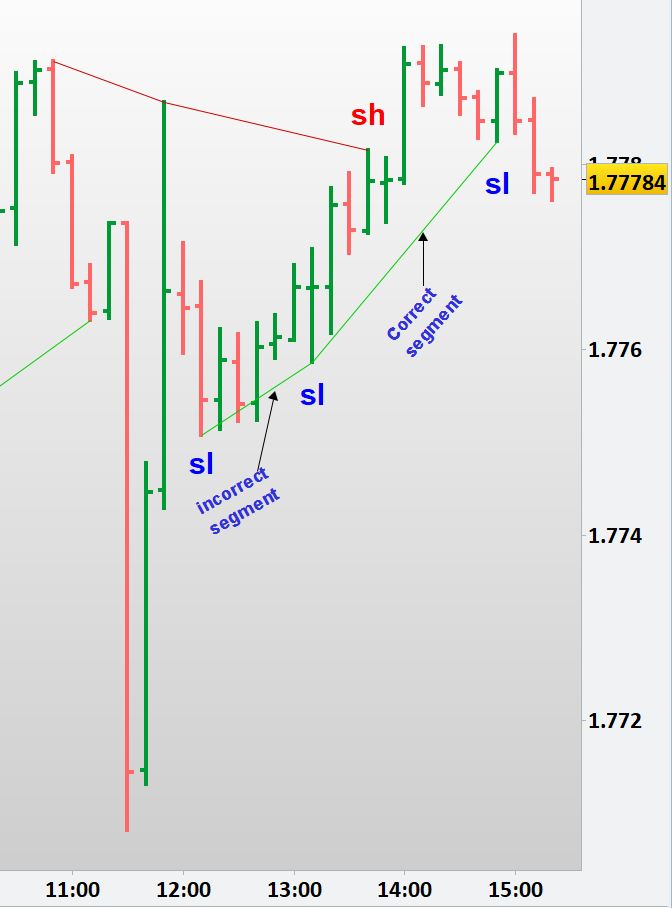
    Many thanks Nicolas. I tried to find the in-between swing high between the 2 swing lows for drawing the up trend segment via the code, “IF Ltt>Ltt[1] and htt>ltt and htt>ltt[1] THEN” and tried to find the in-between swing low between the 2 swing highs for drawing the down trend segment via the code, “IF htt<Htt[1] and ltt<htt and ltt<htt[1] THEN” but it is drawing the segment even if there is no in-between swing high or low.

    The captured chart shows an up trend segment by joining 2 swing lows when there is no swing high present in-between the 2 swing lows. This is not correct (marked as “incorrect segment”).

    Your assistance would be of great help.

    Regards,

    Invalid-trend-line.jpg Invalid-trend-line.jpg
    #144502 quote
    Nicolas
    Keymaster
    Master

    But you are comparing price and not bar number! What I was talking about is the sequence of events of the swings: a swing high event must be present between 2 swings low events, and you can test that with their barindex numbers.

    #144552 quote
    parthapersonal
    Participant
    Average

    Thank you Nicolas, but honestly I am not a master in Barindex numbers coding. Appreciate your help please.

    Best Regards,

    #144559 quote
    Nicolas
    Keymaster
    Master

    Please provide the itf file that embed all your external variables? or add them into the code please.

    #144612 quote
    parthapersonal
    Participant
    Average

    Many thanks dear. Here it is. Much appreciated

    //VARIABLES
    //ST= 0, ET=240000, X=255, Y=0, Z=0, U=0, V=0, W=255
    H2=high[2]
    H1=HIGH[1]
    H0=HIGH[0]
    L2=LOW[2]
    L1=LOW[1]
    L0=LOW[0]
    
    // Swing High and Swing Low separation
    iF h1>=h2 AND h1>h0 THEN
    T=-3
    else
    t=0
    endif
    IF l1<=l2 AND l1<l0 THEN
    T1=3
    ELSE
    T1=0
    ENDIF
    
    // Swing High
    if t=-3 AND T1=0 then
    sh=h1
    ELSif t=-3 AND T1=8 then
    sh=h1
    ELSE
    SH=0
    ENDIF
    
    // Swing Low
    If t1=3 AND T=0 then
    sl=l1
    elsif t1=3 AND T=3 then
    sl=l1
    else
    sl=0
    endif
    
    //Down trend segment/ line
    iF SH=h1 THEN
    IF TIME>ST AND TIME<ET and date=today THEN
    lasthtt = htt
    lasthttbar = httbar
    htt=H1
    httbar = barindex[1]
    
    if lasthttbar <> lasthttbar[1] then
    IF TIME>ST AND TIME<ET and date=today THEN
    IF htt<Htt[1] then//and ltt<htt and ltt<htt[1] THEN
    DRAWsegment(lasthttbar,lasthtt,httbar,htt) COLOURED(X,Y,Z)//(205,0,0)
    endif
    ENDIF
    endif
    ENDIF
    ENDIF
    
    //Up trend segment/ line
    iF SL=l1 THEN
    IF TIME>ST AND TIME<ET and date=today THEN
    lastltt = ltt
    lastlttbar = lttbar
    ltt=L1
    lttbar = barindex[1]
    
    if lastlttbar <> lastlttbar[1] then
    IF TIME>ST AND TIME<ET and date=today THEN
    IF Ltt>Ltt[1] then//and htt>ltt and htt>ltt[1] THEN
    DRAWsegment(lastlttbar,lastltt,lttbar,ltt) COLOURED(U,V,W)//(0,205,0)
    endif
    ENDIF
    endif
    ENDIF
    ENDIF
    return


    .

    #144625 quote
    Nicolas
    Keymaster
    Master

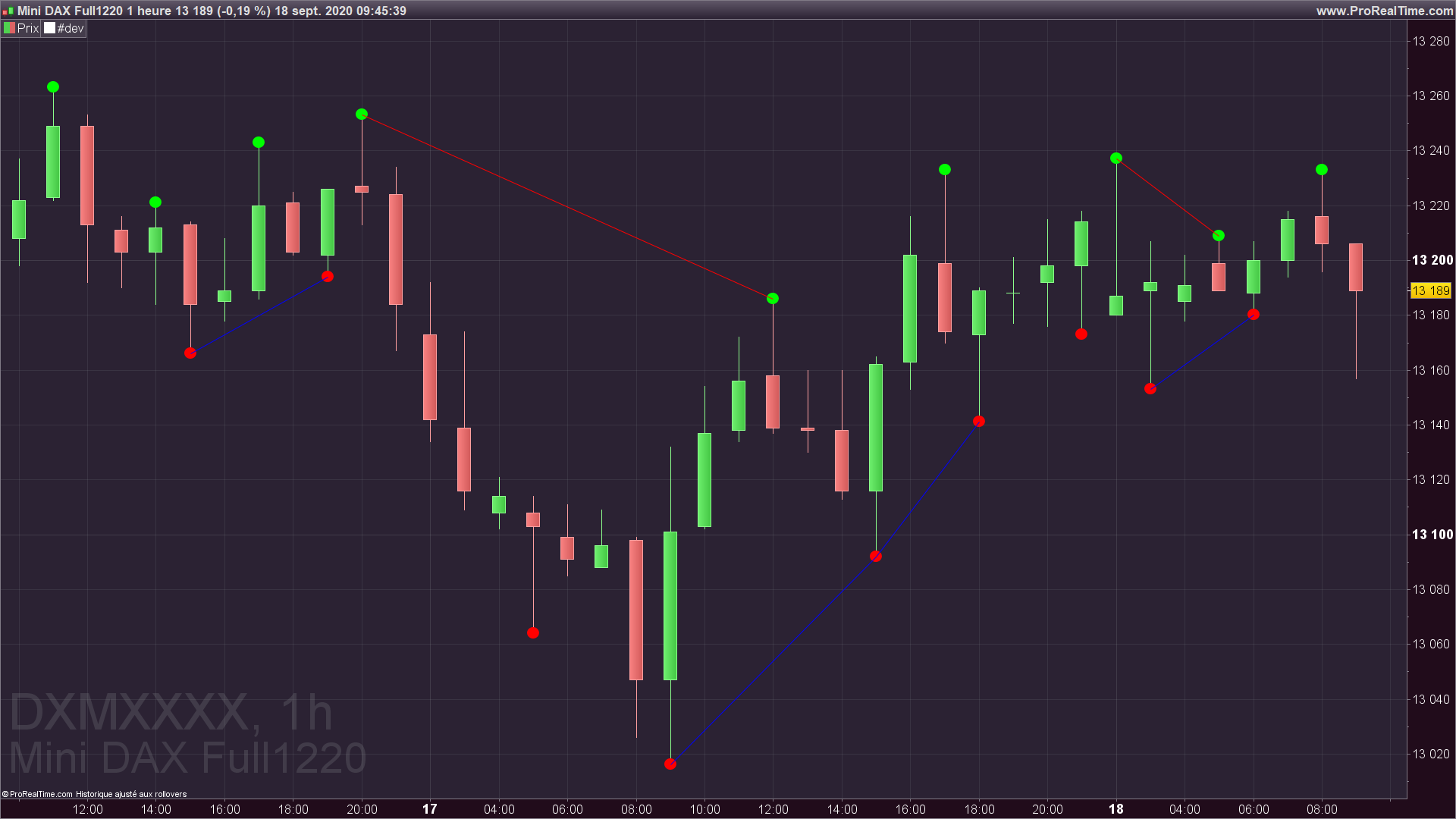
    In that version, descending trend line can be plotted only if the last swing before the current one was a red dot, and vice-versa for an ascending trend line.

    //VARIABLES
    ST= 0
    ET=240000
    X=255
    Y=0
    Z=0
    U=0
    V=0
    W=255
    // ----------------------
    
    H2=high[2]
    H1=HIGH[1]
    H0=HIGH[0]
    L2=LOW[2]
    L1=LOW[1]
    L0=LOW[0]
    
    // Swing High and Swing Low separation
    iF h1>=h2 AND h1>h0 THEN
    T=-3
    else
    t=0
    endif
    IF l1<=l2 AND l1<l0 THEN
    T1=3
    ELSE
    T1=0
    ENDIF
    
    // Swing High
    if t=-3 AND T1=0 then
    sh=h1
    ELSif t=-3 AND T1=8 then
    sh=h1
    ELSE
    SH=0
    ENDIF
    
    // Swing Low
    If t1=3 AND T=0 then
    sl=l1
    elsif t1=3 AND T=3 then
    sl=l1
    else
    sl=0
    endif
    
    //Down trend segment/ line
    iF SH=h1 THEN
    drawtext("●",barindex[1],sh,dialog,bold,20) coloured(0,255,0)
    lastbar=1
    IF TIME>ST AND TIME<ET and date=today  THEN
    lasthtt = htt
    lasthttbar = httbar
    htt=H1
    httbar = barindex[1]
    
    if lasthttbar <> lasthttbar[1]  and lastbar[1]=-1 then
    IF TIME>ST AND TIME<ET and date=today THEN
    IF htt<Htt[1] then//and ltt<htt and ltt<htt[1] THEN
    DRAWsegment(lasthttbar,lasthtt,httbar,htt) COLOURED(X,Y,Z)//(205,0,0)
    endif
    ENDIF
    endif
    ENDIF
    ENDIF
    
    //Up trend segment/ line
    iF SL=l1 THEN
    drawtext("●",barindex[1],sl,dialog,bold,20) coloured(255,0,0)
    lastbar=-1
    IF TIME>ST AND TIME<ET and date=today THEN
    lastltt = ltt
    lastlttbar = lttbar
    ltt=L1
    lttbar = barindex[1]
    
    if lastlttbar <> lastlttbar[1] and lastbar[1]=1 then
    IF TIME>ST AND TIME<ET and date=today THEN
    IF Ltt>Ltt[1] then//and htt>ltt and htt>ltt[1] THEN
    DRAWsegment(lastlttbar,lastltt,lttbar,ltt) COLOURED(U,V,W)//(0,205,0)
    endif
    ENDIF
    endif
    ENDIF
    ENDIF
    return
    trend-lines-swings-hilo.png trend-lines-swings-hilo.png
    #144662 quote
    parthapersonal
    Participant
    Average

    This is brilliant. You are a genius Nicolas.

    Many thanks for your intention, effort and time.

Viewing 9 posts - 16 through 24 (of 24 total)
  • You must be logged in to reply to this topic.

TREND LINE through Peaks and Troughs

ProBuilder: Indicators & Custom Tools

New Reply
Author
Summary

This topic contains 23 replies,
has 3 voices, and was last updated by parthapersonal
5 years, 4 months ago.

Topic Details
Forum: ProBuilder: Indicators & Custom Tools
Language: English
Started: 08/31/2020
Status: Active
Attachments: 6 files
Logo Logo
Loading...