Trailingstop vid graphonprice

Viewing 9 posts - 1 through 9 (of 9 total)

  • Author
    Posts
  • #238929 quote
    Vicke1990
    Participant
    New

    Hi,

    Im trying to use an algo with a trailingstop, but the trailingstop dosent seem to be working as intended
    Does anyone know a code with a working trailingstop that you can use with graphonprice so I can view the behavior of the trailingstop?

    Im using a similar code like this:

    
    //points trailing stop function
    trailingstart = tst //trailing will start @trailinstart points profit
    trailingstep = st //trailing step to move the "stoploss"
     
    //reset the stoploss value
    IF NOT ONMARKET THEN
    newSL=0
    ENDIF
     
    //manage long positions
    IF LONGONMARKET THEN
    //first move (breakeven)
    IF newSL=0 AND close-tradeprice(1)>=trailingstart*pipsize THEN
    newSL = tradeprice(1)+trailingstep*pipsize
    ENDIF
    //next moves
    IF newSL>0 AND close-newSL>=trailingstep*pipsize THEN
    newSL = newSL+trailingstep*pipsize
    ENDIF
    ENDIF
     
    //manage short positions
    IF SHORTONMARKET THEN
    //first move (breakeven)
    IF newSL=0 AND tradeprice(1)-close>=trailingstart*pipsize THEN
    newSL = tradeprice(1)-trailingstep*pipsize
    ENDIF
    //next moves
    IF newSL>0 AND newSL-close>=trailingstep*pipsize THEN
    newSL = newSL-trailingstep*pipsize
    ENDIF
    ENDIF
     
    //stop order to exit the positions
    IF newSL>0 THEN
    SELL AT newSL STOP
    EXITSHORT AT newSL STOP
    ENDIF
    #238932 quote
    GraHal
    Participant
    Master

    Did you try below

    GRAPH NewSL 
    GRAPHONPRICE NewSL
    robertogozzi and Iván González thanked this post
    #238985 quote
    Vicke1990
    Participant
    New

    Did you try below

    Hi,

    I haven’t been able to try the code yet, but I will tomorrow. Will get back to you with the results 🙂

    Btw, is there a way to access prt from your phone? I’m using prt through IG…

    Thank you 🙂

    #238987 quote
    GraHal
    Participant
    Master

    There is a web based version, but no AutoTrading yet.

    Compare 3 versions on the link below

    https://www.prorealtime.com/en/compare-trading-platforms

    #239014 quote
    Vicke1990
    Participant
    New

    Hi again,

    Thank you so much!

    question,

    can graphonprice be used when using a autotradingsystem?

    I thought that only “graph” that couldet be used when using a automatic tradingsystem?

    #239032 quote
    GraHal
    Participant
    Master

    Neither GRAPH nor GRAPHONPRICE can be used when Autotrading on live data, but both can be used when backtesting an Algo and then // comment out after finished backtesting etc.

    Vicke1990 thanked this post
    #239037 quote
    Vicke1990
    Participant
    New

    Ah okay, so If I want some visual qs, I need to use an indicator, correct?

    I just read up on Arrays, can I use that so see where my trailingSL and SL is and so on?

    Thank you once again GraHal, much appreciated 🙂

    #239039 quote
    GraHal
    Participant
    Master

    When Algo is trading Live all we get to see is equity curve and positions.

    GRAPHS and GRAPHONPRICE are best for debugging Stops and Taget and Trailing Stops etc, but only when backtesting Algos.

    To check performance before going Live, we use our Demo Accounts … have you enabled your PRT Demo Account?   It is enabled on the IG Dashboard.

    #239088 quote
    druby
    Participant
    New

    I think there’s an error in above code, lines 14 and 18 appear to set newSL with none zero value, however, lines 35 and 36 look for a none zero newSL and exits.

    Similar scenario for the short.


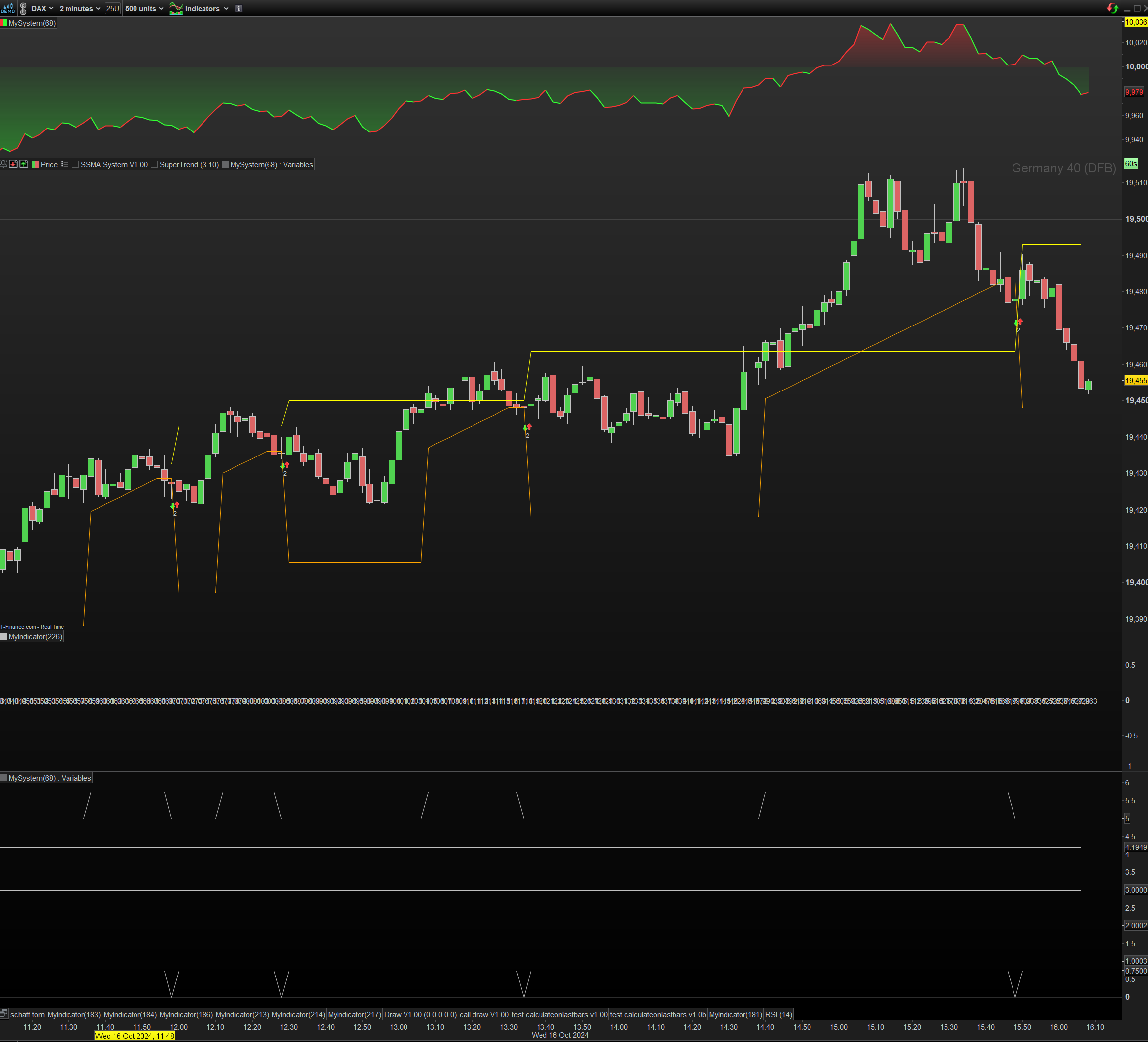
    I played around with some code to display  the trailing stop (TS)  to see what’s what using a out of thin air entry condition.

    I added in a default TS value , TSdefaultAmt,  because zero messes with the charts auto scale with graphonprice.


    When the yellow line is horizontal, it represents the TS start threshold level above the entry price , TSstartLvl.

    When price closes above, the TS is active, TSactive = 1,  which triggers the TS.


    After entry but before TS triggered, The horizontal orange line represent the default TS.

    After being triggered, TS jumps to the startprice + step amount.

    Subsequent bars increment the TS ‘TSL’ by the step amount.


    If close triggers the exit condition, the trade is exited.

    If low hits the default stop level it is also exited.


    As I worked through I graphed  some variables.

    Some are true/false and some are number values.

    Using cursor values…

    The values are scaled within a ‘1’ range and  +n value offset then to the ‘y’ scale.

    The *0.75 are the booleans  where the integer value is false and value+0.75 is true.

    The*0.00001 are values, just look at decimal portion and crop off last digit.


    see what you think.


    entryCondition = date = 20241016 and opentime >= 000000
    
    TSdefaultAmt = 30 // TS default stop level
    TSstartAmt   = 15 // TS threshold setting amount
    TSstepAmt    =  1 // TS step amount per step
    
    
    // difference between Current price and last Trade entry
    CTdiff     = close-tradePrice[1]
    // get the TS threshold level
    TSstartLvl = tradeprice[1] + TSstartAmt
    // set a default TS stop
    TSdefaultL = close - TSdefaultAmt
    // new TS step
    CmTSL      = Close - TSL


    // not on market
    if not LongonMarket then
    LONG = 0
    TSactive = 0
    // enter Market
    if  entryCondition then
    buy 1 contract at market
    // set a default TS
    TSL = TSdefaultL
    endif
    endif
    
    
    // on Market
    if LongonMarket then
    LONG = 1
    
    if close >= TSstartLvl and TSactive = 0 then
    TSactive = 1
    TSL = tradePrice[1] + TSstepAmt
    endif
    
    if TSactive =1 and  CmTSL >= TSstepAmt then
    TSL = TSL + TSstepAmt
    endif
    
    // if close below TSL
    if close <= TSL then
    sell at market
    endif
    
    // exit if low hits default stop level
    if low <= tradePrice[1] - TSdefaultAmt then
    sell at market
    endif
    endif


    // display
    if onmarket then
    graphonprice TSstartLvl as"TSstartLvl" coloured("yellow")
    graphonprice TSL        as"TSL"        coloured("orange")
    endif
    
    
    graph TSactive       * 0.75    + 5 as"TSactive"
    graph TSstartLvl     * 0.00001 + 4 as"TSstepLvl"
    graph TSstepAmt      * 0.00001 + 3 as"TSstepAmt"
    graph TSstartAmt     * 0.00001 + 2 as"TSstartAmt"
    graph TSdefaultAmt   * 0.00001 + 1 as"TSdefaultAmt"
    graph LONG           * 0.75    + 0 as"LONG"
    GraHal and PeterSt thanked this post
    Screenshot-2024-10-16-160907.png Screenshot-2024-10-16-160907.png
Viewing 9 posts - 1 through 9 (of 9 total)
  • You must be logged in to reply to this topic.

Trailingstop vid graphonprice


ProOrder: Automated Strategies & Backtesting

New Reply
Author
author-avatar
Vicke1990 @vicke1990 Participant
Summary

This topic contains 8 replies,
has 3 voices, and was last updated by druby

1 year, 4 months ago.

Topic Details
Forum: ProOrder: Automated Strategies & Backtesting
Language: English
Started: 10/13/2024
Status: Active
Attachments: 1 files
Logo Logo
Loading...