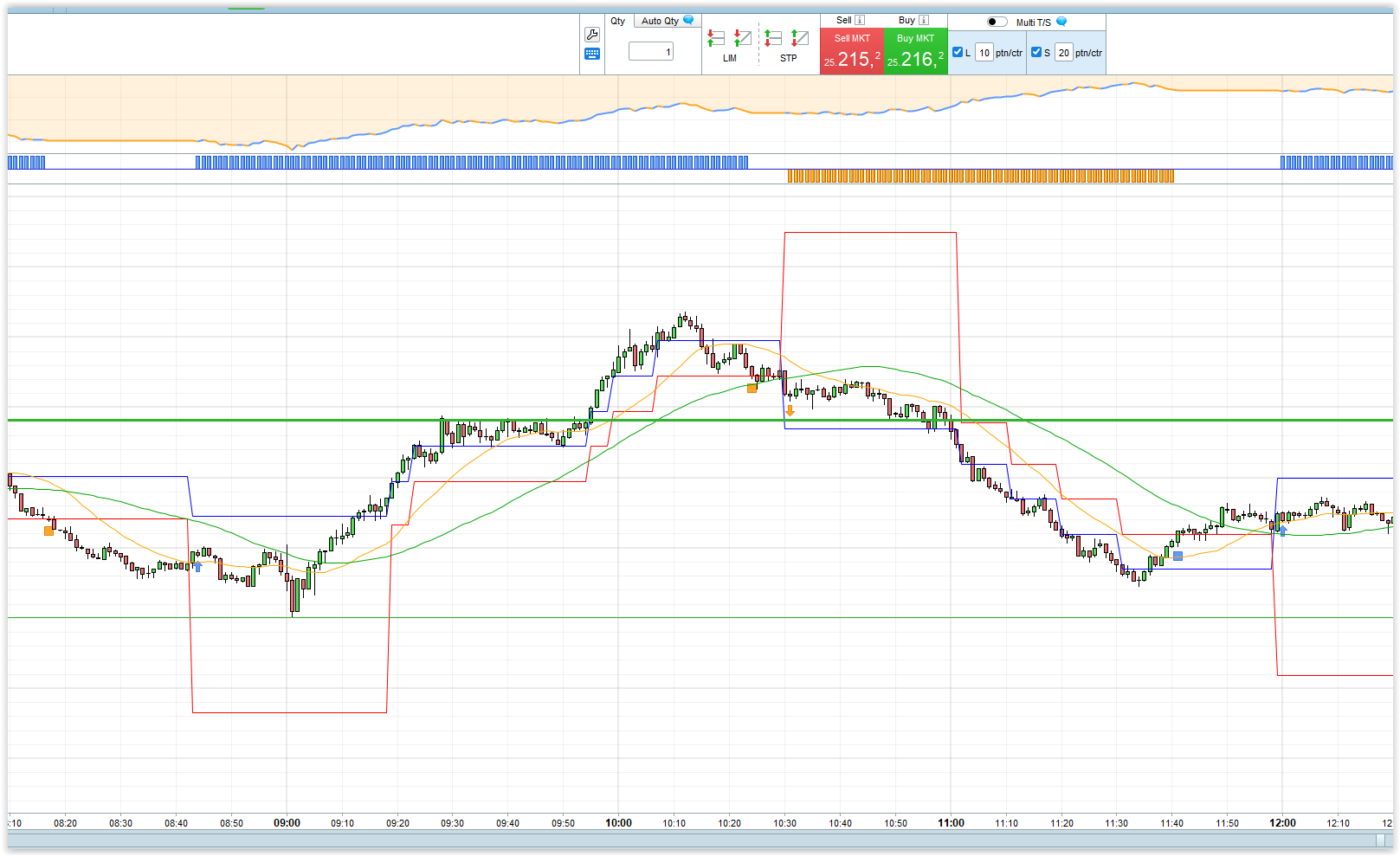
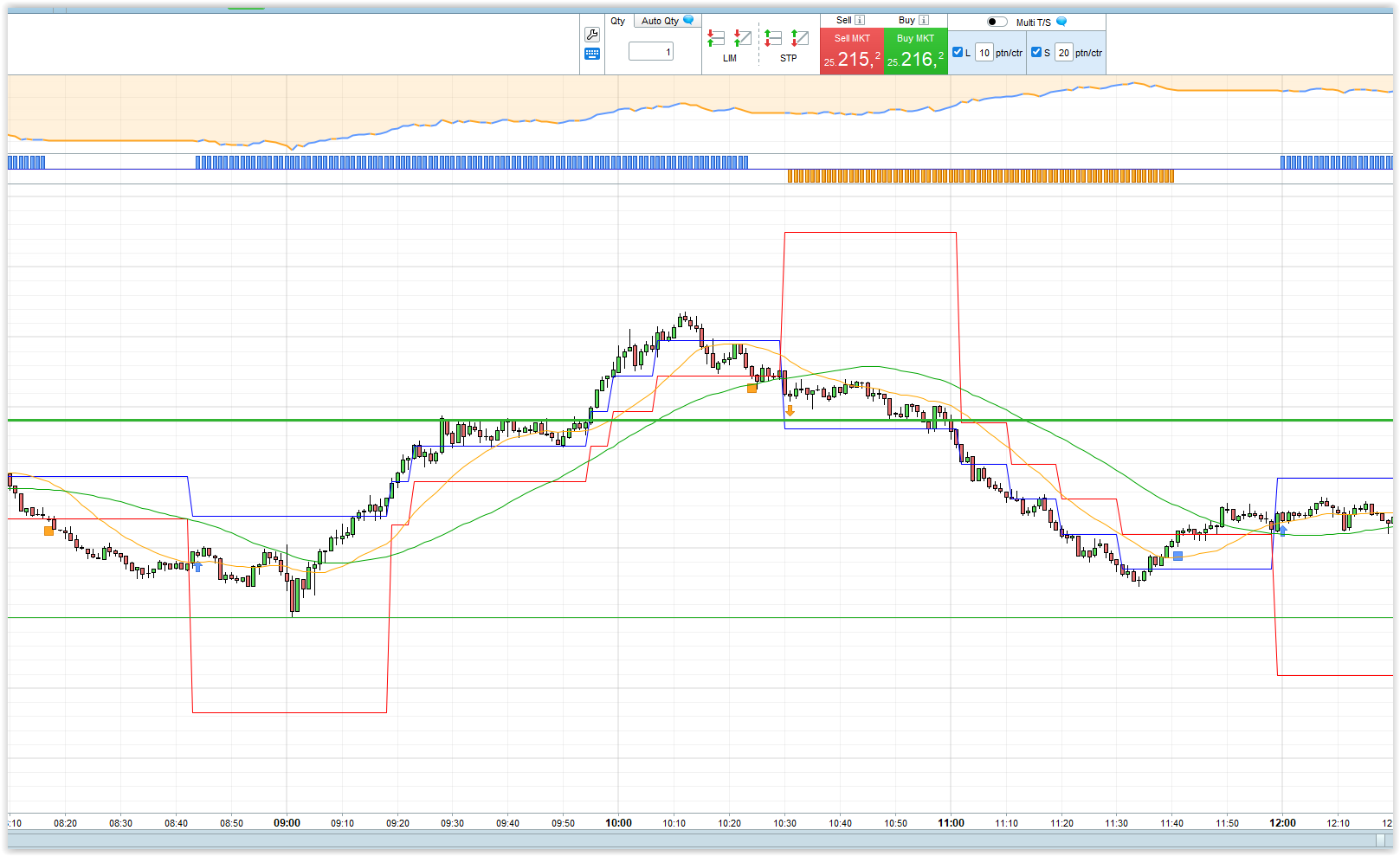
Hi all,
I have two related questions about stop-loss and trailing stops in ProRealTime:
- Does ProRealTime have any plans to add “steps” to the default stop-loss and trailing stop features?
For example, a trailing stop that moves only after the price has moved a certain number of points (a step), so that every time it moves X points it steps up by X points.
- In the meantime, does anyone know how to write ProRealTime code so that whenever there is an open position, the stop code is automatically applied to it — even if the position was opened manually?
I’ve tried using some example code from this website, but in that code a Buy/Sell command needs to be part of the code, which means that if I open a position manually, the trailing stop doesn’t apply.
What I want is something like this:
- A “trailing stop” with a 100-point step, but not constantly trailing — only one movement.
- In other words, as soon as the position is X points in profit (e.g., 100 points), the stop moves to break-even and then stays there.
So if the market moves 100 points in my favour, the stop automatically moves to break-even and then stays there (no further trailing).
If anyone has code for this — or knows how to implement it in ProRealTime — I’d really appreciate your help.
Thanks!
- The native PRT Stop Loss does move by 1 point (for 1 point profit) after exceeding, for example, 100 as: Set Stop pTrailing 100.
- See next post.
Anybody wanting to do a more comprehensive answer, please feel free.
Credit / Thanks for below goes to @JS
If longonmarket then
StopdistanceBreakeven = A154 //20
NormalStop = A155 //60

nb = barindex - tradeindex
minprice = lowest[nb + 1](Low)
maxprice = highest[nb + 1](High)
If maxprice >= positionprice + StopdistanceBreakeven then
sell at positionprice stop
else
sell at POSITIONPRICE  - NormalStop stop
endif
endif

If shortonmarket then
StopdistanceBreakeven = A176 //20
NormalStop = A177 //60

nb = barindex - tradeindex
minprice = lowest[nb + 1](Low)
maxprice = highest[nb + 1](High)
If minprice <= positionprice - StopdistanceBreakeven then
exitshort at positionprice stop
else
exitshort at positionprice + NormalStop stop
endif
endif
Here you have another example:
// ===========================
// Trail Stop steps
// ===========================
triggerDistance = 100
if not onmarket then
   MoveToBreakEven=0
endif
// Example entry condition
IF NOT ONMARKET AND close CROSSES OVER Average[20](close) THEN
   BUY 1 CONTRACT AT MARKET
   stoploss = close-triggerDistance*pointsize
   newStopLevel = close + (triggerDistance * pointsize)
   set stop price stoploss
ENDIF

// Management of open position
IF LONGONMARKET THEN
   // Check if profit is greater or equal to trigger distance
   IF close >= newStopLevel and MoveToBreakEven=0 THEN
      MoveToBreakEven=1
      stoploss=positionprice //breakeven
      newStopLevel = newStopLevel+triggerDistance*pointsize
      set stop price stoploss
   ENDIF

   if close >= newStopLevel + (triggerDistance * pointsize) and MoveToBreakEven=1 then
      stoploss = newStopLevel
      newStopLevel = newStopLevel+triggerDistance*pointsize
      set stop price stoploss
   endif
ENDIF

// ===========================
// Graphic
// ===========================
// Trailing Stop and Next Level
graphonprice newStopLevel coloured(0, 0, 255) AS "NextLevel"
graphonprice stoploss coloured(255, 0, 0) AS "Trail Stop"
// Moving Average
graphonprice Average[20](close) coloured(255, 165, 0) AS "SMA"
Thanks, where should I copy this code? When I create a new startegy system with this code it says I need at least one instruction to enter the market.
I want to enter the market then change the native PRT stop loss to move by 100 points instead of 1 point. It is like IG platform trailing stop where you can set Step to 100
I just figured out how to adjust the step to 100. After entering market with trailing stop , click on the stop and in the modify section you can adjust the steps.
Hi, I have made some modifications and a version for shorts
// ===========================
// Trail Stop steps
// ===========================
triggerDistanceProfit = 20
triggerDistanceLoss = 15
MinimumProfit=20
MaxLoss=100


if not onmarket then
MoveToBreakEven=0
endif
// Example entry condition
IF NOT ONMARKET AND close CROSSES OVER Average[20](close) THEN
BUY 1 CONTRACT AT MARKET
stoploss = close-maxloss-(triggerDistanceLoss *pointsize)
newStopLevel = close + (triggerDistanceProfit * pointsize)
set stop price stoploss
ENDIF

// Management of open position
IF LONGONMARKET THEN
// Check if profit is greater or equal to trigger distance
IF close >= (newStopLevel + MinimumProfit) and MoveToBreakEven=0 THEN
MoveToBreakEven=1
stoploss=positionprice + Minimumprofit  //Stoploss with small profit
newStopLevel = newStopLevel+triggerDistanceProfit*pointsize
set stop price stoploss
ENDIF

if close >= newStopLevel + (triggerDistanceProfit * pointsize) and MoveToBreakEven=1 then
stoploss = newStopLevel
newStopLevel = newStopLevel+triggerDistanceProfit*pointsize
set stop price stoploss
endif
ENDIF


IF NOT ONMARKET AND close CROSSES under Average[50](close) THEN
SELLSHORT  1 CONTRACT AT MARKET
stoploss = close+maxloss+(triggerDistanceLoss *pointsize)
newStopLevel = close - (triggerDistanceProfit * pointsize)
set stop price stoploss
ENDIF

// Management of open position
IF shortonmarket THEN
// Check if profit is greater or equal to trigger distance
IF close <= (newStopLevel - MinimumProfit) and MoveToBreakEven=0 THEN
MoveToBreakEven=1
stoploss=positionprice - Minimumprofit  //Stoploss with small profit
newStopLevel = newStopLevel-triggerDistanceProfit*pointsize
set stop price stoploss
ENDIF

if close <= newStopLevel - (triggerDistanceProfit * pointsize) and MoveToBreakEven=1 then
stoploss = newStopLevel
newStopLevel = newStopLevel-triggerDistanceProfit*pointsize
set stop price stoploss
endif
ENDIF
// ===========================
// Graphic
// ===========================
// Trailing Stop and Next Level
graphonprice newStopLevel coloured(0, 0, 255) AS "NextLevel"
graphonprice stoploss coloured(255, 0, 0) AS "Trail Stop"
// Moving Average
graphonprice Average[20](close) coloured(255, 165, 0) AS "SMA20"
graphonprice Average[50](close) coloured(0, 165, 0) AS "SMA50"
Very nice, will create a new code snippets post with these new trailing stop functions. Thanks for contribution.
@DeathMetal
Congrats, your full strategy with the trailing stop Steps is now featured in the Snippets codes list. If you ever have any good examples of re-usable code parts for prorealtime, you can share them there.
Here it is: https://www.prorealcode.com/snippet/how-to-build-a-step-based-trailing-stop-that-moves-to-break-even-first/
Hi,
The credits are for Ivan, he has made the base.
HELLO Mr
Thank you for your program change, but when I copy
On my computer, PRT M4 indicates an error on line 15. Could you tell me how to fix it?
Thank you, I look forward to your reply.
EDOUARD TEIXEIRA
Teixeira wrote: A MISTAKE LINE 15
Please can you post a screenshot of the error message you are seeing?
Above will help us to help you.
Hello
There’s something I’m missing; I can’t get it to work on EUR/USD.
Which version of the code exactly? The first code posted by GraHal does not include the adaptation for all instruments according to their POINTSIZE.
Here is its version adapted for forex:
If longonmarket then
StopdistanceBreakeven = 20
NormalStop = 60


nb = barindex - tradeindex
minprice = lowest[nb + 1](Low)
maxprice = highest[nb + 1](High)
If maxprice >= positionprice + StopdistanceBreakeven*pointsize then
sell at positionprice stop
else
sell at POSITIONPRICE  - NormalStop*pointsize stop
endif
endif


If shortonmarket then
StopdistanceBreakeven = 20
NormalStop = 60


nb = barindex - tradeindex
minprice = lowest[nb + 1](Low)
maxprice = highest[nb + 1](High)
If minprice <= positionprice - StopdistanceBreakeven*pointsize then
exitshort at positionprice stop
else
exitshort at positionprice + NormalStop*pointsize stop
endif
endif
Alternatively, see the code snippet with a complete strategy example here:
How to Build a Step-Based Trailing Stop That Moves to Break-Even First