Trailing Stop incorrect

Viewing 2 posts - 1 through 2 (of 2 total)
  • Author
    Posts
  • #152274 quote
    trevor
    Participant
    Senior

    Hi.

    I am not able to understand the result in ProBackTest.

    The trailing stop is not the same as the Backtesting and Automatic trading script.

    The settings are below:

    // Stops and targets
    SET STOP pTRAILING 73
    SET TARGET pPROFIT 210


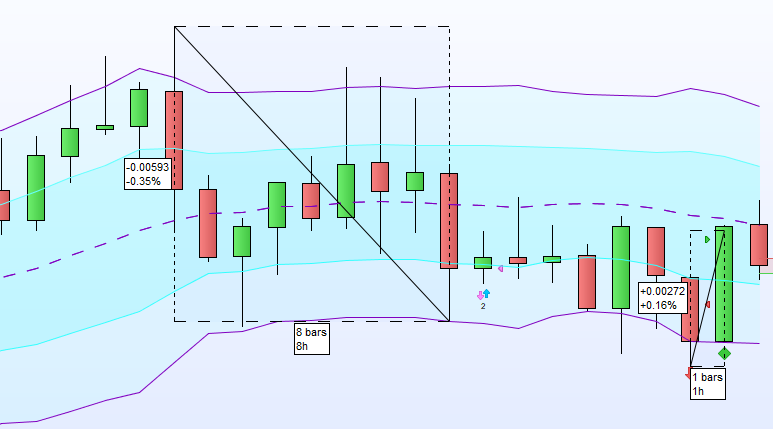
    In the attached PNG file, “trailing stop error” the results are not the same as the settings.

    Note: The trades are daily, but shown in “trailing stop error” on the one hour candle.

    to show the trades..


    I have attached the file.

    Its is not pretty as I had to have a script for the ZeroLagMACD,

    that was ProBackTest compatible.

    Not written by me. Just copied through ProRealCode.

    Source unknown.

    // MACD ZERO LAG
    // ZerolagMACD = variable macd zerolag : 12 par défaut
    // Signal = variable signal : 26 par défaut
    // Histo = variable macd - signal : 9 par défaut // mettre histogramme
    
    ZeroLagMACD = 12
    Signal = 26
    Histo = 9
    z1=DEMA[ZeroLagMACD](close)
    z2 =dema[Signal](close)
    e= z1 - z2
    z3=DEMA[Histo](e)
    f=z3
    g=e-f
    
    return e AS "MACD ZEROLAG\",f AS "signal\",g as "macd-signal\",0 as "zero\"
    // Stops and targets
    SET STOP pTRAILING 73
    SET TARGET pPROFIT 210

    I cannot understand the variation in the trailing stop settings and on the charts?

    Thank you, for any thoughts and suggestions.

    regards

    Trevor

    Trailing-Stop-Error.png Trailing-Stop-Error.png Macd-RSI-combo-strategy.itf
    #152278 quote
    Nicolas
    Keymaster
    Master

    Post your topic in the correct forum, next time please! and always use the ‘Insert PRT Code’ button when putting code in your posts to make it easier for others to read.

    The “set stop trailing” instruction is a trailing stop attached to your order and manage by IG, so they can adapt the levels whenever and however they want and this behavior cannot obviously be replicated by a backtest.

    Most of people don’t use this instruction and prefer to use soft coded trailing stop, there are numerous versions over the website.

    Search in the snippets list:  PRT codes Snippets

    or use this one: Complete trailing stop code function

Viewing 2 posts - 1 through 2 (of 2 total)
  • You must be logged in to reply to this topic.

Trailing Stop incorrect


ProOrder: Automated Strategies & Backtesting

New Reply
Author
Summary

This topic contains 1 reply,
has 2 voices, and was last updated by Nicolas

5 years, 2 months ago.

Topic Details
Forum: ProOrder: Automated Strategies & Backtesting
Language: English
Started: 12/01/2020
Status: Active
Attachments: 2 files
Logo Logo
Loading...