Trailing Stop Formula

Viewing 6 posts - 1 through 6 (of 6 total)
  • Author
    Posts
  • #38315 quote
    prcolf
    Participant
    New

    I’m trying to write a trailing stop formula. I have managed to make it plot on the chart but I have a few questions.

    1. In PRT if I want to edit custom parameters like for instance the date or the ATR multiplier am I able to display that in the Price Settings screen alongside the width and style or do I have to got to Price Settings-Indicator -Modify Indicator to do that?
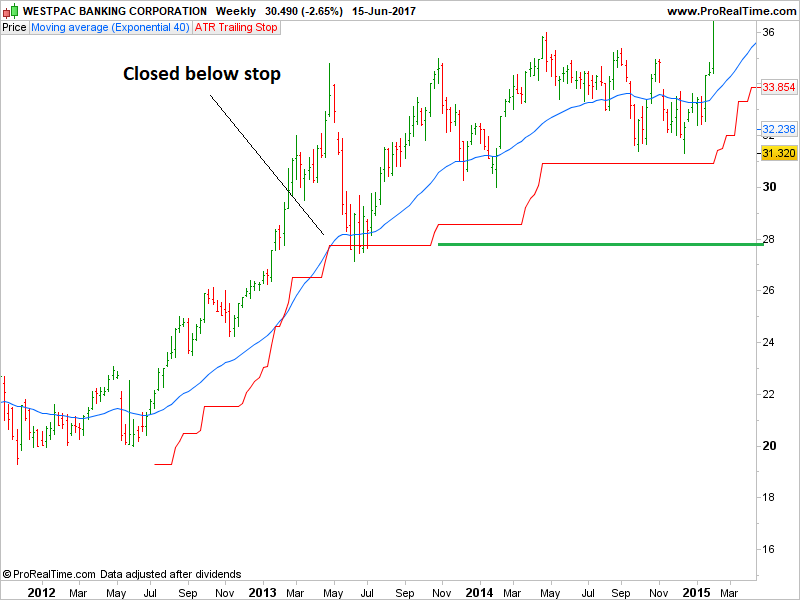
    2. How can I edit the formula so that if price closes below the trailing stop then the trailing stop will just stay at that current level and will not rise even if price keeps rising. (Its stops trailing and just goes horizontal at its current level)
    3. Is there a way to alter the date format so that it is DDMMYYYY

    Thanks

    Once trailingstop=undefined 
    
    StartDate = 20120713  //YYYYMMDD
    EntryPrice = 22.64 
    InitialATR = AverageTrueRange[10](close) * 2
    TrailATR = AverageTrueRange[10](close) * 3
    
    
    IF date = StartDate THEN
    
    TrailingStop = EntryPrice - InitialATR 
    
    ENDIF
    
    IF close > TrailingStop THEN
    NewTStop = close - TrailATR
    IF NewTStop > TrailingStop THEN
    TrailingStop = NewTStop
    
    ENDIF
    ENDIF
     
    return TrailingStop  COLOURED(255,0,0)as "ATR Trailing Stop"
    #38316 quote
    Nicolas
    Keymaster
    Master
    1. You’ll always need to go into the indicator settings in order to change any parameter of a custom indicator
    2. Not sure to understand but you could “flag” a variable if the price crosses under the TrailingStop level and test if this flag is not true in your conditional statement to move your TS (lines 15 to 22)
    3. Not possible, the default date format is YYYYMMDD
    prcolf thanked this post
    #38319 quote
    prcolf
    Participant
    New

    I’ve tried a few things but I’m not great at loops

    If Close<TrailingStop THEN
    TrailingStop = TrailingStop[1]
    ENDIF

    That probably doesn’t work because it would only work until price closed back above the trailing stop.

    I’m trying to make the stop stay horizontal like the green line that I have drawn on this chart.

    #38325 quote
    Nicolas
    Keymaster
    Master

    Not tested, but this code should work as intended:

    Once trailingstop=undefined 
    
    StartDate = 20120713  //YYYYMMDD
    EntryPrice = 22.64 
    InitialATR = AverageTrueRange[10](close) * 2
    TrailATR = AverageTrueRange[10](close) * 3
    
    IF date = StartDate THEN
     TrailingStop = EntryPrice - InitialATR 
    ENDIF
    
    //test if close has touch the trailing stop line
    if low crosses under trailingstop then 
     flag=1
    endif
    
    IF close > TrailingStop THEN
     NewTStop = close - TrailATR
     IF NewTStop > TrailingStop and flag<>1 THEN
      TrailingStop = NewTStop
     ENDIF
    ENDIF
     
    return TrailingStop  COLOURED(255,0,0)as "ATR Trailing Stop"
    prcolf thanked this post
    #38337 quote
    prcolf
    Participant
    New

    Thanks for that. I would never have got that !!

    I’ve added a default “entryprice” so that if entryprice is left as zero then it will use the current bars close.

    I’ve noticed that PRT doesn’t show the correct closing date for each weekly bar. The last 3 dates displayed are 5 June, 29 May and 22 May. If I set the trail startdate to those dates it wont plot. Why are the dates wrong? I have to go to a calendar to get the correct date for last Friday.


    Once TrailingStop=undefined
     
    StartDate = 20170519  //YYYYMMDD  Enter Start Date
    EntryPrice = 0// Enter Entry Price - Leave as Zero to use close
    
    if EntryPrice = 0 THEN
    Entry = Close //Select your default entry price
    Else
    Entry = EntryPrice
    ENDIF
    
    InitialATR = AverageTrueRange[10](close) * 2
    TrailATR = AverageTrueRange[10](close) * 3
     
    IF date = StartDate THEN
    TrailingStop = Entry - InitialATR
    ENDIF
     
    //test if close has touch the trailing stop line
    if close crosses under trailingstop then
    flag=1
    endif
     
    IF close > TrailingStop THEN
    NewTStop = close - TrailATR
    IF NewTStop > TrailingStop and flag<>1 THEN
    TrailingStop = NewTStop
    ENDIF
    ENDIF
     
    return TrailingStop  COLOURED(255,0,0)as "ATR Trailing Stop"
    #38340 quote
    Nicolas
    Keymaster
    Master

    You can use OpenDate too.

    prcolf thanked this post
Viewing 6 posts - 1 through 6 (of 6 total)
  • You must be logged in to reply to this topic.

Trailing Stop Formula


ProBuilder: Indicators & Custom Tools

New Reply
Author
author-avatar
prcolf @ozzietrader Participant
Summary

This topic contains 5 replies,
has 2 voices, and was last updated by Nicolas

8 years, 7 months ago.

Topic Details
Forum: ProBuilder: Indicators & Custom Tools
Language: English
Started: 06/15/2017
Status: Active
Attachments: 1 files
Logo Logo
Loading...