trailing stop based on higher lows

Viewing 6 posts - 1 through 6 (of 6 total)
  • Author
    Posts
  • #191155 quote
    SwisspatrickSwisspatrick
    Participant
    New

    hi! Need a little help for an individual stoploss. let’s take a simple setup for an entry condition:

    1
    2
    3
    4
    PatternToday = range > 5*PipSize   //range = high – low
    IF high > high[1] AND PatternToday[1] AND Not OnMarket THEN
       BUY 1 CONTRACT AT MARKET
    ENDIF

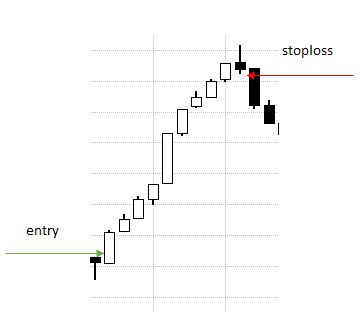
    now I would like to build a simple, but effective trailing stoploss just like in the image:

    • after the entry, the first stop will be the low of the entry bar
    • if the next bar’s low is higher, then this will become the new stoploss level
    • if the next bar’s low is not higher, either the old stoploss level will remain, or like in the graphic, it will trigger a sell order

    any help is much appreciated. Thank you.

    higher-lows.jpg higher-lows.jpg
    #191186 quote
    robertogozzirobertogozzi
    Moderator
    Legend

    There you go:

    IF Not OnMarket THEN
       MySL = 0
    ENDIF
    IF MyLongConditions THEN
       BUY 1 CONTRACT AT Market
       MySL = low
    ENDIF
    IF MySL > 0 THEN
       MySL = max(MySL,low)
       SELL AT MySL STOP
    ENDIF
    Midlanddave, Swisspatrick and icharttop thanked this post
    #191196 quote
    GraHalGraHal
    Participant
    Legend

    Link to code above saved as Log 317 here …

    Snippet Link Library

    robertogozzi and Midlanddave thanked this post
    #197655 quote
    sibeihotansibeihotan
    Participant
    New

    Hi,

    Chanced upon this idea and found it to be really useful. I wanted to make some tweaks to it and would greatly appreciate some help to double check if I’ve coded it correctly. If i wanted the stop loss to be at the lows/highs of the previous candle instead of the entry candle and for subsequent candles, to be at the lows/highs of the previous candles as well, is this the correct code for it?

    IF Not OnMarket THEN
    MySLl = 0
    MySLs = 0
    ENDIF
    
    IF LONGONMARKET THEN
    MySLl = low[1]
    ENDIF
    
    IF MySLl > 0 THEN
    MySLl = max(MySLl,low[1])
    SELL AT MySLl STOP
    ENDIF
    
    IF SHORTONMARKET THEN
    MySLs = high[1]
    ENDIF
    
    IF MySLs > 0 THEN
    MySLs = min(MySLs,high[1])
    BUY AT MySLs STOP
    ENDIF

    Thanks in advance!

    #197711 quote
    robertogozzirobertogozzi
    Moderator
    Legend

    I changed it this way:

    IF Not OnMarket THEN
       MySLl = 0
       MySLs = 999999
    ENDIF
     
    IF LONGONMARKET AND (close > low[1]) THEN
       MySLl = max(low[1],MySLl)
    ENDIF
     
    IF MySLl > 0 THEN
       SELL AT MySLl STOP
    ENDIF
     
    IF SHORTONMARKET AND (close < high[1]) THEN
       MySLs = min(MySLs,high[1])
    ENDIF
     
    IF MySLs > 0 THEN
       BUY AT MySLs STOP
    ENDIF
    sibeihotan and Midlanddave thanked this post
    #197718 quote
    GraHalGraHal
    Participant
    Legend

    Link to above added as Log 331 here …

    Snippet Link Library

    robertogozzi and Midlanddave thanked this post
Viewing 6 posts - 1 through 6 (of 6 total)
  • You must be logged in to reply to this topic.

ProRealAI ProRealAI New

Stuck on this ProBuilder code?

Describe what this topic is trying to build, in plain English, and ProRealAI writes the ProRealTime™ indicator, screener or system for you.

Available in 7 languages
Try ProRealAI

trailing stop based on higher lows


ProOrder: Automated Strategies & Backtesting

New Reply
Author
Summary

This topic contains 5 replies,
has 4 voices, and was last updated by GraHalGraHal

4 years, 3 months ago.

Topic Details
Forum: ProOrder: Automated Strategies & Backtesting
Language: English
Started: 04/04/2022
Status: Active
Attachments: 1 files
ProRealCode ProRealCode
Loading...