Trailing stop

Viewing 8 posts - 1 through 8 (of 8 total)

  • Author
    Posts
  • #45758 quote
    Gard
    Participant
    New

    Hi, I have been working on a simple startegy, but I need a specific trailing stop loss. The trailing stop needs to always pick the highest lows during the past x days. Visually it would be like a stair moving higher as the price moves higher. This should also be the case when the price moves lower, then the stair moves downwards. I have read a few posts about this in the forum, but the code posted on these threads does not work. Could anybody please give me some help about this?

    Thank you in advance!

    #45778 quote
    juanj
    Participant
    Master

    Hi Gard

    I understand what you are looking for but in reality placing a stop at or even just below a previous low is a very obvious place to get yourself stopped out. Markets tend to frequently pull back to these level (just at or below a previous low) to take out obvious stops and then continue onwards. You would most likely be far better off using something like the trailing stops in the below 2 threads (trust me on this);

    https://www.prorealcode.com/blog/trading/complete-trailing-stop-code-function/

    https://www.prorealcode.com/blog/learning/trailing-stop-max-favorable-excursion-mfe/

    Regards,

    #45807 quote
    Gard
    Participant
    New

    Hi Juanj

    Thank you for your reply. Yes I know, but when that trailing stop is working I can further manipulate it by multiplying it with a factor of, say 0.99, which will shift the “trailing stair” downwards. By doing so, I can find the multiplying factor that I am confortble with, and at the same time have a trailing stop that behaves the way I want to. I will also have a look at the threads you have linked.

    Thank you again for your answer!

    #45811 quote
    Eric
    Participant
    Master

    Hi Gard

    maybe you think of something like this?

    at market

    Dob = LOWEST [15] (LOW) [1]

    at stop

    Dob = LOWEST [15] (LOW)

    #45814 quote
    Gard
    Participant
    New

    Hi Eric
    Thank you for your reply. If you try to graph it, you can see that it moves just like the low of the daily movements, i.e., up and down just like any asset. What I aim to code, is a stop that only moves upwards when the asset moves up, and any corrections down, would not lower the stop. Just like an stair. This should happen when one is long that asset, and vica versa if one is short.

    #45815 quote
    juanj
    Participant
    Master

    @Gard, the code Eric provided should function as you describe.

    But maybe just to flesh it out a bit;

    where x = the number of bars to look back on (gets the highest low in that period)

    where y = the number of points/pips to place the stop below that previous low

    Note the below code will only be able to close the position at the next evaluation based on your timeframe (i.e. delayed by 1 timeframe unit)

    //Trailing Stop
    
    PreviousLow = Highest[x](low)[1]
    If close <= PreviousLow - y Then
    If longonmarket Then
    Sell at market
    ElsIf shortonmarket Then
    Exitshort at market
    EndIf
    #45819 quote
    Gard
    Participant
    New

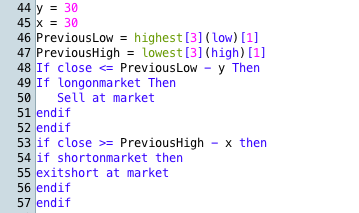
    Thank you Erik for elaborating on this. I got it to work by simplifying it and splitting up the if functions. Here is the code:

    //Trailing stop

    Skjermbilde-2017-09-08-kl.-23.02.35.png Skjermbilde-2017-09-08-kl.-23.02.35.png
    #45830 quote
    juanj
    Participant
    Master

    See you managed to add the parameter for short positions on your own. Glad you have what you were looking for.

    Let us know how it works for you.

Viewing 8 posts - 1 through 8 (of 8 total)

  • You must be logged in to reply to this topic.

Trailing stop


ProOrder: Automated Strategies & Backtesting

New Reply
Author
author-avatar
Gard @gardsaa Participant
Summary

This topic contains 7 replies,
has 3 voices, and was last updated by juanj

8 years, 6 months ago.

Topic Details
Forum: ProOrder: Automated Strategies & Backtesting
Language: English
Started: 09/07/2017
Status: Active
Attachments: 1 files
Logo Logo
Loading...