TradingRange recognize and breakout

Viewing 8 posts - 1 through 8 (of 8 total)

  • Author
    Posts
  • #142572 quote
    Friend
    Participant
    Average
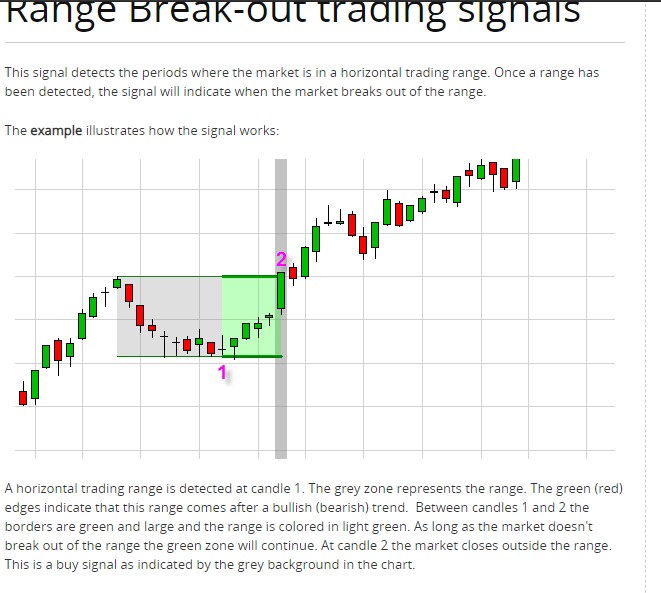
    Dear guys, I’ve seen you have programmed several Breakout solutions. Most Open breakouts and some others too. Yet they are not what I am looking for. I am looking for a TradingRange recognition and breakout indicator without a start- or end time. For all timeframes. Where you enter an (adjustable) number of bars back to determine the start. I have found an indicator (attachment) that shows exactly what I mean (times must be entered here, if there is no other option, also ok). Unfortunately I don’t have a code for it. Can this be programmed in Prorealtime? It would be great. Full explanation is given on YouTube in French at this link https://www.youtube.com/watch?v=sKu2e4h55os.  

    Thanks in advance

    #142575 quote
    Nicolas
    Keymaster
    Master
    There is no explanation on how are found the range zones. However I think it might be something like X candles haven’t moved more than Y points either up or down. Or a BB squeeze (BollingerBands inside Keltner Bands)?
    #142627 quote
    Friend
    Participant
    Average
    Hi Nicolas, Thanks for your quick response! No, indeed, and I can’t find that explanation anywhere. Your first option seems best to me. An adjustable number of bars, and could it be an adjustable percentage up or down? Then it is more universally applicable for multiple indices, currencies, etc. Can that be programmed?
    #142640 quote
    Nicolas
    Keymaster
    Master
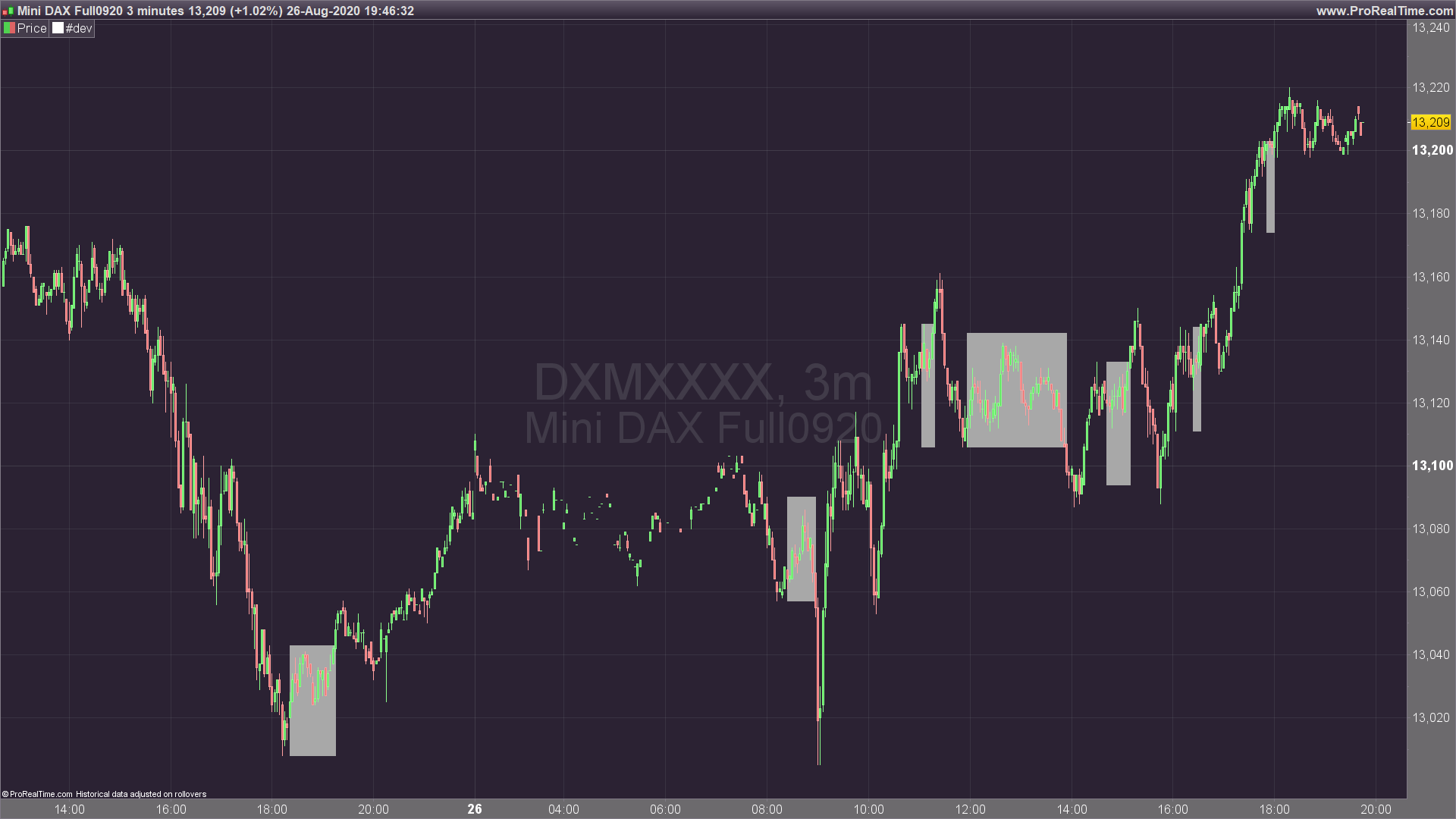
    Please find below a draft of that code with settings to change according to the instrument/timeframe:
    percent = 0.3 //percent to find the zones
    period = 10 //period of hh-ll boxes
    minBar = 3 //minimal bar for the boxes
    
    hh=highest[period](high)
    ll=lowest[period](low)
    
    irange = (hh-ll)/ll*100
    
    if irange crosses under percent then 
    startbar=barindex
    starthh=hh
    startll=ll
    endif 
    
    if irange<=percent and barindex-startbar>=minBar and startbar>0 then 
    drawrectangle(startbar,startll,barindex,starthh) coloured(168,168,168) bordercolor(168,168,168,0) style(dottedline)
    endif
    
    if close crosses over starthh or close crosses under startll then 
    startbar=0
    endif
    
    return //irange 


    Pensera thanked this post
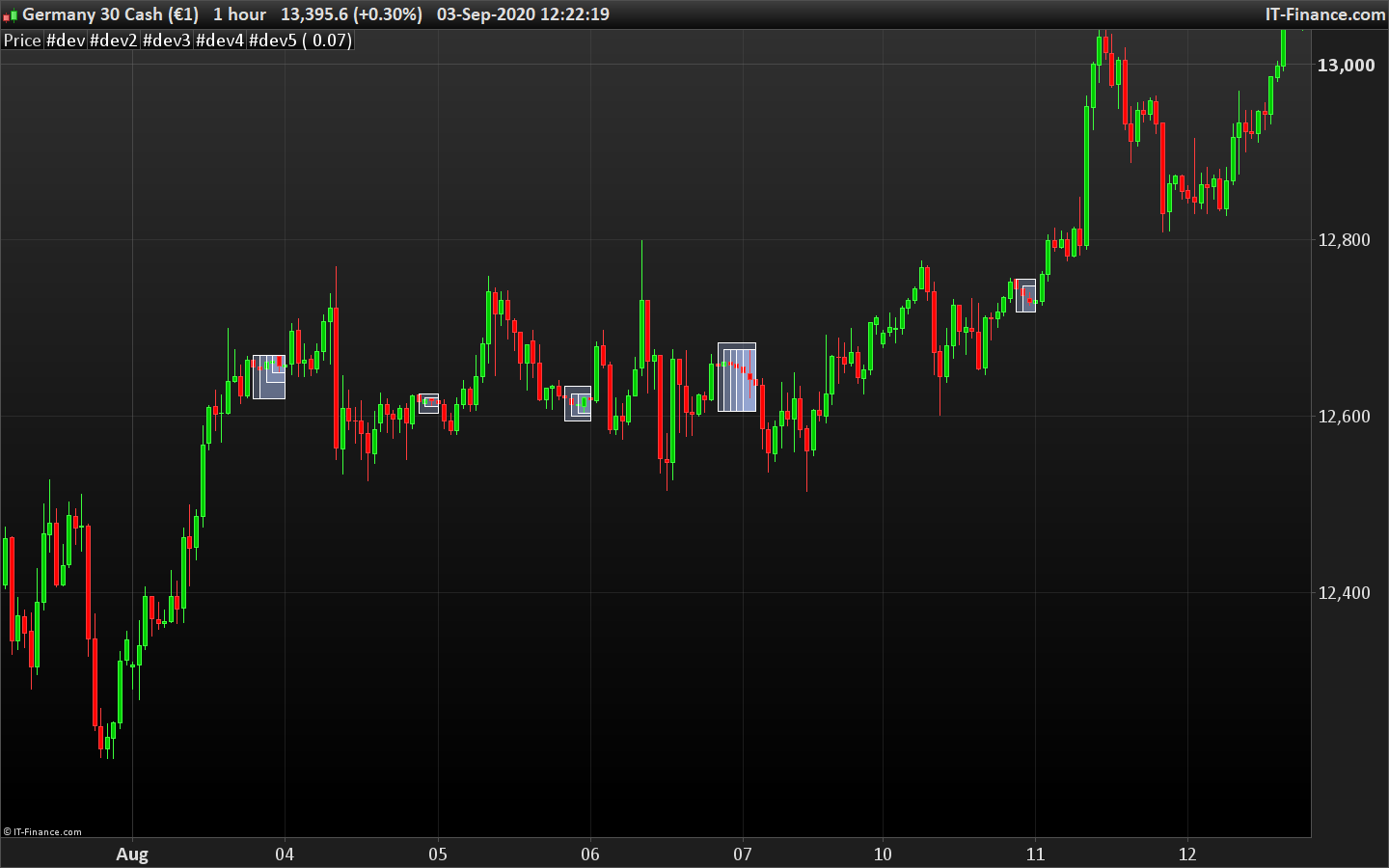
    breakout-boxes.png breakout-boxes.png
    #142701 quote
    Friend
    Participant
    Average
    Hi Nicolas,   Thank you for this initial setup. Yet it is not quite what I mean. Below you can see what I think it should be. If you see any adjustments or suggestions on this or if something is not possible, please let me know.   First of all: in your code I get a syntax error with bordercolor and style. I still have V10.3, could that be a reason?   My thoughts:
    • You look back x candles (for example 20)
    • If in that period at least x candles (for example 3) in a row deviate less than x percent (for example 0.3) from the Close of the first bar of that row, then a rectangle becomes signed from that first bar.
    • That rectangle searches from the first bar of the row for the highest and lowest price (tails) of next bars and adjusts accordingly.
    • The rectangle remains until a BarClose breaks above or below the set percentage.
      Extra, if possible:
    • If the average Close of 5 bars before the first bar of the row is lower than the Close of that first bar, the rectangle turns green.
    • If the average Close of 5 bars before the first bar of the row is higher than the Close of that first bar, the rectangle turns red. 
    #143262 quote
    Friend
    Participant
    Average
    Hi guys,   I’m probably way too premature and I know you guys are getting a lot more requests. But could you see if my setup can be programmed? I would really appreciate it.   On 28/8 I had reported a bug in the Bressert scalper improved in another topic as well. Should something be changed here or can I change something myself?   Thanks in advance
    #143282 quote
    Nicolas
    Keymaster
    Master
    I think that this code is in line with your query, let me know. Regarding the Bressert Scalper, I will answer you asap.
    percent = 0.3 //max percent deviation
    period = 20 //period of lookback
    minBar = 3 //minimal bar for the boxes
    
    count=0
    hh=0
    ll=close*10
    
    for i = period-1 downto 0 do
    dev=abs(close[i+1]-close[i])/close[i+1]
    
    if dev<=percent/100 then
    //drawarrow(barindex[i],close[i])
    count=count+1
    hh=max(hh,high[i])
    ll=min(ll,low[i])
    if count=1 then
    startbar=barindex[i]
    else
    endbar=barindex[i]
    endif
    else
    break
    endif
    next
    
    if count>=minbar  then
    drawrectangle(startbar,ll,endbar,hh)
    endif
    
    return //(close-close[1])/close,percent/100,count,high<hh and low>ll,dev
    
    range-zone-indicator.png range-zone-indicator.png
    #143309 quote
    Friend
    Participant
    Average
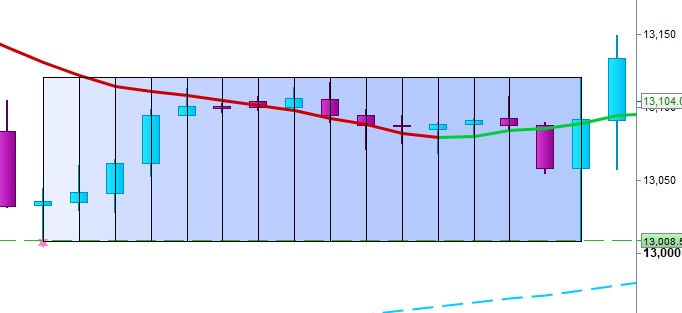
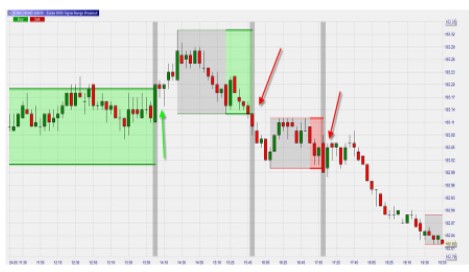
    Hi Nicolas,   Thanks for your response. Some more comments and some attachments:   The deviation percentage is not calculated correctly in my opinion. In the first attachment, the Close of the first candle is 13,036. A 3% deviation upwards is 13,076. The 4th bar closes at 13,096 and yet the range is not ended.   The vertical stripes in the rectangles may be removed. They have no function and mask the candle tails.   I thought that I had added some attachments to my first post of the optimal solution for me.  I don’t see them, here another try.Green and red rectangles to show the direction. That’s what I meant as Extra in a previous post 
    voorbeeld-3pct.jpg voorbeeld-3pct.jpg Range-bullish.jpg Range-bullish.jpg Range.jpg Range.jpg
Viewing 8 posts - 1 through 8 (of 8 total)
  • You must be logged in to reply to this topic.

TradingRange recognize and breakout


ProBuilder: Indicators & Custom Tools

New Reply
Author
author-avatar
Friend @friend Participant
Summary

This topic contains 7 replies,
has 2 voices, and was last updated by Friend

5 years, 5 months ago.

Topic Details
Forum: ProBuilder: Indicators & Custom Tools
Language: English
Started: 08/26/2020
Status: Active
Attachments: 5 files
Logo Logo
Loading...