Trading Systems

Viewing 4 posts - 1 through 4 (of 4 total)

  • Author
    Posts
  • #158172 quote
    bearbullbearbull
    Participant
    Average

    I just had the platform upgrade from v10.3 to v11………………….errrr where do I find my auto trading systems? Cant find a tab or anything?

    #158174 quote
    VonasiVonasi
    Moderator
    Master

    bearbull – Your topic has been moved to the correct forum as it has nothing to do with indicators which is what the ProBuilder forum is for. Please be more careful with future topics.

    Post your topic in the correct forum:
    _ ProRealTime Platform Support: only platform related issues.
    _ ProOrder: only strategy topics.
    _ ProBuilder: only indicator topics.
    _ ProScreener: only screener topics
    _ General Discussion: any other topics.
    _ Welcome New Members: for new forum members to introduce themselves.

    #158175 quote
    PeterStPeterSt
    Participant
    Master

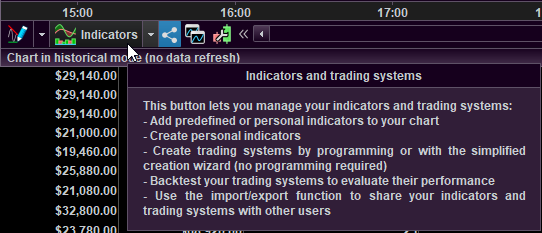
    Press that button you see under the mouse pointer (see attachment). This button is present at the bottom – left hand, in each chart.

    image_2021-01-17_162741.png image_2021-01-17_162741.png
    #158278 quote
    bearbullbearbull
    Participant
    Average

    sorry and many thanks peterSt

Viewing 4 posts - 1 through 4 (of 4 total)

  • You must be logged in to reply to this topic.

ProRealAI ProRealAI New

Stuck on this ProBuilder code?

Describe what this topic is trying to build, in plain English, and ProRealAI writes the ProRealTime™ indicator, screener or system for you.

Available in 7 languages
Try ProRealAI

Trading Systems


Platform Support: Charts, Data & Broker Setup

New Reply
Author
author-avatar
bearbull @bearbull Participant
Summary

This topic contains 3 replies,
has 3 voices, and was last updated by bearbullbearbull

5 years, 8 months ago.

Topic Details
Forum: Platform Support: Charts, Data & Broker Setup
Language: English
Started: 01/17/2021
Status: Active
Attachments: 1 files
ProRealCode ProRealCode
Loading...