





Trading system automatically stopped

Viewing 15 posts - 1 through 15 (of 36 total)
  • Author
    Posts
  • #115742 quote
    JASS
    Participant
    Junior

    Two of my strategies are constantly being stopped and I have a hard time finding out why. I never encountered this problem before and the only two differences from other strategies, are that I normally use 5 minutes charts and above and in these two cases I use 1 minute charts. The other difference is that I have set the “DEFPARAM CumulateOrders” to true, which I normally not use.

    It toggles between two error messages, apparently randomly.

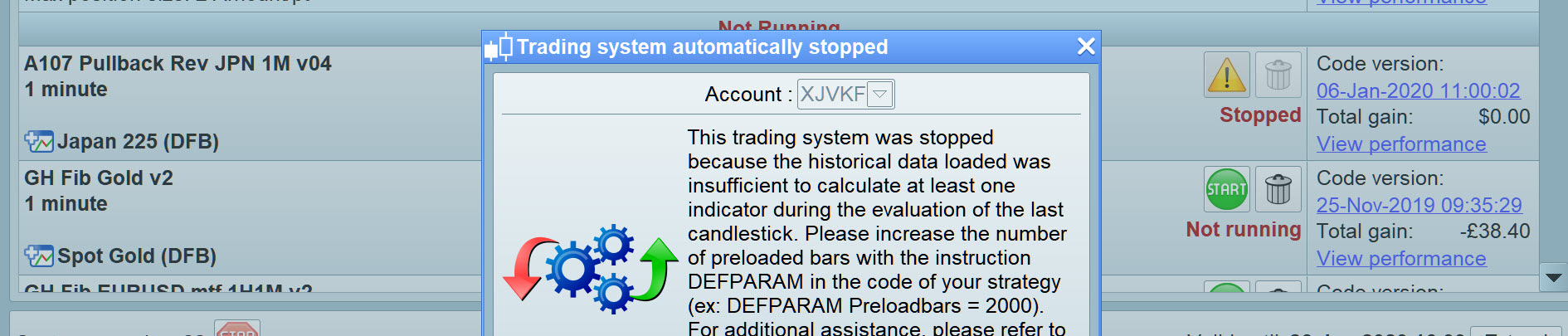
    The first error message relates to the preloadbars setting:

    This trading system was stopped because the historical data loaded was insufficient to calculate at least one indicator during the evaluation of the last candlestick. Please increase the number of preloaded bars with the instruction DEFPARAM in the code of your strategy (ex: DEFPARAM Preloadbars = 2000). For additional assistance, please refer to the help text of the DEFPARAM function in the trading systems programming manual.

    The maximum period used in the strategy for calculations is 51 and no matter if I set it for 100, 200 or the default value 2000, it still doesn’t work. I can even delete the parameter without any change.

    The second error message relates to order rejection:

    One of the orders of this trading system was rejected. Due to the type of rejection, the trading system had to be stopped. To see the reason the order was rejected, open the order list, go to the”Canceled/Rejected” tab and place your mouse over the warning icon in the “Status” column.

    This is incorrect, since it never comes to a point where it actually tries to open a trade and the order list is always empty.

    For the Nikkei index I use DEFPARAM FLATBEFORE = 010000 and DEFPARAM FLATAFTER = 073000, but I can start the strategy at e.g. 9.30 and it is stopped a few minutes later.

    I can read in another (very emotional) thread, that this kind of error is believed to reside on IG side, but how can that be the case if the strategy is stopped even before it tries to open a trade? Most likely my lack of knowledge on the interface between IG and PRT, but could someone shed light on this?

    Is there a solution to this problem?

    #115759 quote
    GraHal
    Participant
    Master

    Have you got two very similar version of the same strategy running?

    I ask as I do several versions often and I frequently get Systems stopped because it seems IG cannot handle 2 Orders from the same Account for the same Instrument on the same Timeframe at the same time etc.

    JASS thanked this post
    #115762 quote
    JASS
    Participant
    Junior

    The coding is very similar, but one runs on DOW (Wall Street) between 9.00 and 21.59 and the other one runs on Nikkei (Japan 225) between 1.00 and 7.30. So they do not overlap in time. Of course when you set the cumulateorders to true, you will eventually have 2 orders from the same account, but as I wrote, both strategies are stopped even before they try to place orders.

    GraHal thanked this post
    #115768 quote
    GraHal
    Participant
    Master

    To see the reason the order was rejected, open the order list, go to the”Canceled/Rejected” tab and place your mouse over the warning icon in the “Status” column.

    What error message does it show when you do above?

    Ah gotcha … there is no entry to show anything??

    Yeah I have had a few of these lately … no entry / no error message.

    Best to restart the System and see if it gets stopped again??

    JASS thanked this post
    #115770 quote
    JASS
    Participant
    Junior

    Thanks GraHal, but I restarted many times

    #115771 quote
    GraHal
    Participant
    Master

    Okay next best thing is to post the code on here and then the coding Wizards may spot something that is making it fail?

    Also I would run the code on my Platform and see if I can spot a fix by trying a few things.

    JASS thanked this post
    #115833 quote
    Nicolas
    Keymaster
    Master

    Please post the whole code or give the list of indicators used, thanks.

    JASS thanked this post
    #115990 quote
    JASS
    Participant
    Junior

    Hi Nicolas and GraHal

    I spend the weekend trying to find errors in the code, but it became a “needle-in-a-haystack” exercise. I would appreciate if you would take a look at it and see if you can spot any errors.

    By the way: the code works fine in backtesting.

    Thanks

    JASS

    //**********************************************************************************
    // Title: A107 Pullback Rev JPN 1M v04
    // Chart: JAPAN225 / NIKKEI 1M
    // Note: Exploiting one bar pullbacks in steep trending market
    //**********************************************************************************
    
    DEFPARAM CumulateOrders = True
    DEFPARAM PreLoadBars = 100
    DEFPARAM FLATBEFORE = 010000
    DEFPARAM FLATAFTER = 073000
    
    //**********************************************************************************
    // Variables
    //**********************************************************************************
    
    PositionSize = 1
    tp = 138 // Target profit
    sl = 28 // Stop loss
    EMAp1 = 34
    EMAp2 = 29
    EMAp4 = 41
    SMAp2 = 40
    SP = 1 // Stochastic Period
    v10 = 10 // Stochastic lower line
    v90 = 94 // Stochastic upper line
    emadiff = 1.95 // EMA difference to ensure steep trend
    MOMp = 51 // Momentum period
    MOMLv = 40 // Momentum long value
    MOMSv = -100 // Momentum short value
    PBLp = 25 // Power bar long period
    PBSp = 25 // Power bar short period
    PBLv = 12 // Power bar long value
    PBSv = 33 // Power bar short value
    LBL = 20 // Large bar long
    LBS = 15 // Large bar short
    COSH = 4 // Count of shares
    
    //**********************************************************************************
    // Indicators and Math
    //**********************************************************************************
    
    // Stochastic
    C = Close
    HH = Highest[SP](high)
    LL = Lowest[SP](low)
    K = ((C-LL)/(HH-LL))*100
    
    // EMA
    c01 = exponentialaverage[EMAp1](close)
    
    // Momentum
    c03 = momentum[MOMp](close)
    
    // SMA
    c04 = average[SMAp2](close)
    
    // Power bar long - no powerbar for the last PBLp number of periods before entry
    PBL = close - open
    IF highest[PBLp](PBL) < PBLv THEN
    c13 = 1
    else
    c13 = 0
    ENDIF
    
    // Power bar short - no powerbar for the last PBSp number of periods before entry
    PBS = open - close
    IF highest[PBSp](PBS) < PBSv THEN
    c33 = 1
    else
    c33 = 0
    ENDIF
    
    c05 = abs(c01[0]-c01[1]) > emadiff
    
    c06 = exponentialaverage[EMAp2](((2*close)+open)/3)
    
    c07 = exponentialaverage[EMAp4](((2*close)+open)/3)
    
    //**********************************************************************************
    // Entry/exit conditions
    //**********************************************************************************
    
    // Enter long conditions
    c10 = c01[1] > c01[2]
    c11 = countoflongshares < COSH
    c12 = c03 > MOMLv
    
    c14 = K[0] < v10
    
    // Exit long conditions
    c20 = c04[0] < c04[1]
    c21 = close[0]-open[0] > LBL
    c22 = c06[0] < c06[1]
    
    // Enter short conditions
    c30 = c01[1] < c01[2]
    c31 = countofshortshares < COSH
    c32 = c03 < MOMSv
    
    c34 = K[0] > v90
    
    // Exit short conditions
    c40 = c04[0] > c04[1]
    c41 = open[0]-close[0] > LBS
    c42 = c07[0] > c07[1]
    
    //**********************************************************************************
    // Enter Long
    //**********************************************************************************
    
    if c05 and c10 and c11 and c12 and c13 = 1 and c14 then
    buy PositionSize contract at market
    endif
    
    //**********************************************************************************
    // Exit Long
    //**********************************************************************************
    
    if longonmarket and (c20 or c21 or c22) then
    sell at market
    endif
    
    //**********************************************************************************
    // Enter Short
    //**********************************************************************************
    
    if c05 and c30 and c31 and c32 and c33 = 1 and c34 then
    sellshort PositionSize contract at market
    endif
    
    //**********************************************************************************
    // Exit Short
    //**********************************************************************************
    
    if shortonmarket and (c40 or c41 or c42) then
    exitshort at market
    endif
    
    //**********************************************************************************
    // Stops and Targets
    //**********************************************************************************
    
    set stop ploss sl
    set target pprofit tp
    #115993 quote
    Vonasi
    Moderator
    Master

    JASS – Please use the ‘Insert PRT Code’ button when posting code to make it easier for others to read.

    I have tidied up your last post 🙂

    JASS thanked this post
    #116025 quote
    GraHal
    Participant
    Master

    Timezone is Denmark (UTC +1) Yes?

    So I am deducting 1 hour from times in the code to get to UK time (UTC +0)?

    Why don’t you use below as Line 8 ?

    DEFPARAM PreLoadBars = 10000 //(not 100 as you used??)

    I’ve set it going on my Platform so I take I will have to wait until it tries to take a Trade (every few days) then I may get a rejection?

    JASS thanked this post
    #116027 quote
    JASS
    Participant
    Junior

    Timezone Denmark, correct.

    It really doesn’t matter if I preload 100 or more bars, since my maximum period for calculations is 51.

    Exciting to see if you are stopped out too.

    #116028 quote
    JASS
    Participant
    Junior

    In UK time will be 00.00-06.30

    #116031 quote
    GraHal
    Participant
    Master

    It really doesn’t matter if I preload 100 or more bars, since my maximum period for calculations is 51.

    Well as you are getting the … insufficient preload bars error message … it is worth trying more preload bars.

    Anyway I’ve set my preloads bars = 10000 so we shall see what we get.

    Btw if you leave it off altogether then the default for preload bars is 2000.

    JASS thanked this post
    #116034 quote
    GraHal
    Participant
    Master

    Hey we don’t have to wait days … I’ve been rejected already … see attached.

    So the reject is when the code is read not when a trade is attempted??  is this what you have been getting also??

    Makes it easier to fault find anyway as it keeps the momentum up as we can keep onto it etc.

    I’ve got 2 versions running now … one with Cumulative = True one with False …

    JASS thanked this post
    #116037 quote
    GraHal
    Participant
    Master

    Both versions rejected!

    Weird as it is not every minute … I had to wait several minutes for the reject and yet the Timeframe is 1 min so the code would be read every minute (or should be!?).

    No Reject listed in the Orders List so I cant see the exact time of Reject!

    JASS thanked this post
Viewing 15 posts - 1 through 15 (of 36 total)
  • You must be logged in to reply to this topic.

Trading system automatically stopped


ProOrder: Automated Strategies & Backtesting

New Reply
Author
author-avatar
JASS @jass Participant
Summary

This topic contains 35 replies,
has 4 voices, and was last updated by Vonasi

6 years ago.

Topic Details
Forum: ProOrder: Automated Strategies & Backtesting
Language: English
Started: 01/02/2020
Status: Active
Attachments: 3 files
Logo Logo
Loading...
