Hi everyone.
I would kindly ask you for a suggestion to set up trading only on certain dates or days of the week.
I already know and use the “Dayofweek” function and I know how to set the system to operate, for example, only on Friday.
But I would like to ask you how to set up trading only on the first Friday of the month and not on every Friday of the month, especially to have a report of the operations relative only to the first Friday of each month.
Thank you so much for your kind help.
GRAZIE, CIAO !
You should use a flag, say TradeOn, and clear it when first launched and when OnMarket.
Add TradeOn to your conditions.
When you spot a month change, Month<>Month[1], set TradeOn.
As soon as you detect Thursday enter your trade and clear TradeOn.
Something a bit like this?
Choose the number of the day of the week you want and the number of the week you want with ChosenDay and ChosenWeek variables.
It’s an indicator but can easily be adapted into a strategy.
chosenday = 5
chosenweek = 2

if openmonth <> openmonth[1] then
newmonth = 1
daytotrade = 0
weekflag = 0
endif

if newmonth and opendayofweek = chosenday then
weekflag = weekflag + 1
endif

if weekflag = chosenweek and opendayofweek = chosenday then
daytotrade = 1
endif

if opendayofweek <> chosenday then
daytotrade = 0
endif

return daytotrade
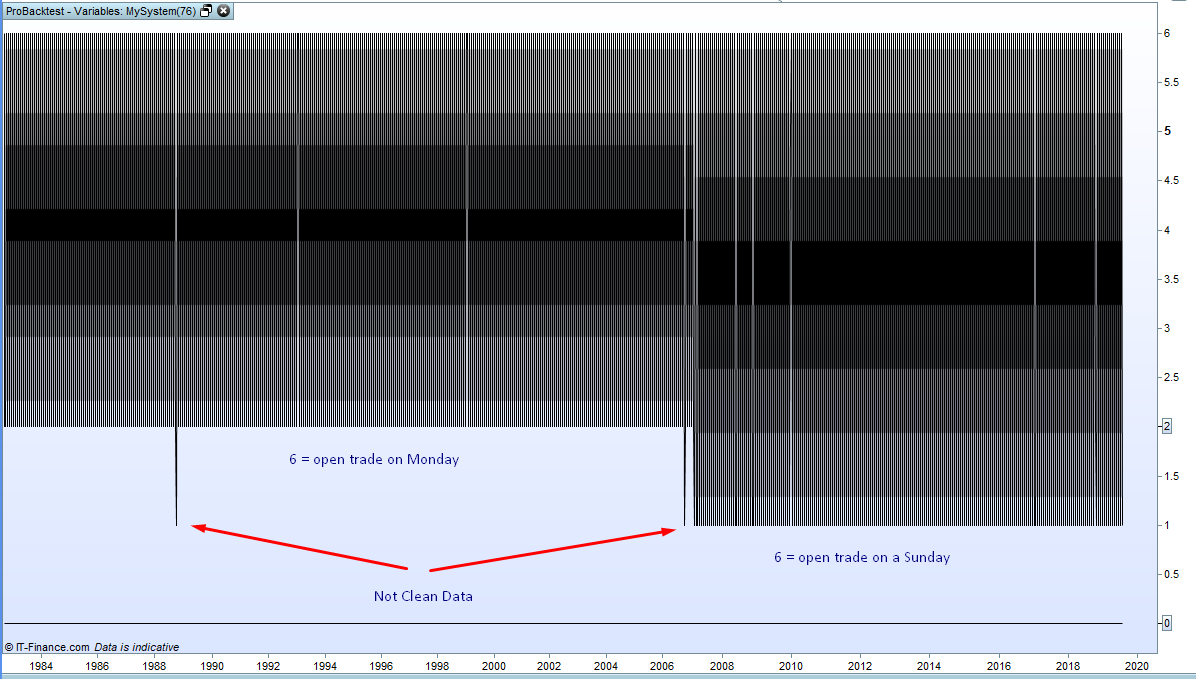
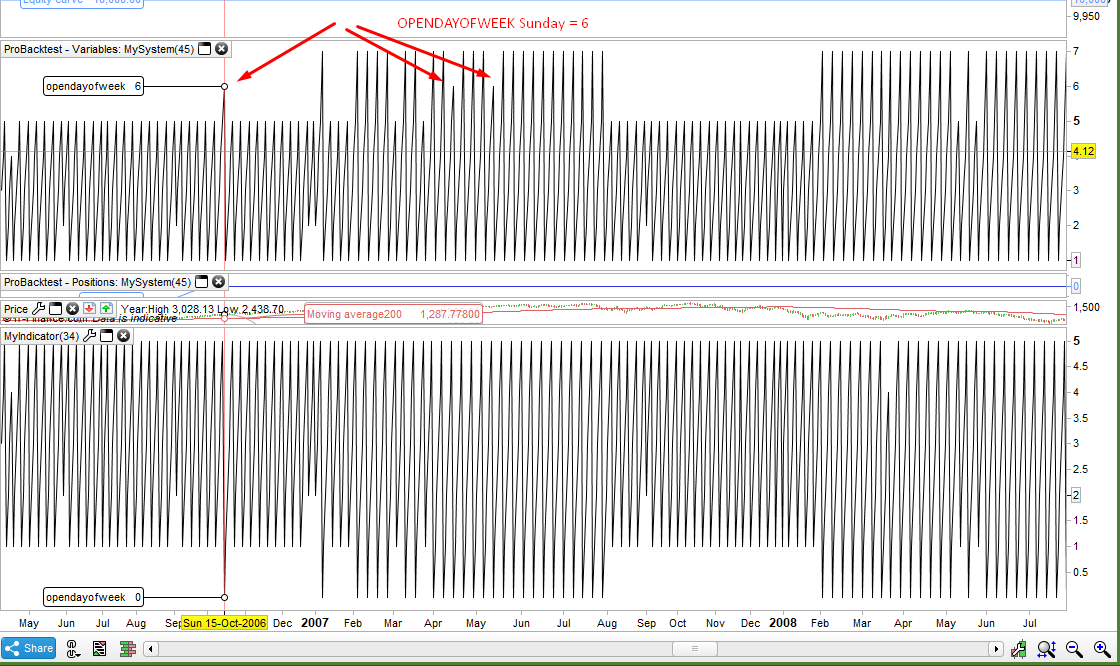
I’ve been doing some testing and as an indicator the above works just fine as it uses OPENDAYOFWEEK which is great in an indicator as we are working on the fly with the current forming candle. In a strategy however you have to decide the day before whether to trade tomorrow at the open of the candle so we are supposed to use DAYOFWEEK which returns tomorrows day number. However I was testing on a daily time frame and there are major issues due to PRT’s data switching from 5 day weeks to 6 day weeks at some point around the beginning of 2007. This means that prior to the 2007 data change on a Friday the DAYOFWEEK returns a value of 6 and the next day is a Monday but after the 2007 data change the 6 opens a trade on a Sunday.
It should be simple to code round this with a date filter but the change is not a clean one and there are even some rogue DAYOFWEEK values pre 2007!
We must be careful when using DAYOFWEEK when backtesting if it is involved in any strategy decisions!
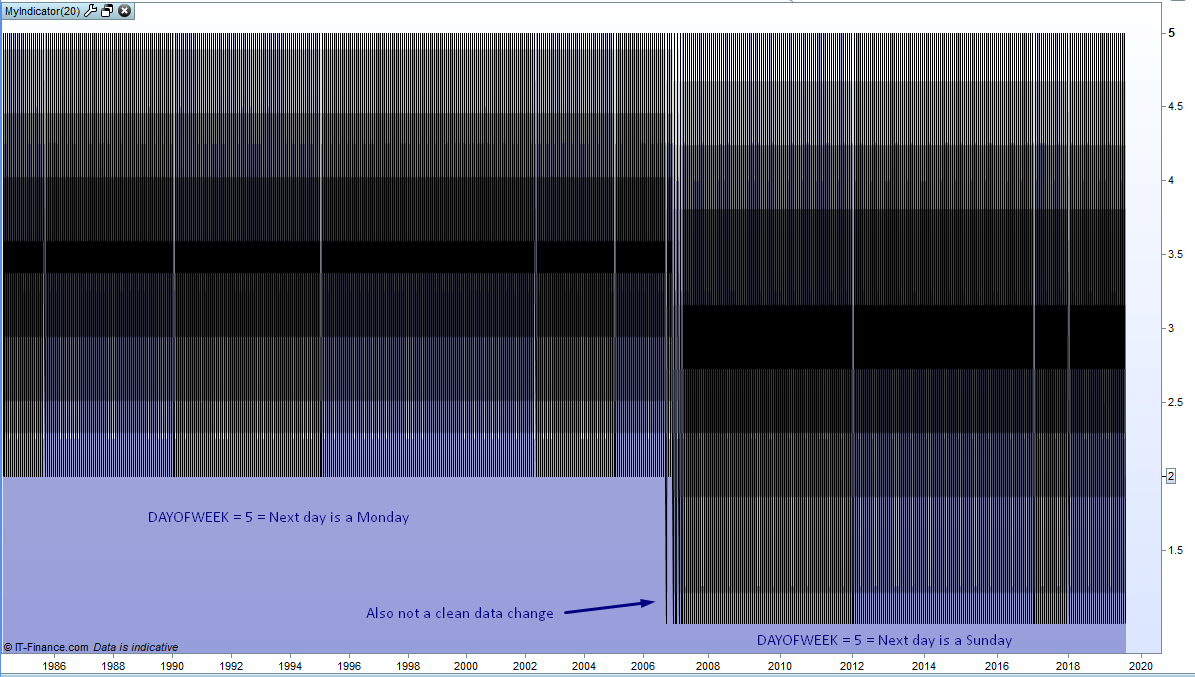
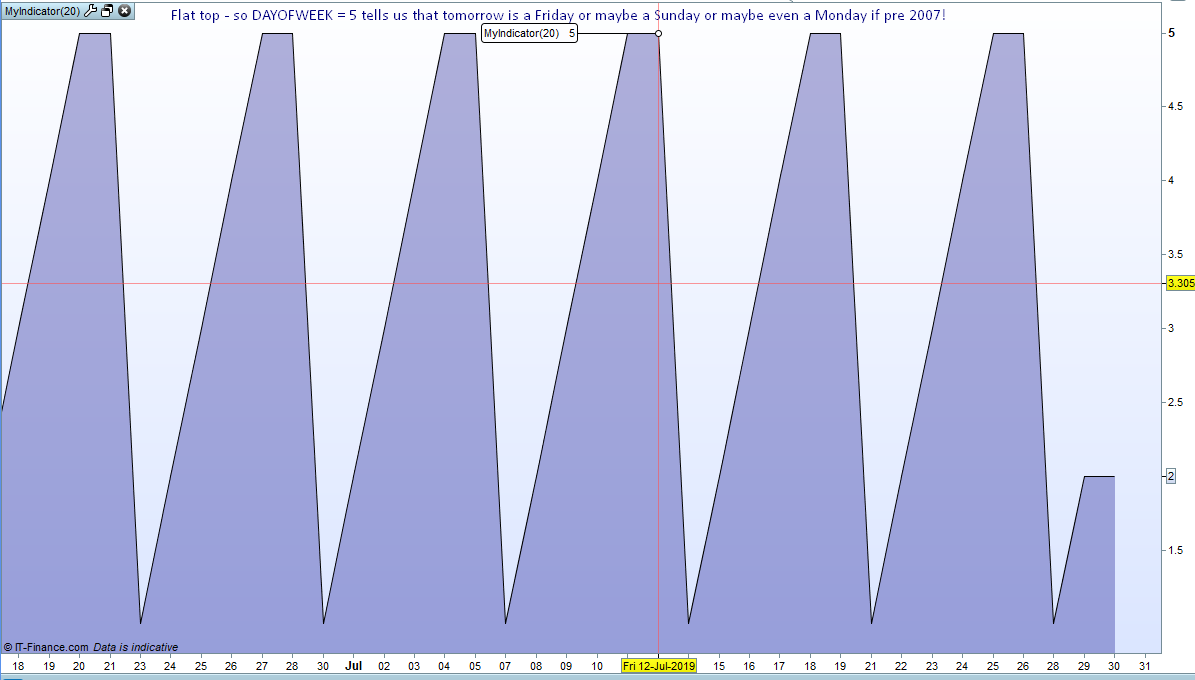
It gets even more difficult to understand what a DAYOFWEEK value actually means. If you use it in an indicator then it has the same data problem with the switch from 5 day weeks to 6 day weeks but also returns different values and it can’t decide whether a value of 5 tells us that tomorrow is a Friday or a Sunday or even a Monday if pre 2007!
Link to code above added to here
Snippet Link Library
Hello everyone and thank you so much for your answers.
I also tried some very simple solutions to program and use and reading the PRT manual maybe I found a solution that I would like to share with you and know what you think.
if the month starts right on Friday the “DAY” function will be equal to 1.
if the month starts instead with Saturday the “DAY” function will tell me that the first Friday of the month will be as maximum equal to 7.
in any of these two cases the first Friday of the month must always have a “DAY” value of less than 8.
so if I connect the “DAY” function and the “DAYofWEEK” function I can get:
IF (Day < 8 AND DayOfWeek = 5) THAN ….
if these two conditions are true I will have the indication that it is the first Friday of the month.
what do you think ? can it work?
Ciao GRAZIE !
This will only buy the first Friday of any month (not tested):
Once TradeOn = 0
If TradeOn = 0 and Not OnMarket Then
   If openmonth <> openmonth[1] Then
      TradeOn = 1
   Endif
Endif
If TradeOn and opendayofweek = 4 and MyConditions Then
   Buy 1 contract at market
   TradeOn = 0
Endif
edit Tested on DAX 1min and it works as expected, replace 4 with 1 to 5 as needed
You will need to add TP & SL to make it exit.
This will only buy the first Friday of any month
Days Wednesday Thursday and Friday can all be easily coded by checking the previous days OPENDAYOFWEEK value but Monday is a difficult one due to the unclean data due to changes from 5 day to 6 day weeks. In a strategy the OPENDAYOFWEEK before a Monday was 5 when we had 5 day weeks and 7 when we had 6 day weeks but there is also the odd value of 6 thrown in during the change over! The change over seemed to be introduced and then withdrawn and then reintroduced. For Tuesdays there is the issue of holidays – if you are looking for a Tuesday and there was no Monday candle then the OPENDAYOFWEEK for the previous day will be the Friday value of 5.
Far too complicated and makes coding strategies with selective trading days virtually impossible.
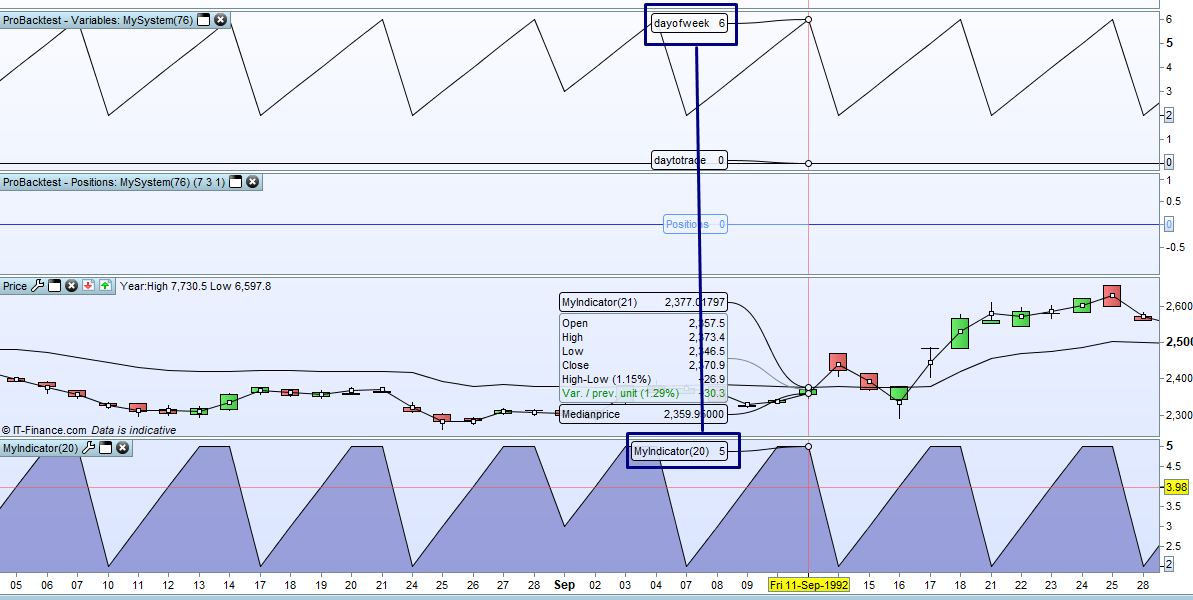
The difference between indicator values compared to strategy values also makes everything a bit of a nightmare!
The image shows strategy values for OPENDAYOFWEEK at the top and indicator values for OPENDAYOFWEEK at the bottom during the 2007 switch from 5 day to 6 day weeks.
I coded the following to calculate the exact day of the week using the key value method. I wanted to compare the day calculated from OPENDATE to the OPENDAYOFWEEK returned day. It was a bit of a futile exercise as it just confirmed that the numbers returned by indicators are totally different to those returned by strategies. If we had a crystal ball and could know what the next candle date is going to be on our chart then we could use it to calculate the correct day of the week. I guess We will just have to wait and see if PRT fix the different values between strategies and indicators and see if they can do something about the fact that DAYOFWEEK is pretty useless for auto-trading as it currently is unless you are backtesting on a limited history.
I post the code here just in case anyone wants to know what day their birthday will be on in 2050!! Mine’s a Sunday so that will be nice. 0 = Sunday 1 = Monday, 2 = Tuesday and so on.
mydate = opendate //or whatever date you want to look for

Y = round((myDate / 10000) - 0.5)
MM = round((myDate - ((Y * 10000))-0.5) /100)
DD = round(mydate - (Y * 10000) - (MM * 100)-0.5)
C = round((y / 100) - 0.5)
YY = y - (c *100)

a = round((yy / 4)-0.5)
b = a + DD

if mm = 1 or mm = 10 then
b = b + 1
endif

if mm = 2 or mm = 3 or mm = 11 then
b = b + 4
endif

if mm = 5 then
b = b + 2
endif

if mm = 6 then
b = b + 5
endif

if mm = 8 then
b = b + 3
endif

if mm = 9 or mm = 12 then
b = b + 6
endif

LeapYear = 0
If y mod 4 = 0 then
If y mod 100 = 0 then
If y mod 400 = 0 then
LeapYear = 1
Endif
Else
LeapYear = 1
Endif
Endif

if (mm = 1 or mm = 2) and leapyear then
b = b - 1
endif

if y > 2000 then
b = b + 6
endif

b = b + yy

result = b mod 7

myday = result - 1

return myday as "Day of Week"
 Bel
BelParticipant
Veteran
Great insight Vonasi, thanks👍🏽
Also how about buying on specific days lets say on the 11th each month? If Day=11 works but once 11th falls into weekend it stops working. Doing If Day=11 Or Day=12 will open 2 trades on the following days instead of 1 on either day which is not the weekend:/
Regards,
Bel.
BelParticipant
Veteran
Got the code working but its a bit of a riddle why not to make it easier for such a simple task🤷🏽♂️