Hello,
I would like to open a position every 10. days of a month.
If it is a Saturday or Sunday then the position should be opened on Monday.
I just can’t get the code to work, can someone help me?
Greetings
Suffi
There you go:
If ((Day = 10) or ((Day > 10) and (Day[1] < 10))) Then
   BUY 1 Contract at Market
Endif
Hello Roberto,
thanks for the support, please add a little explanation.
(Day = 10) or ((Day > 10) this is the 10th of the month or the next day if the 10th is a Sunday.
(Day[1] < 10) ????? what is meant by this?
Shouldn’t something from DAY OF WEEK (0 or 6) go in there?
Greetings
Suffi
When DAY returns a day it’s because that one is a trading day.
If that day is 10 that’s easy, no other chacks are needed.
If that day is NOT a trading day, then the number 10 will NEVER be detected, so you want (have) to trade the next trading day.
If Friday is day 9, then Monday will be day 12. That’s when it works, as Day[0](Monday) > 10 AND Day[1] (Friday) < 10. The same occurs when Friday is Day 8 and Monday is Day 11.
They are NOT 10, but one is greater and the previous one is lower. This means that 12 or 11 is the first trading day AFTER 10.
Example (t = Trading day):
days 1 2 3 4 5 6 7 8 9 10 11 12 13
. t t – – t t t t t – – t t
Wow,
where can I read up on something like that? I didn’t get any further with the help of the programme and the instructions.
Greetings
Suffi
Thanks a lot
On the forum you can find many code snippets to be used as tools in addition to built-in instructions and constants.
This is a very useful place (thanks to GraHal for having created and still managing it regularly)
Snippet Library
Hello Roberto,
I do not get the desired result, where is the error?
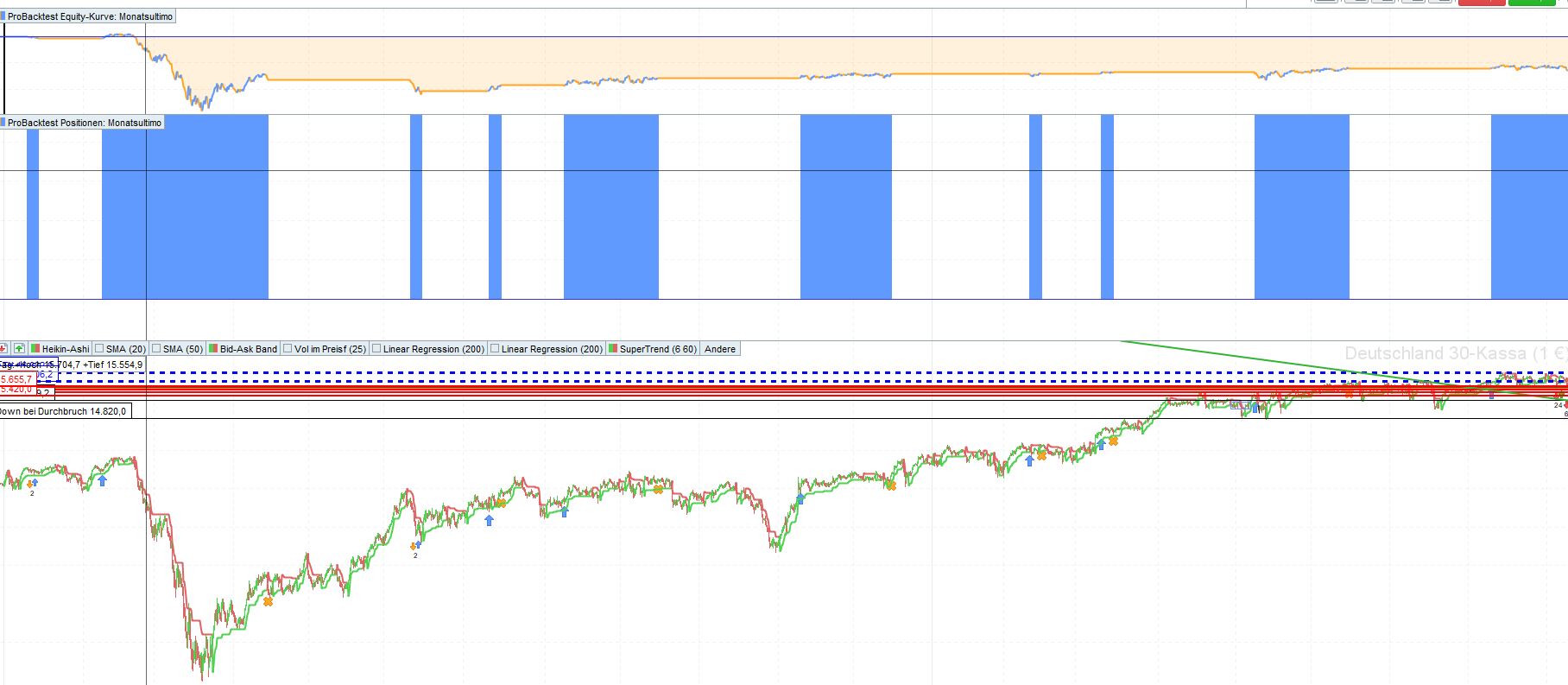
The narrow bars are correct trades (open on 10, – close on 15), the wide ones are closed on 15 of the next month or the month after?
Greetings
Suffi
If (((Day = 10) or ((Day > 10) and (Day[1] < 10))) AND CurrentTime =90000 ) Then //AND HOUR=9
BuyTime = 1
ELSE
BuyTime = 0
ENDIF

If (((Day = 15) or ((Day > 15) and (Day[1] < 15))) AND CurrentTime =150000 ) Then //AND HOUR=15
SellTime = 1
ELSE
SellTime = 0
ENDIF

IF (NOT OnMarket AND BuyTime=1) THEN
BUY 1 CONTRACTS AT MARKET
ENDIF

IF (OnMarket AND SellTime=1) THEN
SELL AT MARKET
ENDIF
[attachment file=”177223″]
What instrument and TF is it?
That code works on a Daily chart, because when using an intraday TF, at 9 or 15, DAY[0] will always be the same as DAY[1], so if the day is 10 or 15, it works perfectly, otherwise it needs to be changed so that it sets a flag whenever Day 10 and Day 15 is detected on the first bar of the day:
ONCE Day10 = 0
ONCE Day15 = 0
IF Month <> Month[1] THEN
   Day10 = 0
   Day15 = 0
ENDIF
IF (Day = 10) or ((Day > 10) and (Day[1] < 10)) THEN
   Day10 = 1
ENDIF
IF (Day = 15) or ((Day > 15) and (Day[1] < 15)) THEN
   Day15 = 1
ENDIF
IF OnMarket THEN
   Day10 = 0
ENDIF
If Day10  AND (CurrentTime =90000) Then //AND HOUR=9
   BuyTime = 1
ELSE
   BuyTime = 0
ENDIF

If Day15 AND (CurrentTime =150000) Then //AND HOUR=15
   SellTime = 1
ELSE
   SellTime = 0
ENDIF

IF (NOT OnMarket AND BuyTime=1) THEN
   BUY 1 CONTRACTS AT MARKET
ENDIF

IF (OnMarket AND SellTime=1) THEN
   SELL AT MARKET
ENDIF
//graph Day
//graph currenttime
//graph BuyTime
//graph SellTime
Hi Roberto,
perfect, it works, unfortunately my programming skills are not enough to understand it completely.
Now I have tried to optimise the date.
The code only works if the trade runs within the same month.
Errors follow when buying on the 20th and closing on the 2nd of the next month.
I tried to change it here:
IF Month <> Month[1] THEN
Day10 = 0
Day15 = 0
without success
Greetings
Suffi
I have also tried the short direction, the on and off buttons did not work.
IF (NOT SHORTOnMarket AND BuyTime=1) THEN
SELLSHORT 1 CONTRACTS AT MARKET
ENDIF

IF (SHORTOnMarket AND SellTime=1) THEN
BUY AT MARKET
ENDIF
The code I posted works on any month.
– BUY enters a Long trade
– SELL exits a Long trade
– SELLSHORT enters a Short trade
– EXITSHORT exits a Short trade
Hi Roberto,
I have since read up on the short and corrected it. It works now.
I can’t manage the exit in the next month.
20. open this month
04. next month close
Thanks for your patience
It’s not much different, you actually don’t have to care about the month, just the days:
- open on the 20th
- close on the 4th
There you go:
BuyTime  = 0
SellTime = 0
IF (Day = 4) or ((Day > 4) and (Day[1] < 4)) THEN
   SellTime = 1
ENDIF
IF (Day = 20) or ((Day > 20) and (Day[1] < 20)) THEN
   BuyTime = 1
ENDIF
   IF NOT LongOnMarket AND BuyTime THEN
BUY 1 CONTRACTS AT MARKET
ENDIF
IF LongOnMarket AND SellTime THEN
   SELL AT MARKET
ENDIF
//graph Day
//graph currenttime
//graph BuyTime
//graph SellTime