Trade ticket always there at platform open.

Viewing 8 posts - 1 through 8 (of 8 total)
  • Author
    Posts
  • #72625 quote
    Vonasi
    Moderator
    Master

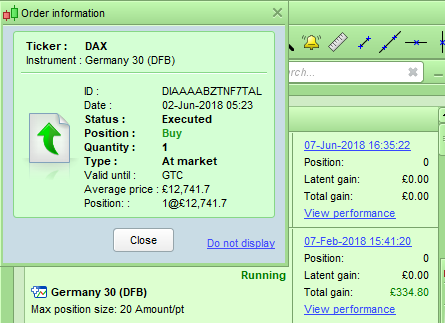
    This week every time I open my demo PRT it opens with an order confirmation ticket in the top left hand corner of the screen. I close the ticket and save upon exit and throughout the day but at the next start up the ticket is there again. Not sure if this is related to the recent issues PRT had as during that time I did have a strategy stopped on the DAX but could find no reason for it being stopped and was told it was due to the PRT/IG problems.

    How can I get rid of this ticket once and for all?

    [attachment file=72626]

    Screenshot_5.png Screenshot_5.png
    #72631 quote
    GraHal
    Participant
    Master

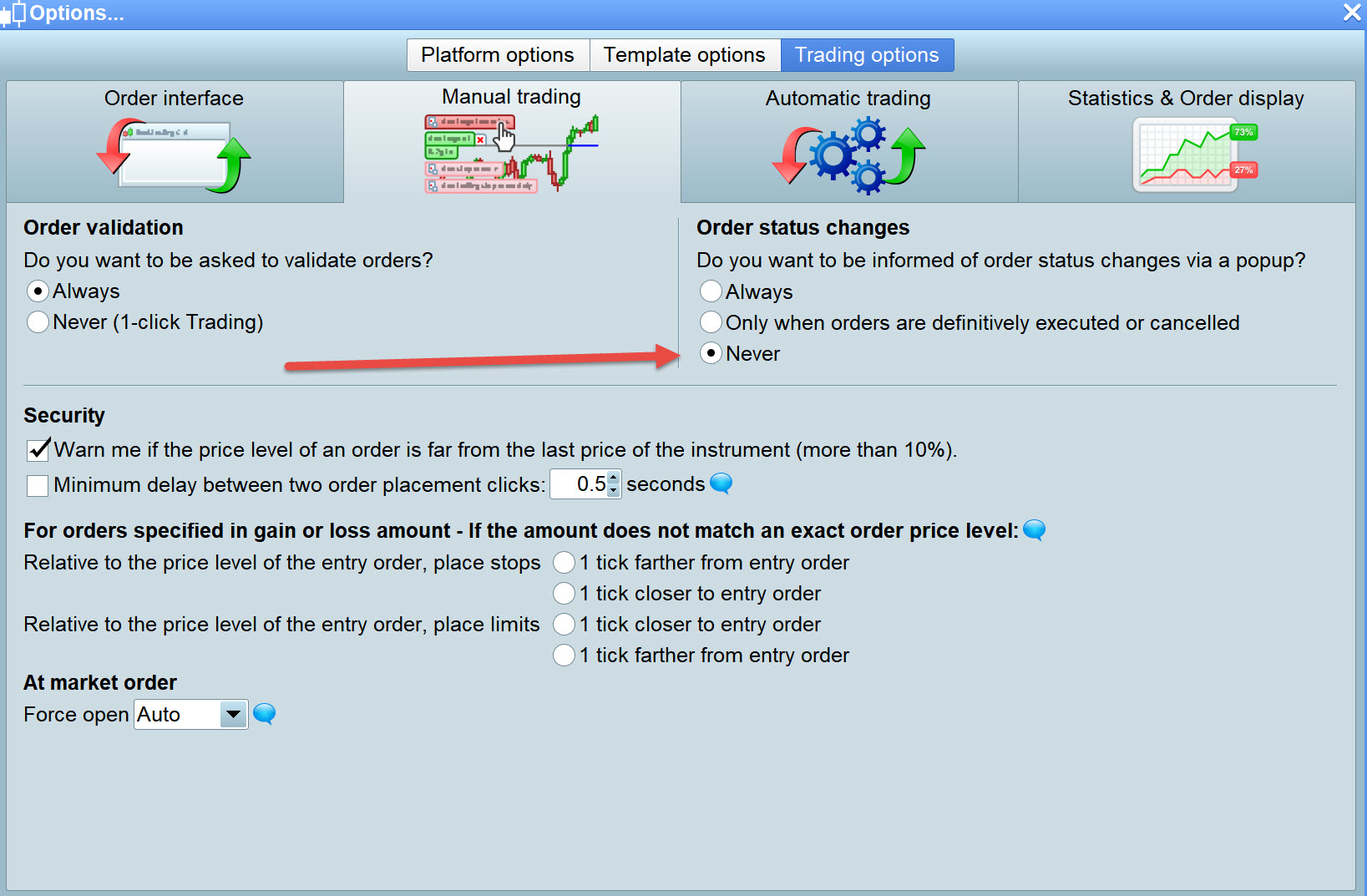
    There’s a PRT Platform setting to enable Order Confirmation, I’ll let you know if I find it! 🙂

    PS Found it – see attached

    Von-5.jpg Von-5.jpg
    #72632 quote
    Vonasi
    Moderator
    Master

    There’s a PRT Platform setting to enable Order Confirmation, I’ll let you know if I find it! 🙂

    You can find it by clicking on ‘Do not display’ on the ticket. pretty sure I tried that earlier in the week but will double check on the next start up.

    I might just send a technical report to PRT and see if they can delete it from there end.

    #72634 quote
    GraHal
    Participant
    Master

    See my PS / attachment in my post above  … what is yours set on??

    #72640 quote
    Vonasi
    Moderator
    Master

    That setting is for manual trading only. I have never done any manual trades (except closing orphaned trades!) on my demo account so I do not understand why I would get the ticket in the first place. I have sent a report to PRT. Maybe they can delete it once and for all.

    #72642 quote
    Carine
    Moderator
    Average

    Hello,

    In order to allow us to analyze your platform, please send us a technical report following these instructions:

    – As soon as you encounter the issue, go to the “Help” menu on the ProRealTime toolbar.
    – Please assure that the window concerned by this issue is open.
    – Click on “Technical support”
    – Choose the category (e.g. “Data” for a spike)
    – Select the concerned window in the drop-down menu.
    – Giving as much detail as possible, explain the issue you are having in the text box.
    – Click “Send report”

    This will send us a report containing technical information concerning your platform, which will allow our technical team to run a diagnostic analysis of the issue you have come across.

    Regards,

    Carine

    #72652 quote
    Vonasi
    Moderator
    Master

    Thank you for your reply Carine. As stated in the post prior to yours I have already sent in a ticket to PRT. Marcy has already replied via email and I have directed her to this forum for details of the ticket.

    #72824 quote
    Vonasi
    Moderator
    Master

    The trade ticket did not appear today – so thank you to whoever at PRT was involved in getting rid of it!

Viewing 8 posts - 1 through 8 (of 8 total)

  • You must be logged in to reply to this topic.

Trade ticket always there at platform open.


Platform Support: Charts, Data & Broker Setup

New Reply
Author
author-avatar
Vonasi @vonasi Moderator
Summary

This topic contains 7 replies,
has 3 voices, and was last updated by Vonasi

7 years, 8 months ago.

Topic Details
Forum: Platform Support: Charts, Data & Broker Setup
Language: English
Started: 06/08/2018
Status: Active
Attachments: 2 files
Logo Logo
Loading...