Tracer une ligne horizontale

Viewing 6 posts - 1 through 6 (of 6 total)

  • Author
    Posts
  • #254521 quote
    finplus
    Participant
    Master

    Bonjour,

    dans l’esprit de la demande ci-après.  https://www.prorealcode.com/topic/tracer-une-ligne-horizontale/, je souhaiterai que soient tracées deux lignes horizontales calculées à partir de l’indicateur ci-dessous :

    // Original Script > @DonovanWall
    // Adapted Version > @guikroth

    //////////////////////////////////////////////////////////////////////////
    // Settings for 5min chart, BTCUSDC. For Other coin, change the parameters
    //////////////////////////////////////////////////////////////////////////

    // Source
    src = customclose

    // Sampling Period
    // Settings for 5min chart, BTCUSDC. For Other coin, change the paremeters
    // per = defval=100, minval=1, “Sampling Period”

    // Range Multiplier
    // mult = defval=3.0, minval=0.1, “Range Multiplier”
    PER = 150
    MULT = 3
    // Smooth Average Range
    wper = per*2 -1
    avrng = exponentialaverage[per](abs(src-src[1]))
    smrng = mult * exponentialaverage[wper](avrng)

    // Range Filter
    rngfilt = src
    If src > rngfilt[1] then
    If rngfilt[1] > src-smrng then
    rngfilt = rngfilt[1]
    Else
    rngfilt = src-smrng
    endif
    elsif rngfilt[1] < src+smrng then
    rngfilt = rngfilt[1]
    else
    rngfilt = src+smrng
    endif
    filt = rngfilt

    // Filter Direction
    upward = 0
    If filt > filt[1] then
    upward = upward[1]+1
    elsif filt < filt[1] then
    upward = 0
    else
    upward = upward[1]
    endif
    downward = 0
    If filt < filt[1] then
    downward = downward[1]+1
    elsif filt > filt[1] then
    downward = 0
    else
    downward = downward[1]
    endif

    // Target Bands
    hband = filt + smrng
    lband = filt – smrng

    //// Zone de couleurs : selon des conditions
    ////////////////////////////////////////////////////////////////////////////

    mbTendance = (Average[3](filt) + filt)/2
    if mbTendance > mbTendance[1] then
    red=0
    green=0
    blue=255
    elsif mbTendance < mbTendance[1] then
    red=255
    green=0
    blue=0
    endif

    colorbetween(lband,hband,red,Green,Blue,88)
    Return filt as “Range Filter”, hband as “High Target”, lband as “Low Target”, mbtendance as “tendance”

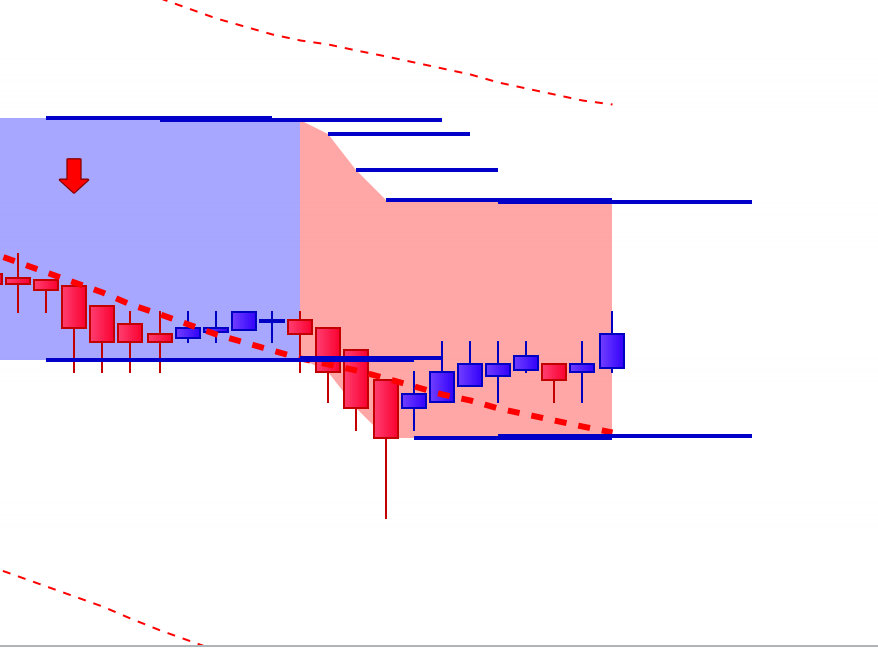
    Une ligne horizontale qui prolongerait hband et une autre lband qui apparaîtraient tant que les cours n’auraient pas franchis à la hausse hband ou à la baisse lband. Une fois franchis, des nouvelles lignes horizontales seraient créées à partir du nouveau hband ou lband. Je joints une capture écran pour visualiser ce que je voudrais.

    Merci pour votre aide.

    #254523 quote
    jacquesgermain
    Participant
    Senior

    Hello ajouter ceci juste avant return :

    if islastbarupdate then
    if close<hband then
    DRAWSEGMENT(barindex, hband, barindex+5, hband)style(line,2) coloured(0,0,200)
    endif
    if close>lband then
    DRAWSEGMENT(barindex, lband, barindex+5, lband)style(line,2) coloured(0,0,200)
    endif
    endif


    robertogozzi, finplus and Iván González thanked this post
    #254525 quote
    finplus
    Participant
    Master

    Bonjour,

    ça a l’air top. Un grand merci pour ta réactivité.

    Je le teste et te reviens.

    Bonne journée.

    #254533 quote
    finplus
    Participant
    Master

    Bonsoir,

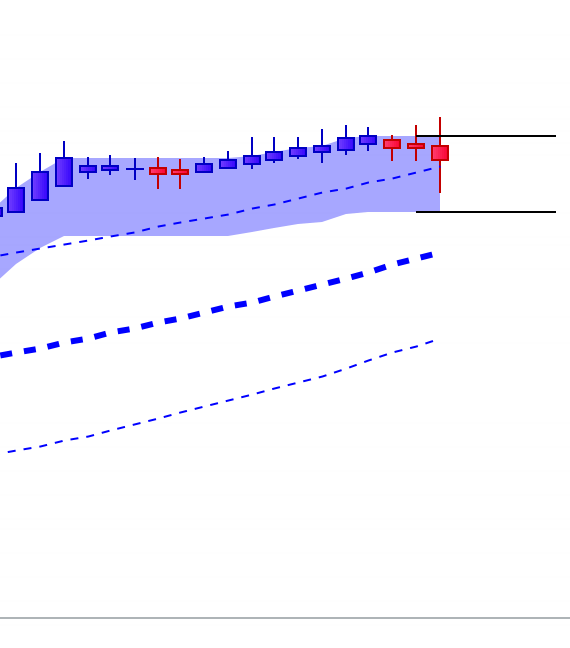
    alors un petit retour : c’est ok mais comment supprimer les lignes horizontales antérieures et donc ne conserver que celles en cours (voir capture écran joint) ?

    Merci.

    #254535 quote
    finplus
    Participant
    Master

    en fait, quand on change de valeurs, les anciennes lignes horizontales disparaissent. Mais si cela pouvait se faire automatiquement, ce sera un plus.

    Merci encore. Je vais demander maintenant d’en faire un screener.

    #254537 quote
    LucasBest
    Participant
    Junior

    Il n’y a pas d’instruction pour supprimer les anciens tracés dans PRT.

    Le seul moyen qui existe est l’instruction : DefParam DrawOnLastBarOnly = true.
    => Et là, tous les tracés sont effacés à chaque nouvelle bougie, et seuls paraîtront à l’écran les éléments tracés à la dernière bougie…
    Dans ton cas, les dernières lignes horizontales comme tu les souhaites, mais pour le reste seuls les derniers points de ta bande, etc apparaîtront.
    Si tu veux que tout soit redessiné (ou une partie – dernière 100 bougies), il faut aussi ajouter une boucle pour les redessiner.

    finplus thanked this post
Viewing 6 posts - 1 through 6 (of 6 total)
  • You must be logged in to reply to this topic.

Tracer une ligne horizontale


ProBuilder : Indicateurs & Outils Personnalisés

New Reply
Author
author-avatar
finplus @finplus Participant
Summary

This topic contains 5 replies,
has 3 voices, and was last updated by LucasBest

1 month, 3 weeks ago.

Topic Details
Forum: ProBuilder : Indicateurs & Outils Personnalisés
Language: French
Started: 12/13/2025
Status: Active
Attachments: 2 files
Logo Logo
Loading...