Toolbar Icon – MySettings – change custom icon color ?

Viewing 5 posts - 1 through 5 (of 5 total)

  • Author
    Posts
  • #187503 quote
    utestit75
    Participant
    New

    Hi,

    toolbar configuration allows to add a custom icon (“MySettings”) in the toolbar. (Settings>Templates>Toolbars>Shape and Pictures>My Settings –  waouh, that’s structured 😉

    and it is said “you can configure the type color and size of the symbol” of this MySettings icon (in >Shortcuts>Shape and Pictures>My Settings)

    How/where do you do that configuration ? Not in the graph, but in the toolbar ? So as, for instance, be able to add an “orange up arrow” in the toolbar (same as “Buy signal”, but orange), and directly click on this to add a new “orange up arrow” in a graph  – if that’s you favorite icon/color for an icon

    (without having to go through “I add a Buy signal, right-click on it, click on configure icon, open color palette, choose orange, close window”)

    note: this used to be available in some earlier versions of ProRealTime, but was leftout when implementing a newer version.

    Thanks !!

    #187528 quote
    RafaelN
    Moderator
    Senior

    Hi, this is done not in the general Settings or in the settings of the toolbar but in the settings of the drawing itself. After you have added an arrow and changed its colour to orange in its settings window, at the top of that window there is a white + in a green circle: click on it to give the custom setting a name, and once you’ve validated it it will add an orange arrow to your toolbar.

    utestit75 thanked this post
    #187539 quote
    utestit75
    Participant
    New

    great – thank you so much RafaelN for the rapid, clear & efficient response 🙂

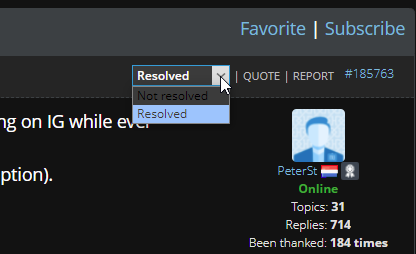
    sidenote: I don’t know if there is any such thing on PRT forum, but this post/ticket can be set to “solved”. Thanks for that !

    #187541 quote
    PeterSt
    Participant
    Master

    @utestit75, the dropdown you see below is visible in the first post of your topic. So you can set it yourself to resolved.

    utestit75 thanked this post
    image_2022-02-04_164727.png image_2022-02-04_164727.png
    #187545 quote
    utestit75
    Participant
    New

    thanks & done !

Viewing 5 posts - 1 through 5 (of 5 total)

  • You must be logged in to reply to this topic.

Toolbar Icon – MySettings – change custom icon color ?


Platform Support: Charts, Data & Broker Setup

New Reply
Author
author-avatar
utestit75 @utestit75 Participant
Summary

This topic contains 4 replies,
has 3 voices, and was last updated by utestit75
4 years ago.

Topic Details
Forum: Platform Support: Charts, Data & Broker Setup
Language: English
Started: 02/04/2022
Status: Active
Attachments: 1 files
Logo Logo
Loading...