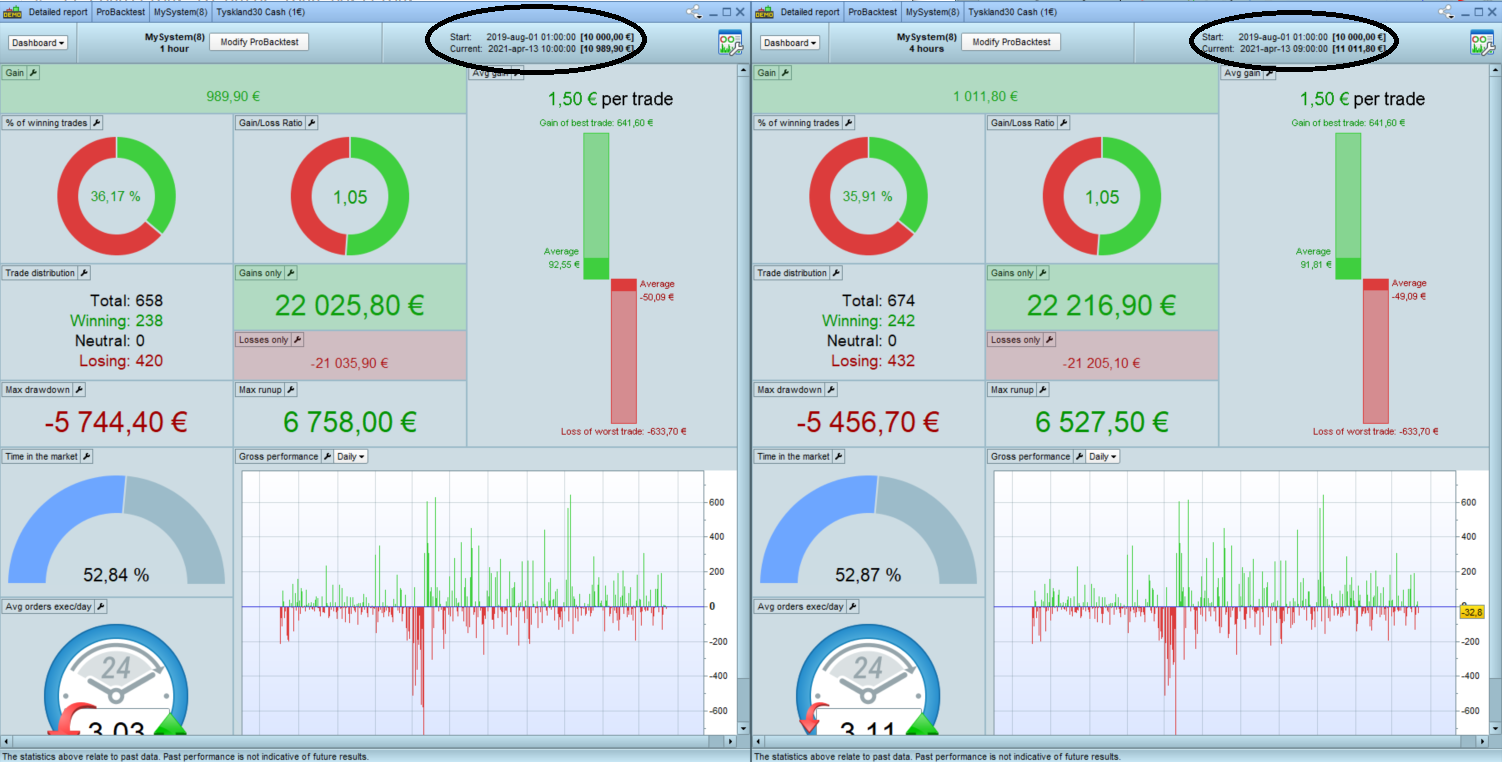
Im about to try using the Timeframe code to have different rules in the script for condition to open and close. Like the conditions to open would “run” on the 4 hour chart and then a coded Stop to be updated on lets say 1 hour.
But when I started to try this out and looked to “validate” I got confused as what I thougt would give the same result didnt, here’s an example.
Example in Backtest
Using the DAX index
The same fixed Time Period of 3 weeks
Scenario 1
Time Unit 4 hours
Scenario 2
Time Unit 1 hour
And using the TF code in the beginning of script
Timeframe (4 hours, updateonclose)
Shoudnt the reslust be the same for those scenarios or have I missunderstood something?
Okey, here’s an example with the most basic code =)
But it illustrates the point or my question at least. As I would think the results should be the same in both cases.
Both are run on DAX within the same “Time Period” in Backtest.
// Definition of code parameters
DEFPARAM CumulateOrders = False // Cumulating positions deactivated

// Conditions to enter long positions
c1 = (close >= close[1])

IF c1 THEN
BUY 1 CONTRACT AT MARKET
ENDIF

// Conditions to exit long positions
c2 = (close <= close[1])

IF c2 THEN
SELL AT MARKET
ENDIF
Example 1
on the 4 hour chart with bellow code will give result X
// Definition of code parameters
DEFPARAM CumulateOrders = False // Cumulating positions deactivated

timeframe (4 hour, updateonclose)

// Conditions to enter long positions
c1 = (close >= close[1])

IF c1 THEN
BUY 1 CONTRACT AT MARKET
ENDIF

// Conditions to exit long positions
c2 = (close <= close[1])

IF c2 THEN
SELL AT MARKET
ENDIF
Example 2
on the 1 hour chart, and added Timeframe to be 4 hour gives result Y (not same “X”)
As I’ve understood it the Timeframe code would “wait” until it has passed 4 hours (in my example) to run the bellow code?
So that if you run the same script on a 4 hour chart or on a 1 hour chart and with “timeframe 4 hour” it should both give the same result?
It’s because with the same number of units, the 1-hour TF allows only approx. 1/4th of the time available for backtest.
thanks for replying. But I didn’t really understand, could you elaborate?
He means that 100k 4 hour candles represents 400k hours whilst 100k 1 hour candles only represents 100k hours. You can’t get the same results from different size data samples.
He means that 100k 4 hour candles represents 400k hours whilst 100k 1 hour candles only represents 100k hours. You can’t get the same results from different size data samples.
That logic I can understand.
However, when Im doing the testing Im using the same load of data (I guess) as Im using the same “Time Period” (Start and End Time) in Backtest, lets say 1 week of data, not letting the BT run on a fix amount of bars to load.
So If im using the same period 1 week, mon-fri, and in Scenario 1: use the 4 hour chart, it would load 30 hours (bars), (24*5)/4, and then run “c1” upon close.
And in Scenario 2: use the 1 hour chart, it would load 120 hours (bars), 24*5, and with added Timeframe (4 hour, updateonclose) it should run “c1” on every 4th hour (bar) ie 120/4=30, the same number of hour, bars, as on 4 hour chart?
there are some diff Vonasi
backtests in PRT are not the best, i think nicolas or robert wrote a list of things that might make backtests turn out wrong not too long ago
I would suggest using GRAPH COUNTOFPOSITION in each strategy to see if you can spot where they go out of synch or miss a trade.
1 week of data is approx. 30 4-hour bars and 120 1-hour bars, completely different!
1 week of data is approx. 30 4-hour bars and 120 1-hour bars, completely different!
Yes of course that’s a big difference.
But that doesn’t help me understand Why the result is not the same (or at least very similar if some trades would be out-of-sync).
As I understood the function; using your numbers, loading 120 1-hour bar and then use TimeFrame 4 hour, updateonclose, wouldn’t the system then use 30 bars, every 4th 1-hour bar? ie the same as directly running on the 4-hour chart?
(Im basically wondering how the TimeFrame update is calculated? in order to understand Why the result is not the same)
Got it!
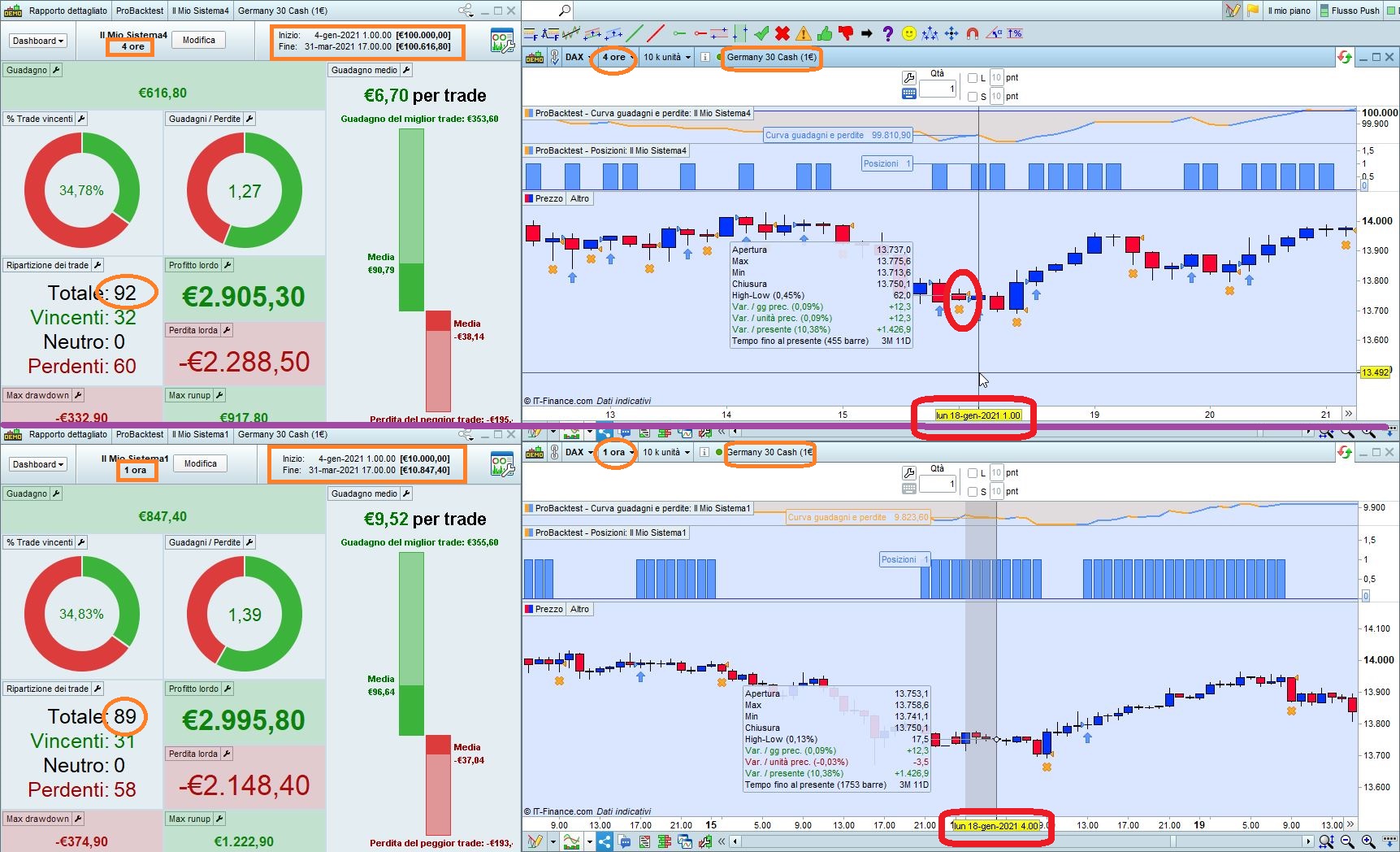
The 4-hour TF opens a few more trades than the 1-hour TF (on the same time range) because tjhe 4-hour TF has a sunday bar, which the 1-hour TF hasn’t.
So on that missing candle the entry condition can be true and the 4-hour bar opens a trade, while the 1-hour doesn’t!
(see attached pic with Jan. 18th 2021 compared, the 4-hour Sunday bar is in the upper chart, circled in red)