tick mode

Viewing 10 posts - 1 through 10 (of 10 total)

  • Author
    Posts
  • #39955 quote
    Seemore Profit
    Participant
    Junior


    When i backtest never really get a high tick mode. This one test not really doing anything major tricky or different but i get tick mode 68+ any ideas why this could be?


    Thanks

    Jamie

    #39985 quote
    Nicolas
    Keymaster
    Master

    I don’t understand what you mean by “get a high tick mode”? Please explain.

    #40104 quote
    michel
    Participant
    New

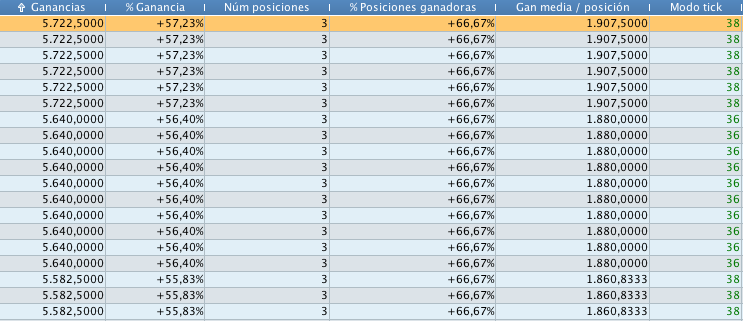
    I also have a “tick mode” field in the vars optimization report (see last column of the attachment) but have no idea what the number shown means. Help will be appreciated 🙂

    PS: my PRT config is in spanish.

    tick-mode.png tick-mode.png
    #40113 quote
    Nicolas
    Keymaster
    Master

    @michel

    @GraHal and I have answered this question in another thread this week, you’ll find it here: https://www.prorealcode.com/topic/tick-mode-help/

    #40114 quote
    michel
    Participant
    New

    Thanks Nicolas I’m aware of this thread but I’m afraid I don’t really understand it. In a few words the less the better?

    #40117 quote
    Nicolas
    Keymaster
    Master

    The optimisation engine don’t avoid the old “0 bar” problem (to be faster), while the simple backtest in tick mode is the most reliable test you can have (without the “0 bar” issue).  You’ll find many discussions about the “0 bar” or “zero bar” phenomena in the forums (use the search form).

    In a few words, the internal bar price movement is not checked in optimisation tool.

    michel thanked this post
    #40119 quote
    michel
    Participant
    New

    Merci beaucoup Nicolas, j’essayerai de comprendre à fond ce que tu viens de me dire.

    michel

    Nicolas thanked this post
    #40163 quote
    GraHal
    Participant
    Master

    @michel the result of changes in price withininside the bars / candles are ignored by the optimisation calculator.

    @Seemore Profit price must be touching your stop loss 68+ times with the variable values in that ’68+ backtest’ row?

    michel and Seemore Profit thanked this post
    #40178 quote
    michel
    Participant
    New

    @Nicolas, @GraHal: PRT 10.3 was supposed to solve some issues like the zero bar problem (http://bit.ly/2u0nueX), so “ignored by the optimization calculator” means that I still can’t trust results consistently? Is it worth doing this optimization or is it a false friend to avoid? I’m doing a large job based on this premise in order to test deeply my last script and the tick by tick backtest results are too good pro tempora. I distrust and that’s why I want to clearly understand the tick mode in practice.

    #40182 quote
    GraHal
    Participant
    Master

    “ignored by the optimization calculator” because to calculate an optimised variable would take forever with the current optimisation engine.

    However, when you select and run a set of optimised variables then tick mode kicks in (is NOT then ignored) and the results you see in the Equity Curve and in the ‘Detail Report’ are what you might expect to get running in real time / Live.

    You say …  tick by tick backtest results are too good … please confirm you have enabled (ticked the box) for running in tick tick mode?

Viewing 10 posts - 1 through 10 (of 10 total)

  • You must be logged in to reply to this topic.

tick mode


ProOrder: Automated Strategies & Backtesting

New Reply
Author
Summary

This topic contains 9 replies,
has 4 voices, and was last updated by GraHal

8 years, 8 months ago.

Topic Details
Forum: ProOrder: Automated Strategies & Backtesting
Language: English
Started: 07/06/2017
Status: Active
Attachments: 1 files
Logo Logo
Loading...