TARGET %PROFIT edit: SET STOP %TRAILING

Viewing 5 posts - 1 through 5 (of 5 total)
  • Author
    Posts
  • #189543 quote
    deletedaccount22102025
    Participant
    New

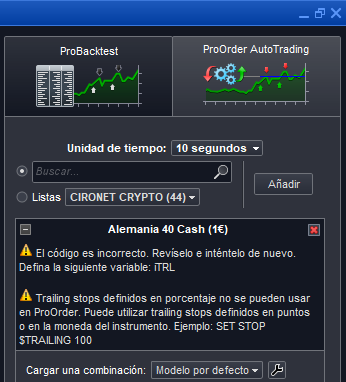
    Hola a todos. Me gustaría saber como poder aplicar un TARGET %PROFIT a una estrategia en un sistema dentro de ProOrder, ya que te deja aplicar la orden ” SET TARGET %PROFIT ” en Backtesting pero a la hora de pasarlo a ProOrder te dice un mensaje que no es posible, únicamente “PPROFIT” o “$PROFIT”. Y me gustaría saber si hubiera alguna manera de aplicarlo mediante otras instrucciones o lineas de código. Gracias

    #189544 quote
    robertogozzi
    Moderator
    Master

    Ejecuté este código en el autotrading (ProOrder) y no se me informó ningún error:

    if close crosses over average[200,0](close) and not Onmarket then
       buy at market
    endif
    set target %profit 2
    set stop   %loss   1
    #189546 quote
    deletedaccount22102025
    Participant
    New

    Disculpa Roberto….con tantas pruebas me confundí….se trata de “SET STOP %TRAILING”. Y por eso me gustaría saber si hubiera alguna manera de aplicarlo mediante otras instrucciones o lineas de código. Gracias

    #189567 quote
    robertogozzi
    Moderator
    Master

    Este es el mismo ejemplo, al que agregué el trailing stop de Nicolás, que modifiqué para poder usar porcentajes en lugar de pips:

    if close crosses over average[200,0](close) and not Onmarket then
       buy at market
    endif
    //*********************************************************************************
    // Trailing Stop by Nicolas
    // https://www.prorealcode.com/blog/trading/complete-trailing-stop-code-function/
    // (lines 17- 56)
    // modified to use Percentages
    //
    //trailing stop function
    //
    StartPerCent  = 0.5    //Trailing Stop will activate after 0.5% gain
    StepPerCent   = 0.1    //Trailing Steps will occur at any further 0.1% gain
    //
    trailingstart = PositionPrice * StartPerCent / 100 / PipSize
    trailingstep  = PositionPrice * StepPerCent  / 100 / PipSize
    //
    //reset the stoploss value
    IF NOT ONMARKET THEN
    newSL=0
    ENDIF
     
    //manage long positions
    IF LONGONMARKET THEN
    //first move (breakeven)
    IF newSL=0 AND close-PositionPrice>=trailingstart*pipsize THEN
    newSL = PositionPrice+trailingstep*pipsize
    ENDIF
    //next moves
    IF newSL>0 AND close-newSL>=trailingstep*pipsize THEN
    newSL = max(newSL,newSL+trailingstep*pipsize)
    ENDIF
    ENDIF
     
    //manage short positions
    IF SHORTONMARKET THEN
    //first move (breakeven)
    IF newSL=0 AND PositionPrice-close>=trailingstart*pipsize THEN
    newSL = PositionPrice-trailingstep*pipsize
    ENDIF
    //next moves
    IF newSL>0 AND newSL-close>=trailingstep*pipsize THEN
    newSL = min(newSL,newSL-trailingstep*pipsize)
    ENDIF
    ENDIF
     
    //stop order to exit the positions
    IF newSL>0 THEN
    SELL AT newSL STOP
    EXITSHORT AT newSL STOP
    ENDIF
    //*********************************************************************************
    //graphonprice PositionPrice coloured(0,0,255,255)
    //graphonprice newSL         coloured(255,0,0,255)
    //graph TrailingStart
    //graph TrailingStep

    Si elimina las barras de comentarios de las últimas 4 líneas, podrá ver los valores de las variables, tanto en el precio como en un pip (después de convertir sus porcentajes).

    thanked this post
    #189582 quote
    deletedaccount22102025
    Participant
    New

    Muchas gracias Roberto. Lo pongo en marcha en ProOrder Demo y a ver qué tal. Muchas gracias por la ayuda. Un saludo

Viewing 5 posts - 1 through 5 (of 5 total)
  • You must be logged in to reply to this topic.

TARGET %PROFIT edit: SET STOP %TRAILING


ProOrder: Trading Automático y Backtesting

New Reply
Summary

This topic contains 4 replies,
has 2 voices, and was last updated by deletedaccount22102025
3 years, 11 months ago.

Topic Details
Forum: ProOrder: Trading Automático y Backtesting
Language: Spanish
Started: 03/07/2022
Status: Active
Attachments: 2 files
Logo Logo
Loading...