


Swing Indicator

Viewing 12 posts - 16 through 27 (of 27 total)
  • Author
    Posts
  • #109564 quote
    robertogozzi
    Moderator
    Master

    You have to add it ON the price chart (like MA’s), not under it (like Rsi).

    You have to:

    1. click the wrench on the upper left corner of the price chart
    2. select price
    3. click add indicator
    4. choose the indicator you want to add from the dropdown list
    #109646 quote
    Robb
    Participant
    Average

    Hello Roberto

    thanks but :

    1) I don’t find the wrench

    2) anyway, I click on price button or alternatively right button directly on the price chart

    3) add indicator option from the menu

    4) select the indicator “swing point” (I previously loaded it among my indicators)

    nothing happens.

    The point is that I used the same procedure with other indicators and they of course are displayed on the price chart….

    Please could you try the same and help me on that

    thanks

    Roberto

    #109647 quote
    fifi743
    Participant
    Master

    Good evening,
    there is a value after the return at the bottom of the code
    or in the draw code

    #109648 quote
    Robb
    Participant
    Average

    Hello Fifi

    thanks for the answer

    what do you mean with “there is a value in the draw code”?

    I just copied it.

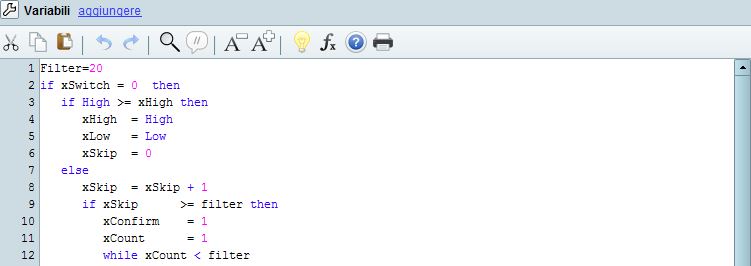
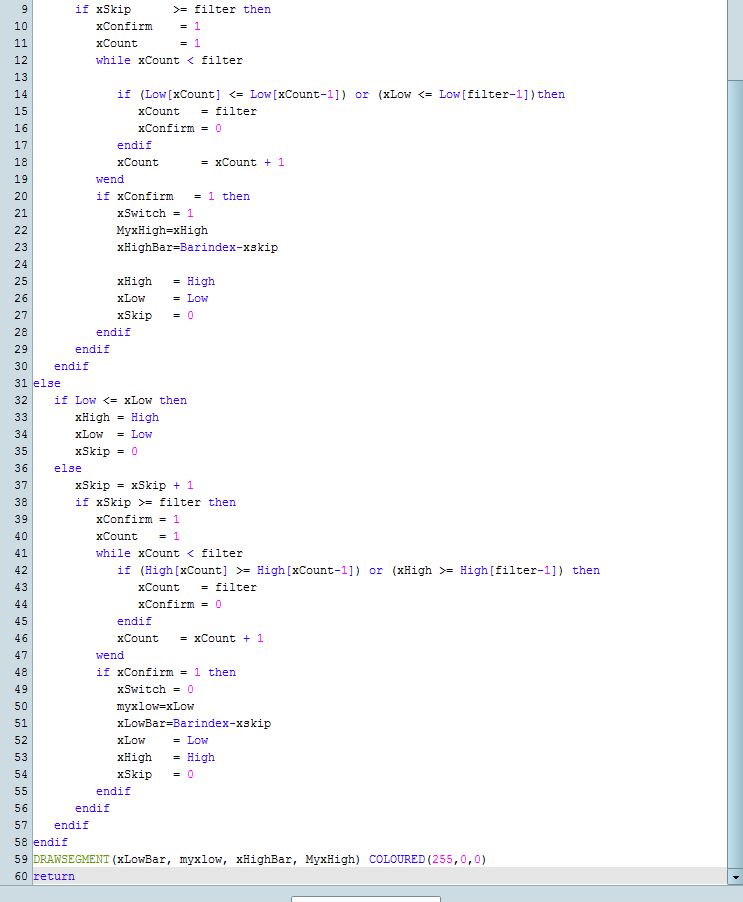
    I attached the code, in order to avoid any doubt

    please could you look at it?

    code-part-1.jpg code-part-1.jpg code-part-2.jpg code-part-2.jpg
    #109651 quote
    Robb
    Participant
    Average

    This is the code

    Filter=20
    if xSwitch= 0 then
    if High >= xHigh then
    xHigh = High
    xLow = Low
    xSkip = 0
    else
    xSkip= xSkip + 1
    if xSkip>= filter then
    xConfirm=1
    xCount=1
    while xCount < filter
    if (Low[xCount] <= Low[xCount-1]) or (xLow <= Low[filter-1])then
    xCount= filter
    xConfirm=0
    endif
    xCount= xCount + 1
    wend
    if xConfirm = 1 then
    xSwitch = 1
    MyxHigh=xHigh
    xHighBar=Barindex-xskip
    xHigh = High
    xLow = Low
    xSkip = 0
    endif
    endif
    endif
    else
    if Low <= xLow then
    xHigh = High
    xLow = Low
    xSkip = 0
    else
    xSkip = xSkip + 1
    if xSkip >= filter then
    xConfirm = 1
    xCount = 1
    while xCount < filter
    if (High[xCount] >= High[xCount-1]) or (xHigh >= High[filter-1]) then
    xCount = filter
    xConfirm = 0
    endif
    xCount = xCount + 1
    wend
    if xConfirm = 1 then
    xSwitch = 0
    myxlow=xLow
    xLowBar=Barindex-xskip
    xLow = Low
    xHigh = High
    xSkip = 0
    endif
    endif
    endif
    endif
    DRAWSEGMENT(xLowBar, myxlow, xHighBar, MyxHigh) COLOURED(255,0,0)
    return
    #109652 quote
    fifi743
    Participant
    Master

    try this one and look at how it’s done

    fermeture-marche.itf
    #109654 quote
    Robb
    Participant
    Average

    I don’t know, I will check the code to understand how it works….

    #109655 quote
    fifi743
    Participant
    Master

    BUT THE FILTER 2

    #109656 quote
    Robb
    Participant
    Average

    It does work with lower value of filter. From 1 to 3,4,5 etc

    20 was to high.

    bye

    #109657 quote
    Robb
    Participant
    Average

    Thank you!

    #109661 quote
    Vonasi
    Moderator
    Master

    Robb – when posting code in the forums always use the ‘Insert PRT Code’ button to make it more readable for others. I have tidied up your post for you, 🙂

    #185795 quote
    Khaled
    Participant
    Veteran

    Good morning fifi743,

    I think there is a symbol # missing to show the quotes

    DefParam DrawOnLastBarOnly = false


    if Time = 220000 then
    customeclose2 = open
    Ccfd = customeclose2
    startbar = barindex
    drawtext("                                                                                                    #CCfd#",startbar,Ccfd,Dialog,BoldItalic,10) coloured(102,51,0)
    endif
    if Time = 173500 then
    startbar = barindex
    customeclose1 = open
    Ccash = customeclose1
    drawtext("                                                                                                    #CCash#",startbar,CCash,Dialog,BoldItalic,10) coloured(102,51,0)
    endif
    //
    RETURN CCash COLOURED(102,51,0) STYLE(dottedline,1) AS "CCash", Ccfd COLOURED(102,51,0) STYLE(dottedline,1) AS "CCfd"
Viewing 12 posts - 16 through 27 (of 27 total)
  • You must be logged in to reply to this topic.

Swing Indicator


ProBuilder: Indicators & Custom Tools

New Reply
Author
author-avatar
Henry @henry Participant
Summary

This topic contains 26 replies,
has 1 voice, and was last updated by Khaled

4 years ago.

Topic Details
Forum: ProBuilder: Indicators & Custom Tools
Language: English
Started: 10/25/2017
Status: Active
Attachments: 4 files
Logo Logo
Loading...