


Swing High / Swing Low

Viewing 3 posts - 1 through 3 (of 3 total)

  • Author
    Posts
  • #104449 quote
    solar
    Participant
    Senior
    Hi everyone, I am looking for a swinghigh/swinglow function same as the one described here: The SwingHigh function returns the high pivot price where a Swing High occurred.

    Syntax

    SwingHigh(Instance, Price, Strength, Length)

    Remarks

    A Swing High occurs when the Price of a bar is at least as high as the same Price on the preceding bar(s), and higher than the same Price on the bar(s) that follow it. The input Strength is the number of bars on each side of the SwingHigh. A strength of one indicates that the value returned by the input Price must be greater than or equal to the same value returned for the bar on its left and greater than the bar on its right. The input Length refers to the number of bars being examined for the SwingHigh. The input Instance refers to which SwingHigh you want to use. For example, if in a twenty-one bar period three swing highs were found, it becomes necessary to specify which SwingHigh is desired. If the most recent SwingHigh is desired, a one (1) would be substituted for the input Instance.

       If no SwingHigh is found in the period (Length) specified, the function will return a minus one (-1). The value of the input Length must exceed Strength by at least one. In addition, the Maximum number of bars referenced by a study (known as MaxBarsBack) must be greater than the sum of the values of Strength and Length.

    Example

    Assigns to Value1 the most recently occurring High in over the last 10 bars that has a strength of 4 on both the left and right sides of the swing bar..

    Value1 = SwingHigh(1,Close,4,10);

    You may search the keyword  ‘swinghigh’ in the link http://help.tradestation.com/09_01/tsdevhelp/subsystems/elword/elword_Left.htm#CSHID=function%2Fslowk_function_.htm|StartTopic=function%2Fslowk_function_.htm|SkinName=ts_slate_skin I have started some draft yet found it hard to complete with my limited knowledge, would anyone please complete it? Cheers
    For b=0 to length do
    	//Strength
    For a =0 to strength do
    countR= Summation [strength](Price[a]<=price[a+1])
    countL=summation [strength](Price[a]>=price[a+1])[strength]
    next
    If countR =strength and countL=strength then 
    xxxxxxx
    endif
    next
    
    #104461 quote
    robertogozzi
    Moderator
    Master
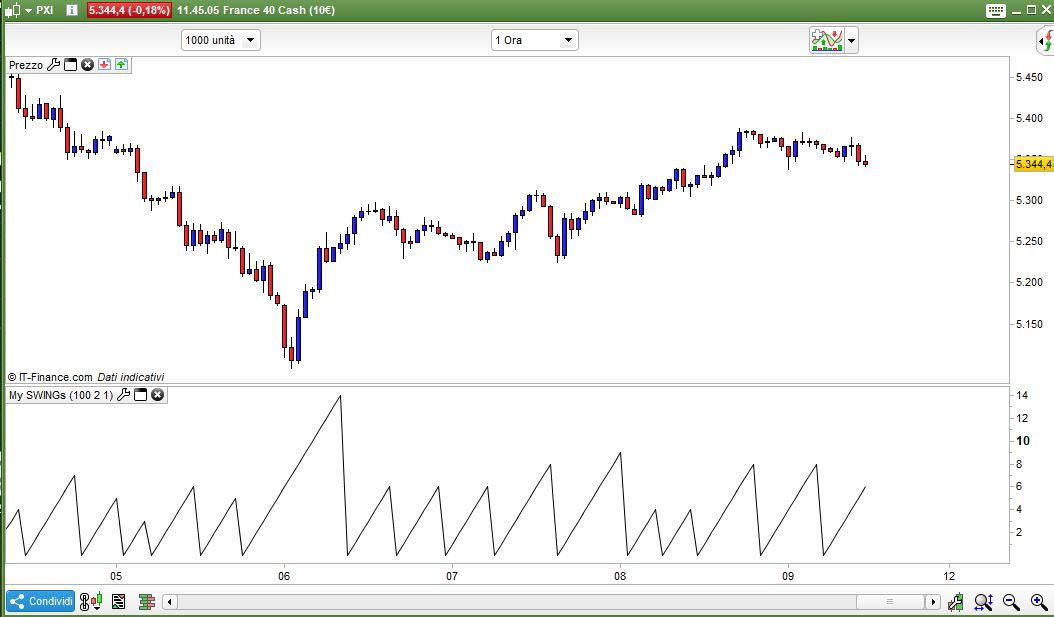
    This the code I wrote for swing HI patterns, if I could understand what you meant. If it’s correct, then I (or you if you can code it) can add the opposite swing LO, if desired:
    DEFPARAM CalculateOnLastBars = 1000
    //Length   = 100
    //Strength = 2
    //Input    = 1
    LeftHI   = high[Strength] >= highest[Strength + 1](high[Strength]) //check LEFT  side
    RightHI  = high[Strength] > highest[Strength](high)                //check RIGHT side
    SwingHI  = summation[Length](LeftHI AND RightHI)                   //tally swing patterns in the last LENGTH bars
    // scan all LENGTH bars to retrieve INPUT swing pattern, if any
    IF SwingHI > 0 THEN
       InputNum = min(SwingHI,max(0,Input))
       Count = 0
       j     = i
       FOR i = 0 TO Length - 1
          IF LeftHI[i] AND RightHI[i] THEN
             Count = Count + 1
             IF Count = InputNum THEN
                BREAK
             ELSE
                j = -1
             ENDIF
          ENDIF
       NEXT
    ELSE
       j = -1
    ENDIF
    RETURN j
    x-8.jpg x-8.jpg My-SWINGs.itf
    #104464 quote
    robertogozzi
    Moderator
    Master
    It’s a function (indicator), and you’ll be able to CALL it from your strategy.
Viewing 3 posts - 1 through 3 (of 3 total)
  • You must be logged in to reply to this topic.

Swing High / Swing Low


ProOrder: Automated Strategies & Backtesting

New Reply
Author
author-avatar
solar @fatlung Participant
Summary

This topic contains 2 replies,
has 2 voices, and was last updated by robertogozzi
6 years, 6 months ago.

Topic Details
Forum: ProOrder: Automated Strategies & Backtesting
Language: English
Started: 08/09/2019
Status: Active
Attachments: 2 files
Logo Logo
Loading...

