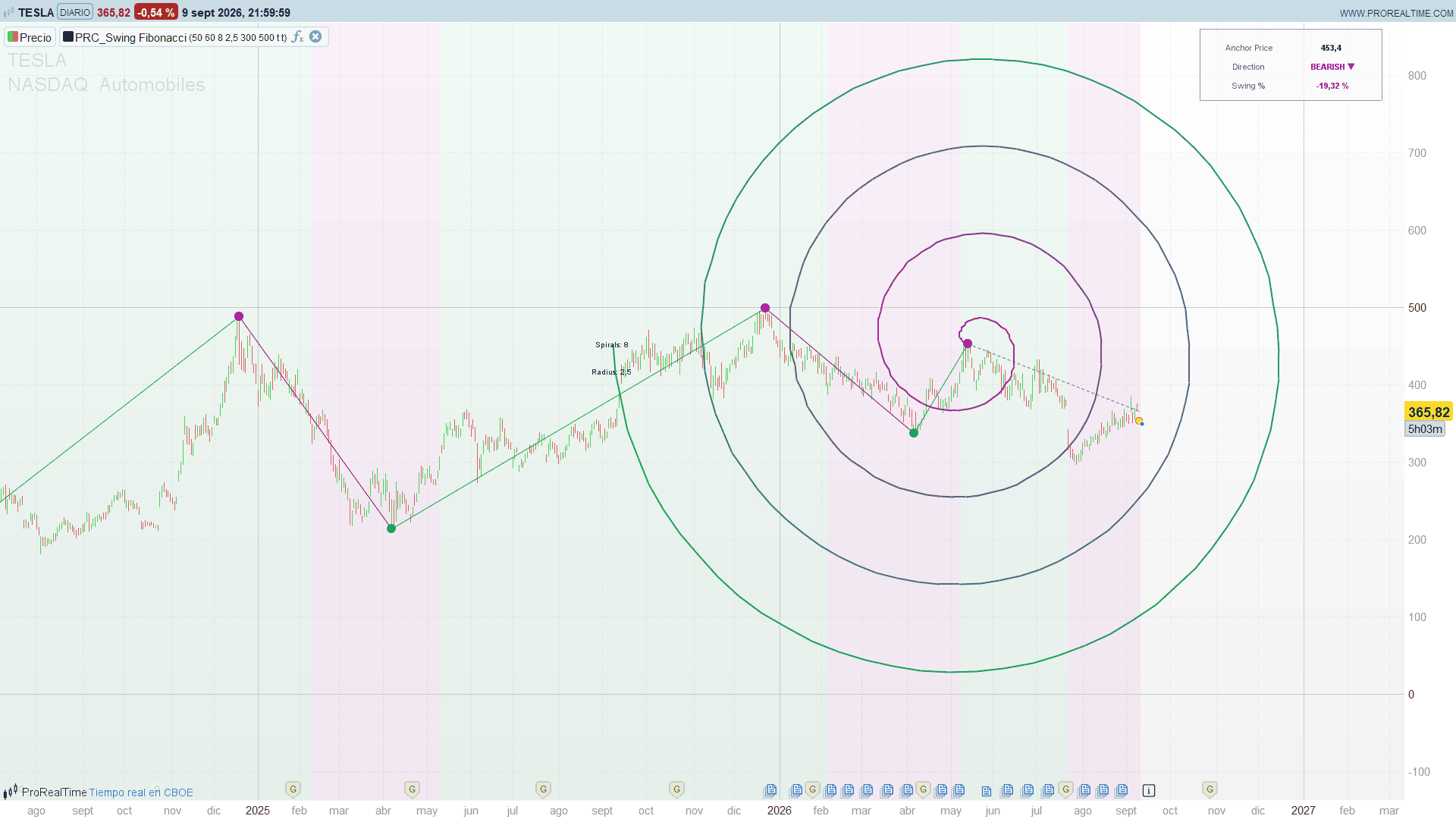
aqui tienes
//---------------------------------------------------------------------------//
//PRC_Swing Fibonacci
//version = 1
//10.09.2026
//Ivan Gonzalez @ www.prorealcode.com
//Original author: BigBeluga
//Sharing ProRealTime knowledge
//---------------------------------------------------------------------------//
//Swing structure zigzag whose last confirmed pivot anchors an Archimedean
//spiral. The spiral is a compass, not a forecast: it is drawn from the anchor
//with a fixed geometry, so its arms mark where the market would be if it kept
//expanding at the pace of the leg that has just been confirmed.
//---------------------------------------------------------------------------//
DEFPARAM drawonlastbaronly = true

//-----Swing structure-------------------------------------------------------//
swingLength = 50       //Swing Structure (50..100): how significant a high or low must be
maxMarks    = 60       //Swing marks kept on the chart

//-----Spiral----------------------------------------------------------------//
spiralArms  = 8        //Spirals qty (1..10): rotations around the anchor
spiralRad   = 2.5      //Radius (1..8): vertical stretch AND horizontal reach
spiralRes   = 300      //Segments of the spiral, 3 or more (original resolution: 300)
maxFwd      = 500      //Bars drawn to the right of the last one (original cut-off)

//-----Panel and regime------------------------------------------------------//
showPanel   = 1        //1 = anchor price / direction / swing % panel
showRegime  = 1        //1 = trend tint behind the price
dashX       = -270     //panel: horizontal offset of the label column
dashY       = -20      //panel: vertical offset from the top edge
dashCol     = 110      //panel: column width

//-----Palette---------------------------------------------------------------//
// The lime / fuchsia of the original are calibrated for a black TradingView
// chart. Both are pulled down in luminance so they stay readable on the light
// PRT background, keeping the hue.
bullR = 0
bullG = 170
bullB = 80
bearR = 190
bearG = 0
bearB = 170
neuR  = 105
neuG  = 110
neuB  = 120
txtR  = 35
txtG  = 38
txtB  = 45

//---------------------------------------------------------------------------//
//1. SWING STRUCTURE
//---------------------------------------------------------------------------//
// A new N-bar high turns the structure bullish, a new N-bar low turns it
// bearish. A swing is CONFIRMED when the state flips: the pivot is then placed
// retroactively on the opposite extreme, which is the one that has just been
// left behind.
//---------------------------------------------------------------------------//
ONCE hiIdx = 0
ONCE hiVal = high
ONCE loIdx = 0
ONCE loVal = low
ONCE hiSet = 0
ONCE loSet = 0
ONCE dirUp = 0
ONCE nMk = 0
ONCE swIdx = 0
ONCE swPrice = 0
ONCE swReady = 0
ONCE lockRng = 0
ONCE lockLen = 0

mkRing = maxMarks + 1        // one spare slot: it is written on the live bar

// state as it stood at the close of the previous bar
prevDir = dirUp
pHiIdx  = hiIdx
pHiVal  = hiVal
pLoIdx  = loIdx
pLoVal  = loVal
pHiSet  = hiSet
pLoSet  = loSet

IF barindex >= swingLength - 1 THEN
   hiWin = highest[swingLength](high)
   loWin = lowest[swingLength](low)

   IF high = hiWin THEN
      hiIdx = barindex
      hiVal = high
      hiSet = 1
      dirUp = 1
   ENDIF
   // the low test runs AFTER the high test, as in the original: on a bar that
   // is both the N-bar high and the N-bar low, the structure ends up bearish
   IF low = loWin THEN
      loIdx = barindex
      loVal = low
      loSet = 1
      dirUp = 0
   ENDIF

   IF dirUp <> prevDir THEN
      // range and leg length are FROZEN here and drive the size of the spiral
      // until the next flip
      rngLen  = min(500, barindex + 1)
      lockRng = highest[rngLen](high) - lowest[rngLen](low)

      IF dirUp = 1 THEN
         lockLen = barindex - loIdx + 20
         IF loSet = 1 THEN
            swIdx = loIdx
            swPrice = loVal
            swReady = 1
         ENDIF
      ELSE
         lockLen = barindex - hiIdx + 20
         IF hiSet = 1 THEN
            swIdx = hiIdx
            swPrice = hiVal
            swReady = 1
         ENDIF
      ENDIF

      // Leg of the zigzag: from the opposite extreme AS IT STOOD on the
      // previous bar to the pivot just confirmed. Without both extremes really
      // recorded the leg would start on bar 0 at the price of bar 0, which
      // draws a huge segment and stretches the price axis.
      IF pHiSet = 1 AND pLoSet = 1 THEN
         slot = nMk MOD mkRing
         IF dirUp = 1 THEN
            $mkXa[slot] = pHiIdx
            $mkYa[slot] = pHiVal
            $mkXb[slot] = loIdx
            $mkYb[slot] = loVal
         ELSE
            $mkXa[slot] = pLoIdx
            $mkYa[slot] = pLoVal
            $mkXb[slot] = hiIdx
            $mkYb[slot] = hiVal
         ENDIF
         $mkD[slot] = dirUp
         nMk = nMk + 1
      ENDIF
   ENDIF
ENDIF

//---------------------------------------------------------------------------//
//2. TREND TINT
//---------------------------------------------------------------------------//
// Replaces the row of coloured squares the original prints at the bottom of
// the pane: ProBuilder has no location.bottom, and any fixed price level would
// drift with the zoom.
//---------------------------------------------------------------------------//
bgA = 0
IF showRegime = 1 THEN
   bgA = 14
ENDIF
IF dirUp = 1 THEN
   BACKGROUNDCOLOR(bullR, bullG, bullB, bgA)
ELSE
   BACKGROUNDCOLOR(bearR, bearG, bearB, bgA)
ENDIF

//---------------------------------------------------------------------------//
//3. DRAWING
//---------------------------------------------------------------------------//
// Everything is repainted from stored state inside a single islastbarupdate
// block, so the defparam above can only help: the spiral and the panel are not
// stacked bar after bar, and the swing marks are not lost because they are
// replayed from the ring buffer instead of being drawn on their own bar.
//---------------------------------------------------------------------------//
IF islastbarupdate AND swReady = 1 THEN

   //-----3.1 Zigzag of confirmed swings-------------------------------------//
   nShow = min(nMk, maxMarks)
   stMk = (nMk - nShow) MOD mkRing
   FOR k = 0 TO nShow - 1 DO
      sl = (stMk + k) MOD mkRing
      IF $mkD[sl] = 1 THEN
         // bullish flip: the leg that just ended is the bearish one, and the
         // pivot marked is a low
         segR = bearR
         segG = bearG
         segB = bearB
         ptR = bullR
         ptG = bullG
         ptB = bullB
      ELSE
         segR = bullR
         segG = bullG
         segB = bullB
         ptR = bearR
         ptG = bearG
         ptB = bearB
      ENDIF
      DRAWSEGMENT($mkXa[sl], $mkYa[sl], $mkXb[sl], $mkYb[sl]) COLOURED(segR, segG, segB, 255) STYLE(line, 1)
      DRAWPOINT($mkXb[sl], $mkYb[sl], 3) COLOURED(ptR, ptG, ptB, 255)
   NEXT

   //-----3.2 Spiral---------------------------------------------------------//
   resN = max(3, spiralRes)
   // Pine builds it in radians over two arrays. Solving the algebra first
   // removes both: the number of arms cancels out on each axis, so
   //
   //     x(u) = anchorBar   - u * cos(theta) * radius * lockLen
   //     y(u) = anchorPrice + s * u * sin(theta) * lockRange * radius / dY
   //
   // with u from 0 to 1, theta from 0 to arms * 180 degrees, s = -1 when the
   // structure is bullish, and dY the peak-to-peak of u * sin(theta), which
   // only the first pass can know. Consequence worth reading twice: the total
   // height of the spiral is exactly lockRange * radius, so radius is not a
   // cosmetic size, it multiplies the 500-bar range.
   //
   // The angle advances by rotation recurrence instead of evaluating
   // sin/cos of a number of degrees that reaches 1800 with 10 arms.
   dAng = spiralArms * 180 / (resN - 1)
   cD = cos(dAng)
   sD = sin(dAng)

   // pass 1: peak-to-peak of u * sin(theta)
   cA = 1
   sA = 0
   yLo = 0
   yHi = 0
   FOR i = 0 TO resN - 1 DO
      yv = i / (resN - 1) * sA
      IF yv < yLo THEN
         yLo = yv
      ENDIF
      IF yv > yHi THEN
         yHi = yv
      ENDIF
      cN = cA * cD - sA * sD
      sN = sA * cD + cA * sD
      cA = cN
      sA = sN
   NEXT
   dY = yHi - yLo

   IF dY > 0 THEN
      yScale = lockRng * spiralRad / dY
      IF dirUp = 1 THEN
         dirSign = -1
      ELSE
         dirSign = 1
      ENDIF

      // pass 2: draw
      cA = 1
      sA = 0
      xPrev = 0
      yPrev = 0
      FOR i = 0 TO resN - 1 DO
         u = i / (resN - 1)
         xCur = round(swIdx - u * cA * spiralRad * lockLen)
         yCur = swPrice + dirSign * u * sA * yScale

         IF i > 0 THEN
            // the original hides whatever falls more than 500 bars to the
            // right of the last bar, which is where Pine stops drawing
            IF xPrev >= 0 AND xCur >= 0 AND xPrev - barindex < maxFwd THEN
               norm = (i - 1) / (resN - 2)
               gR = round(bearR + (bullR - bearR) * norm)
               gG = round(bearG + (bullG - bearG) * norm)
               gB = round(bearB + (bullB - bearB) * norm)
               DRAWSEGMENT(xPrev, yPrev, xCur, yCur) COLOURED(gR, gG, gB, 255) STYLE(line, 2)
            ENDIF
         ENDIF

         xPrev = xCur
         yPrev = yCur
         cN = cA * cD - sA * sD
         sN = sA * cD + cA * sD
         cA = cN
         sA = sN
      NEXT

      // settings tag on the outer end of the spiral
      IF xPrev >= 0 AND xPrev - barindex < maxFwd THEN
         DRAWTEXT("Spirals: #spiralArms#", xPrev, yPrev, sansserif, standard, 10) COLOURED(txtR, txtG, txtB, 255)
         DRAWTEXT("Radius: #spiralRad#", xPrev, yPrev - lockRng * spiralRad / 22, sansserif, standard, 10) COLOURED(txtR, txtG, txtB, 255)
      ENDIF
   ENDIF

   //-----3.3 Live leg and panel---------------------------------------------//
   IF dirUp = 1 THEN
      actPx = high
   ELSE
      actPx = low
   ENDIF
   DRAWSEGMENT(swIdx, swPrice, barindex, actPx) COLOURED(neuR, neuG, neuB, 255) STYLE(dottedline, 1)

   IF showPanel = 1 THEN
      movePct = round((actPx - swPrice) / swPrice * 10000) / 100

      // decimals from the scale of the instrument: format.mintick has no
      // equivalent, and a fixed round(x, 2) flattens forex
      IF swPrice >= 100 THEN
         shownPx = round(swPrice, 2)
      ELSIF swPrice >= 1 THEN
         shownPx = round(swPrice, 4)
      ELSE
         shownPx = round(swPrice, 6)
      ENDIF

      // DRAWTEXT centres the string on its anchor point, so the frame has to
      // clear half a column on each side
      halfCol = dashCol / 2
      boxL = dashX - halfCol - 10
      boxR = dashX + dashCol + halfCol + 10
      cx1 = dashX
      cx2 = dashX + dashCol

      DRAWRECTANGLE(boxL, dashY + 12, boxR, dashY - 82) ANCHOR(topright, xshift, yshift) COLOURED(neuR, neuG, neuB, 200) FILLCOLOR(250, 250, 250, 190)

      DRAWTEXT("Anchor Price", cx1, dashY - 12, sansserif, standard, 11) ANCHOR(topright, xshift, yshift) COLOURED(neuR, neuG, neuB, 255)
      DRAWTEXT("#shownPx#", cx2, dashY - 12, sansserif, bold, 11) ANCHOR(topright, xshift, yshift) COLOURED(txtR, txtG, txtB, 255)

      DRAWTEXT("Direction", cx1, dashY - 37, sansserif, standard, 11) ANCHOR(topright, xshift, yshift) COLOURED(neuR, neuG, neuB, 255)
      IF dirUp = 1 THEN
         DRAWTEXT("BULLISH ▲", cx2, dashY - 37, sansserif, bold, 11) ANCHOR(topright, xshift, yshift) COLOURED(bullR, bullG, bullB, 255)
      ELSE
         DRAWTEXT("BEARISH ▼", cx2, dashY - 37, sansserif, bold, 11) ANCHOR(topright, xshift, yshift) COLOURED(bearR, bearG, bearB, 255)
      ENDIF

      DRAWTEXT("Swing %", cx1, dashY - 62, sansserif, standard, 11) ANCHOR(topright, xshift, yshift) COLOURED(neuR, neuG, neuB, 255)
      IF movePct >= 0 THEN
         DRAWTEXT("#movePct#%", cx2, dashY - 62, sansserif, bold, 11) ANCHOR(topright, xshift, yshift) COLOURED(bullR, bullG, bullB, 255)
      ELSE
         DRAWTEXT("#movePct#%", cx2, dashY - 62, sansserif, bold, 11) ANCHOR(topright, xshift, yshift) COLOURED(bearR, bearG, bearB, 255)
      ENDIF
   ENDIF
ENDIF

RETURN