


Supply & Demand Indicator

Viewing 4 posts - 1 through 4 (of 4 total)

  • Author
    Posts
  • #202281 quote
    taklausetaklause
    Participant
    New

    Hello everyone,

    I m having trouble creating a Supply & Demand indicator.

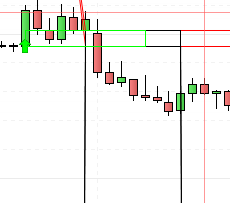
    On the image below you see that the drawing is correct, but the values I m returning are not!

    The values are assigned in the same for loop with the same values that are drawn.

    But somehow it returns the values shifted.

    Can someone help me?

    Thanks Taklause

    SupplyDemandImage.png SupplyDemandImage.png SupplyDemand.itf
    #202286 quote
    NicolasNicolas
    Keymaster
    Legend

    I did not look at the code, but if you return a value contained in a loop with RETURN, therefore the variable is returning the last value assigned in the loop (at the end of the loop or with a BREAK instruction).

    #202287 quote
    taklausetaklause
    Participant
    New
    ATR = AverageTrueRange[inspectingPeriods](close)
    currentSupplyIndex = 0
    IF searchDirection = -1 THEN
    candleWidth = OPEN-CLOSE
    supplyLevelCandleSize = HIGHEST[inspectingPeriods](candleWidth) // GET LAST N CANDLESIZE (RED ARE POSITIVE)
    IF supplyLevelCandleSize > Filterthreshold*STD[inspectingPeriods](candleWidth) THEN // FILTER
    for ind = 0 to inspectingPeriods-1 DO
    IF supplyLevelCandleSize = OPEN[ind]-CLOSE[ind] THEN
    currentSupplyIndex = BARINDEX - ind
    DRAWARROWDOWN(currentSupplyIndex,OPEN[ind]) coloured(255,0,0)
    DRAWRECTANGLE(currentSupplyIndex,OPEN[ind],currentSupplyIndex+resetCounter,OPEN[ind]-ATR)coloured(255,0,0)
    eventCounter = 1 // START INCREMENTING
    
    demandOrSupplyZoneStart = OPEN[ind] // RETURN VALUE AT THE END
    demandOrSupplyZoneEnd = OPEN[ind]-ATR // RETURN VALUE AT THE END
    supplyOrDemand = searchDirection // RETURN VALUE AT THE END
    
    BREAK // conditions met, exit loop
    ENDIF
    NEXT
    ENDIF
    ENDIF

    This is one for loop. The demandOrSupplyZoneStart,demandOrSupplyZoneEnd and the supplyOrDemand flag are returned. They are initialized as a “once” variable. Therefore I would expect if the correct drawings are made, the values are accordingly assigned ? Shouldnt they?

    #202297 quote
    robertogozzirobertogozzi
    Moderator
    Legend

    Try changing lines 15 and 16 with these two:

    demandOrSupplyZoneEnd = OPEN[ind]-ATR[ind]
    supplyOrDemand = searchDirection[ind]

    and line 11 with:

    DRAWRECTANGLE(currentSupplyIndex,OPEN[ind],currentSupplyIndex+resetCounter,OPEN[ind]-ATR[ind])coloured(255,0,0)
    taklause thanked this post
Viewing 4 posts - 1 through 4 (of 4 total)
  • You must be logged in to reply to this topic.

ProRealAI ProRealAI New

Stuck on this ProBuilder code?

Describe what this topic is trying to build, in plain English, and ProRealAI writes the ProRealTime™ indicator, screener or system for you.

Available in 7 languages
Try ProRealAI

Supply & Demand Indicator


ProBuilder: Indicators & Custom Tools

New Reply
Author
author-avatar
taklause @taklause Participant
Summary

This topic contains 3 replies,
has 3 voices, and was last updated by robertogozzirobertogozzi
3 years, 11 months ago.

Topic Details
Forum: ProBuilder: Indicators & Custom Tools
Language: English
Started: 10/11/2022
Status: Active
Attachments: 2 files
ProRealCode ProRealCode
Loading...


