 SVK
SVKParticipant
Junior
Hi all,
again I have run out of talent so I’m turning to you knowledgable guys for help.
I’m trying to create stop loss based on supertrend indicator.
Long condition can be executed once bar closes above Supertrend 2 – 11 or Supertrend 3 – 12.
If long is executed at Supertrend 2 – 11 then stop loss needs to be placed at 2 -11.
If long is executed at Supertrend 3 – 12 then stop loss needs to be placed at 3 -12.
I have run the strategy with folowing code:
IF NOT shortOnMarket and Trigger AND CondiLong1 and CondiLong2 AND TradingON THEN
BUY 1 PERPOINT AT MARKET
StopInd = close-SuperTrend[3,12]
ENDIF


// Stops and targets
SET STOP pLOSS StopInd
SET TARGET pPROFIT StopInd *1.6
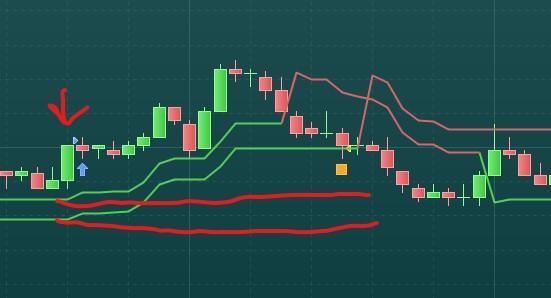
Problem is that Supertrend 3 – 12 is not always below the bar close so I have caught a trade with no stop loss set 🙁
Would anyone know how to code this for Long and Short trading please ?
Thank you very much for the help
What do you want to happen if the supertrend is bigger than the close?
The code below catches such cases and sets the stoploss to 30 points.
IF NOT shortOnMarket and Trigger AND CondiLong1 and CondiLong2 AND TradingON THEN
BUY 1 PERPOINT AT MARKET
StopInd = close-SuperTrend[3,12]
ENDIF

If Stopind < 0 then
Stopind = 30
Endif

// Stops and targets
SET STOP pLOSS StopInd
SET TARGET pPROFIT StopInd *1.6
SVKParticipant
Junior
Hi ProrealAlgos,
many thanks for your response.
I was thinking of having two options for stop loss.
StopInd 1 = close–SuperTrend[3,12]
StopInd 2 = close–SuperTrend[2,11]
If trade is executed and SuperTrend[3,12] is above Close then Stop loss is placed at SuperTrend[2,11] level.
If trade is executed and SuperTrend[3,12] is below Close then Stop loss is placed at SuperTrend[3,12] level.
If trade is executed and SuperTrend[3,12] is above Close then Stop loss is placed at SuperTrend[2,11] level. If trade is executed and SuperTrend[3,12] is below Close then Stop loss is placed at SuperTrend[3,12] level.
Find below the code to achieve this:
if SuperTrend[3,12]>close then
 set stop price SuperTrend[2,11]
else
 set stop price SuperTrend[3,12]
endif
SVKParticipant
Junior
Nicolas,
thank you very much for your help.
Unfortunately I must be doing something wrong as it doesn’t work.
I have insrted your code like this:
//
IF NOT shortOnMarket and Trigger AND CondiLong1 and CondiLong2 AND TradingON and DayLimit  THEN
BUY 1 PERPOINT AT MARKET
if SuperTrend[3,12]>close then
set stop price SuperTrend[2,11]
else
set stop price SuperTrend[3,12]
endif
ENDIF
This way code just keeps following Supertrend and doesn’t place stop loss at the trigger bar.
Because you have wrongly coded the conditions, the IF statement is entered and therefore the stoploss is updated with the SET STOP PRICE instruction.
Replace
IF NOT shortOnMarket
with
IF NOT long
OnMarket
SVKParticipant
Junior
Thank you very much Nicolas.
Can I run Long and Short strategies at the same time on the same instrument with IF NOT longOnMarket ?
Yes if you use something like below …
IF NOT shortOnMarket AND ShortCond Then
SellShort at Market
Endif

IF NOT longOnMarket AND LongCond Then
Buy at Market
Endif
SVKParticipant
Junior
Thank you very much Grahal.
Now I’m trying to figure out how to place profit target at *1.5 of a set stop price.
So far 1 hour and 7 minutes and I’m nowhere. LOL
//
IF NOT longOnMarket and Trigger AND CondiLong1 and CondiLong2 AND TradingON and DayLimit  THEN
BUY 1 PERPOINT AT MARKET
if SuperTrend[3,12]>close then
set stop price SuperTrend[2,11]
else
set stop price SuperTrend[3,12]
endif
ENDIF
Yes coding is very time consuming, especially if at the end of a few hours there isn’t a working result!
Have you tried below …
set stop price (
SuperTrend[2,
11] + (0.5*SuperTrend[2,11]))
But do you really mean 1.5*Price anyway? Taking DJI at 35,000 this gives 52,500 for 1.5*Price??
SVKParticipant
Junior
Thanks Grahal.
Nope nope that would be crazy 🙂
If stop loss is placed at Supertrend 3,12 then profit is 1.5* of a stop loss.
So Spuertrend 3,12 stop loss is 10 points then take profit is 15 points.
Ah right gotcha, sorry watching a film at same time so not concentrating.
How about below …
IF NOT longOnMarket and Trigger AND CondiLong1 and CondiLong2 AND TradingON and DayLimit  THEN
BUY 1 PERPOINT AT MARKET
if SuperTrend[3,12]>close then
set stop price SuperTrend[2,11]
else
set stop price SuperTrend[3,12]
Set Target Price (Close + ((Close -  SuperTrend[2,11]) *1.5))
endif
ENDIF
SVKParticipant
Junior
Grahal,
it works and it improved the forward testing results 🙂
Thank you very much for that 🙂