


Summary of ProBacktest doesn’t show up

Viewing 5 posts - 1 through 5 (of 5 total)

  • Author
    Posts
  • #162984 quote
    reppy123
    Participant
    New

    Hi,

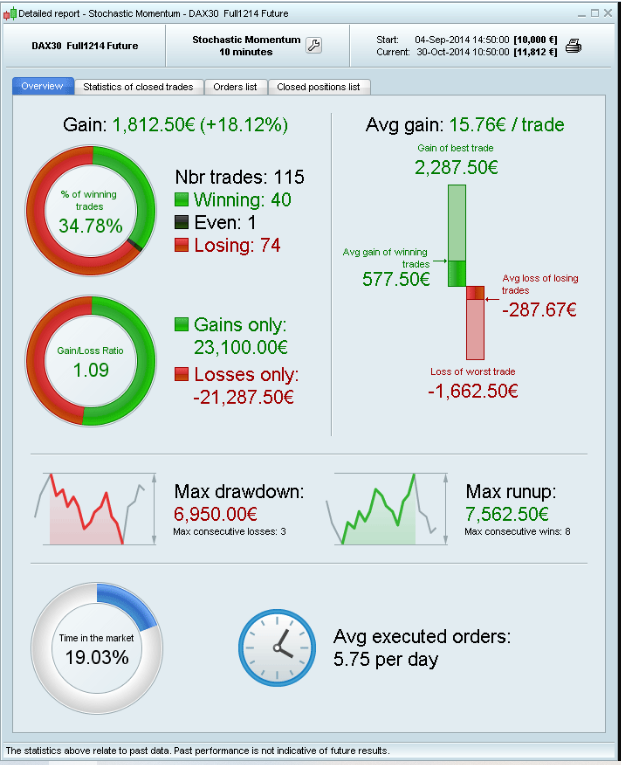
    I tried some strategies with ProBacktest and a window with a summary like the attached image.

    should pop up after the backtest calculations are finished. I closed this window and now, it doesn’t pop up again when I try new strategies in ProBacktest.

    I re-started ProRealtime, but this didn’t help.

    How can I get this summary window again?

    Thanks in advance!

    Screenshot_1.png Screenshot_1.png
    #162989 quote
    Vonasi
    Moderator
    Master

    reppy123 – Welcome to the forms.

    Please do not insert links to external images. Use the ‘Attachments’ facility beneath the text box to attach any files or images that you want to include in your post. I have edited your post and attached the image as it should be.

    #162991 quote
    Vonasi
    Moderator
    Master

    It should appear again if you right click on the equity curve window or positions window and then click on detailed report. I just tested and was able to get the window again but it refused to fill out with details even if I ran the back test again.

    You may have spotted a bug. You should send a technical report via your platform. I will also highlight it to Nicolas off forum and hopefully he will also report it to PRT.

    In the meantime a workaround might be to duplicate your strategy and then start it under a different name and then never close the detailed report window!

    #162993 quote
    reppy123
    Participant
    New

    Hi Vonasi,

    thanks for your fast reply. With the duplicated strategy, it works fine!

    PS: I didn’t attach the image but included a link because I wasn’t sure about the copyright on that image. Strictly speaking, I don’t have any rights on that image, so I only linked it.

    #162994 quote
    Vonasi
    Moderator
    Master

    I think you’ll find that you are pretty safe in copyright terms when attaching screenshots of the PRT platform in a forum dedicated to the PRT platform and fully supported by PRT! 🙂

Viewing 5 posts - 1 through 5 (of 5 total)
  • You must be logged in to reply to this topic.

Summary of ProBacktest doesn’t show up


Platform Support: Charts, Data & Broker Setup

New Reply
Author
author-avatar
reppy123 @reppy123 Participant
Summary

This topic contains 4 replies,
has 2 voices, and was last updated by Vonasi

4 years, 11 months ago.

Topic Details
Forum: Platform Support: Charts, Data & Broker Setup
Language: English
Started: 03/02/2021
Status: Active
Attachments: 1 files
Logo Logo
Loading...
