Hi,
replace line 4/5/6 as below (remove the /): //atrperiod = 18 //bolltrendperiod2 = 24 //bolltrendperiod2 = 80 by atrperiod = 18 bolltrendperiod2 = 24 bolltrendperiod2 = 80
There 3 are variables that I optimize, so if importing the .itf, they are in the variables windows. If copy the code above, then can either do as you said, or add them into variable window if wish to optimize
On my side, when I want to launch the code I have the error message below “The code is invalide, please correct it” (translated from french),
Emm. I have no clue too why this error as I just try and everything is ok. I’m guess you copy paste from above, so I’m wondering is due to default PC language and unicode different, some copied content becomes different when paste into PRT coding window. Can you try to import the .itf directly and try again?
Can anyone explain me the task of lines 167 to 172 ? I have the feeling that some conditions are missing
It has no use, just my template of code for all my strategies, so I have accidentally left it there.
Hi,
I get
“replace variables with specific values: To prepare this strategy for automatic trading, remove all variables from the “ProBacktest” section of the programming window and replace these variables with specific numeric values in the code of the trading system”.
I have tried to remove the “//” comment out parts on :
replace line 4/5/6 as below (remove the /): //atrperiod = 18 //bolltrendperiod2 = 24 //bolltrendperiod2 = 80 by atrperiod = 18 bolltrendperiod2 = 24 bolltrendperiod2 = 80
But still the same issue. 🙁
You also need to remove variables from the variable windows, you can refer to think guideline post, https://www.prorealcode.com/topic/strategy-trendimpulse-v1/page/3/#post-130850
Try this file. Tested from UTC+1
SL in % and different for Long/Short Trade
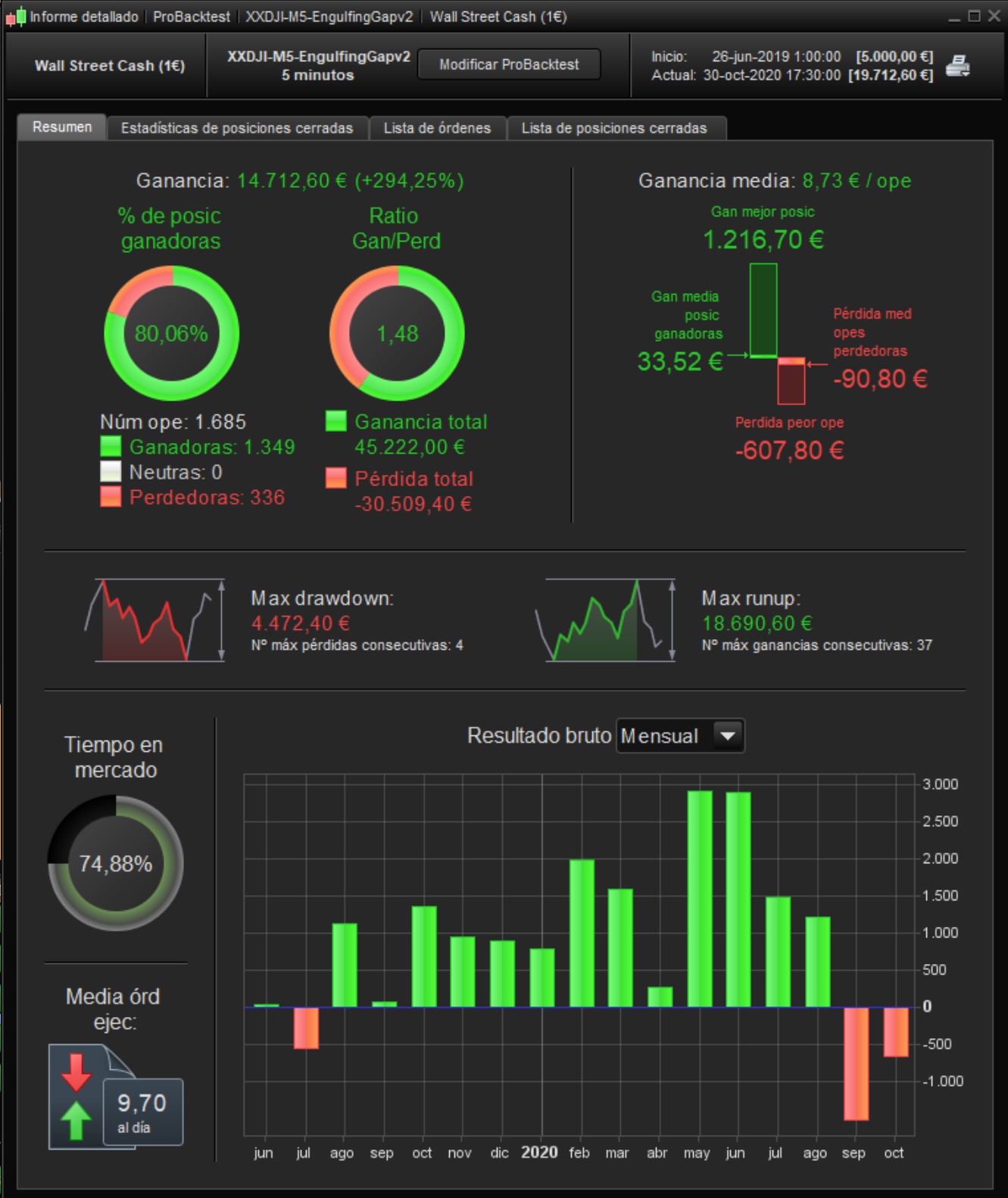
DJ M5
Buenos días Daniel,
gracias por este impresionate trabajo realizado. Yo lo tengo funcionando en real y me va muy bien, es cierto que he ajustado algún parámetro pero te felicito por este robot.
Saludos
Good morning Daniel,
thank you for this impressive work done. I have it working in real life and I’m doing very well, it is true that I have adjusted some parameter but I congratulate you on this robot.
Cheers
@Roberto Blázquez Only post in the language of the forum that you are posting in. For example English only in the English speaking forums and French only in the French speaking forums. Thank you 🙂
@Daniel Carlsson Update your country in your profile. Thank you 🙂
Hi Roberto, share your itf file please
only code change on line
9 stepfactor1 = 1
By
9 stepfactor1 = 3
and the lotage instead of 1 contract I have 0.25
I’ve got it working in real andit doesn’t give any problems and it’s profitable.
Hi,
Altered time zone on my chart for back testing and some forward testing, running this strategy on UTC+8, works okay, great.
My question is, ……….which I’m sure will help many of us.
As this is not my computers system time zone,
How would i lock this time setting in when sending it to ProOrder?
As ProOrder will set the trades at my original computers time zone,
Time setting to offset my system.
Thanks and Regards
running this strategy on UTC+8
If you mean you have set your Platform to UTC+8 then start the Algo in ProOrder and you will see from the ProOrder start screen that the Algo will run in UTC+8.
Then change you Platform back to UTC+0 (UK Time) … then Exit with Save, Log back in and you will be at UTC+0.
Check Algo by clicking on the Algo title in ProOrder and you will see it is still running in UTC+8.
Good Eh!? 🙂
Legendary GraHal, Legendary, Thanks:)
Thanks, Roberto, and Daniel.
I tweaked your version very slightly Roberto, It makes a small improvement.
line 8 SL = 105 from 100
line 15 – shortbarmultipler = 1.4 from 1.5
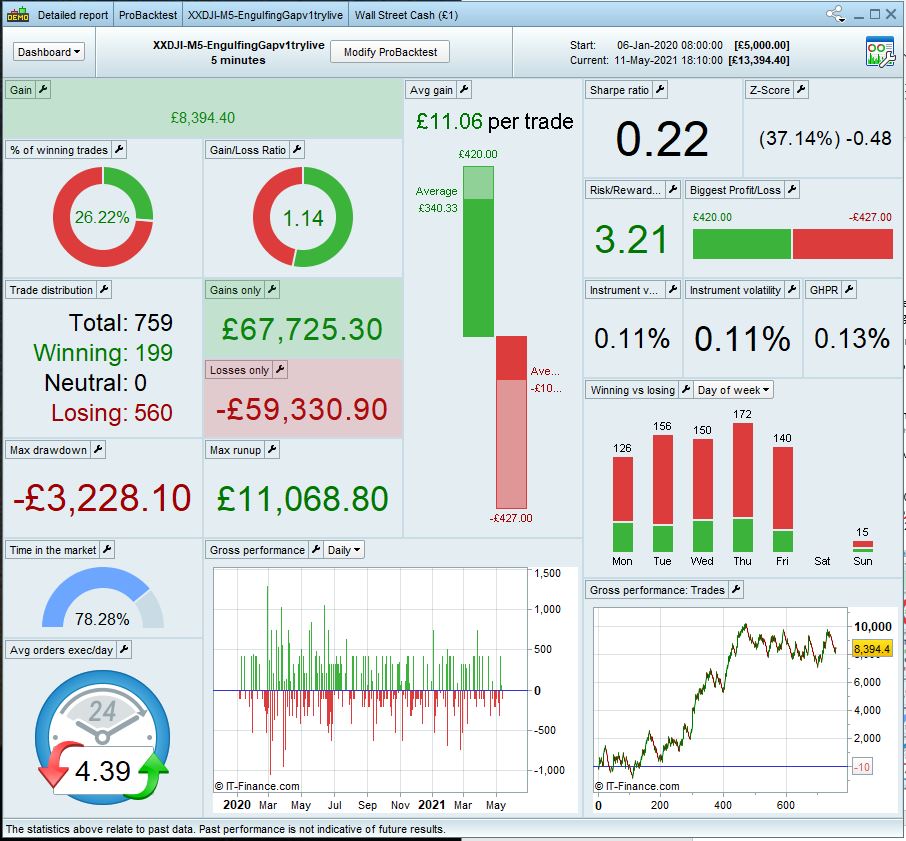
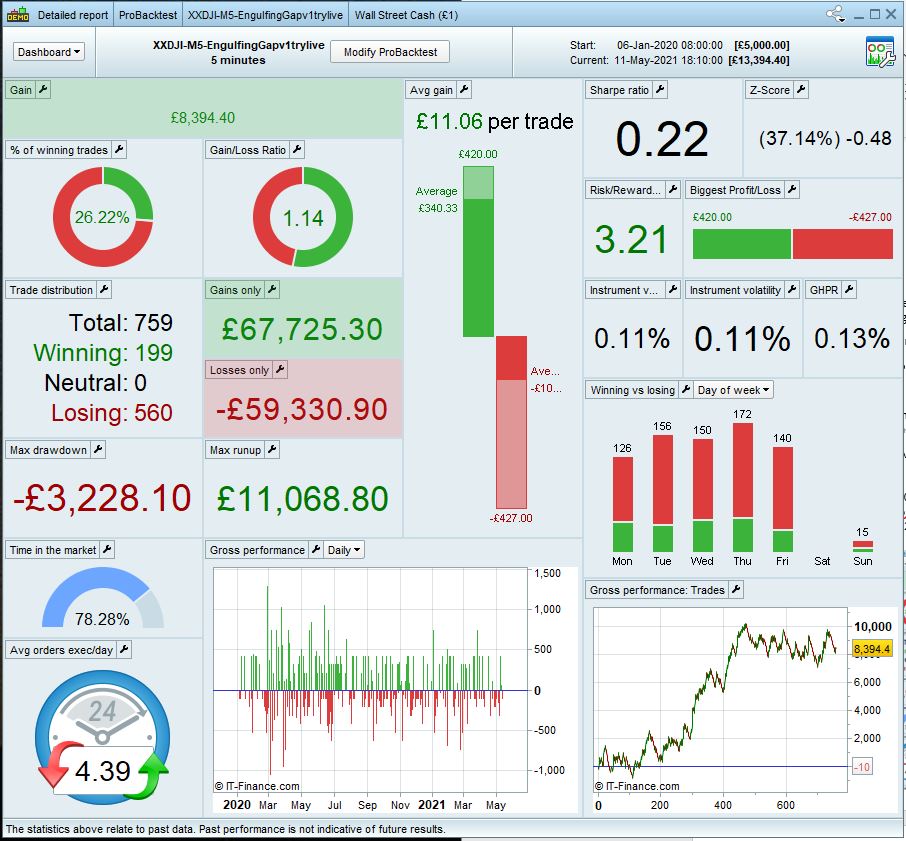
For my demo account, I made it 1 contract, Long or Short. As per the Dashboard results attached.
I have been testing on a demo trading account and works well, however, I have one question.
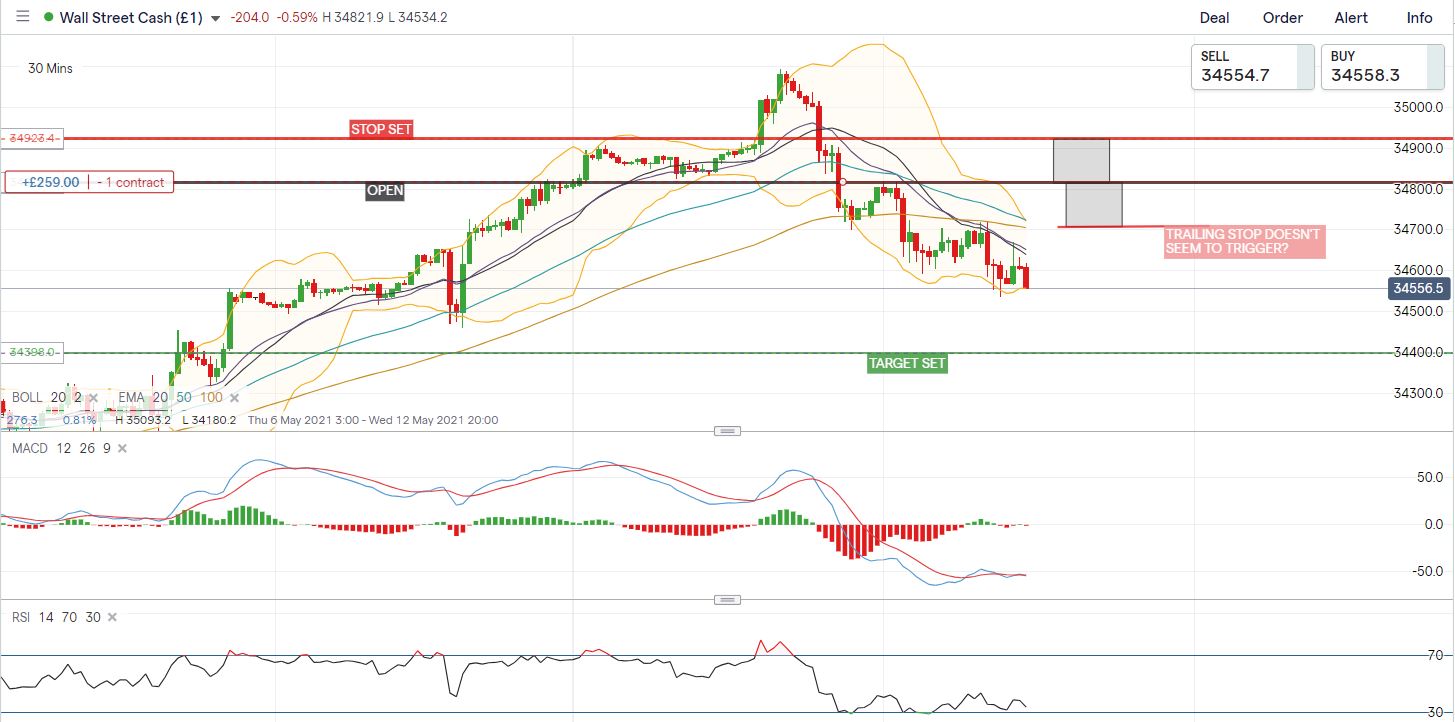
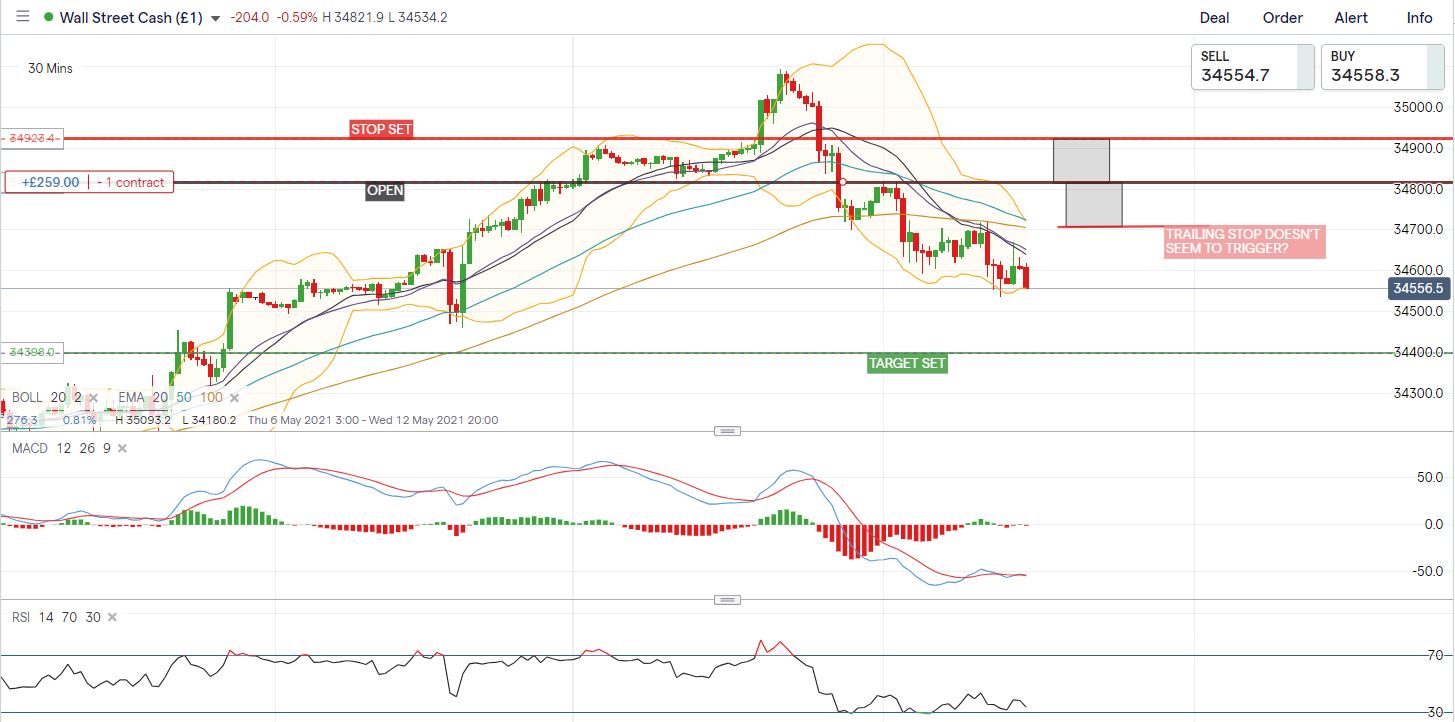
I am not a coder by the way. But in the code, I see there is a trailing stop. But When I watch a successful trade it doesn’t seem to trigger and move down.
I am a trader of 7 years and have been experimenting with ProRealTime for some time. With some good outcomes.
I am looking to work with a developer/coder who knowes trading and coding well to be able to fine-tune some other algos I have made. For mutual benefit, if you guys are interested.
Hi, This is really good and have followed the thread of the post.
On page 2 there is a tweak from Roberto, which I also followed working from your code. It tends to cut the number of trades but lessons the risk.
I tweaked that a little myself, Not being a coder my tweaking was based around trial and error on the existing code. But managed to get Roberto’s version to work better returning more profit and less potential drawdown.
I tweaked your version very slightly Roberto, It makes a small improvement.
line 8 SL = 105 from 100
line 15 – shortbarmultipler = 1.4 from 1.5
For my demo account, I made it 1 contract, Long or Short. As per the Dashboard results attached.
I have been testing on a demo trading account and works well, however, I have one question.
I see there is a trailing stop. But When I watch a successful trade it doesn’t seem to trigger and move down. Which I am sure would protect profit and better these results.
Is the trailing stop working at all?
When I look through the backtesting it’s showing either a full loss or a full win, suggesting it isn’t.
I am a trader of 7 years and have been experimenting with ProRealTime for some time. With some good outcomes.
I am looking to work with a developer/coder who knowes trading and coding well to be able to fine-tune some other algos I have made. For mutual benefit, if you are interested.
thanks once again!
G
Stepfactor1=1, so trailing trigger by stepfactor1 * SL, i.e. 105 points after your modification. Seeing average is $340.33, it should be triggered. If you like it to be triggered earlier, then set stepfactor1 to lower value.
As TF is 5 mins, it means the code is read by PRT every 5 mins, thus trailing checking is done on this time interval.