Strange STYLE problem

Viewing 5 posts - 1 through 5 (of 5 total)
  • Author
    Posts
  • #128975 quote
    smhhadima
    Participant
    Junior

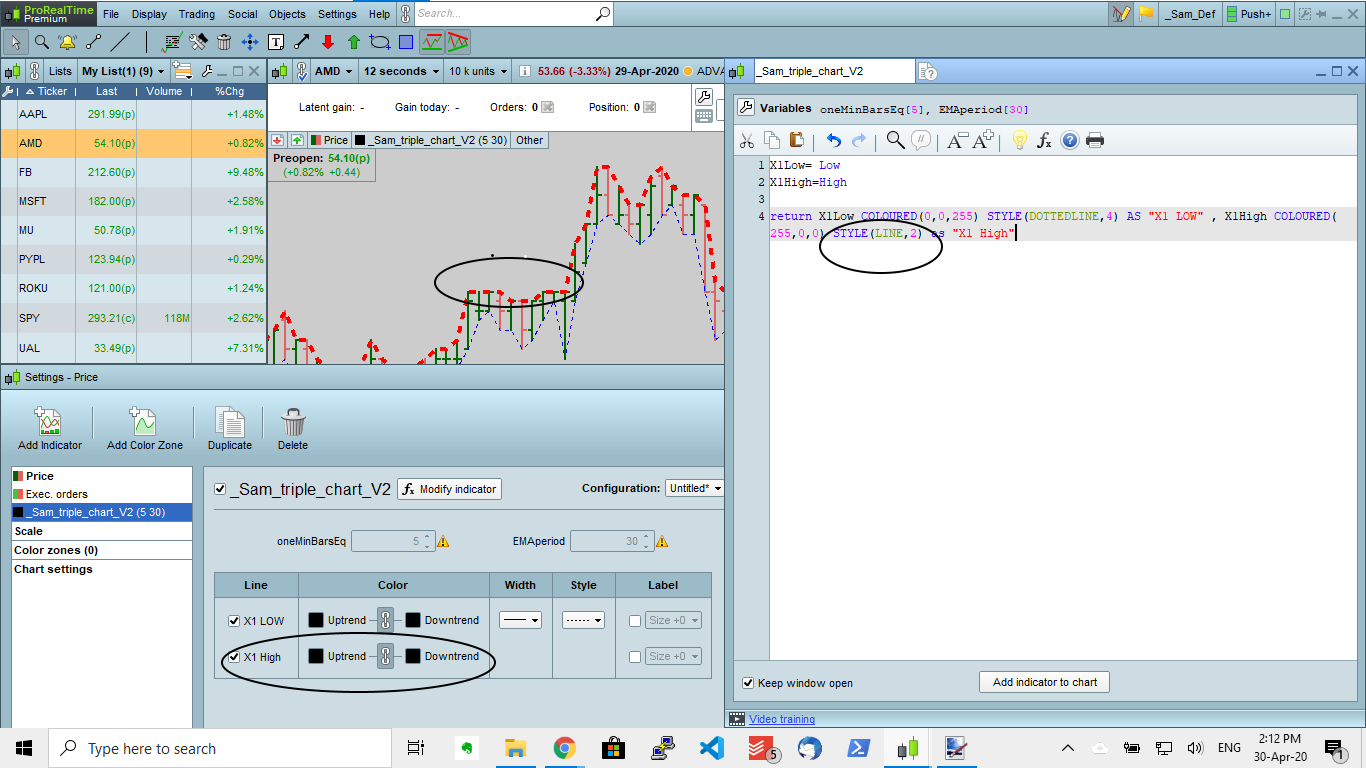
    The software ignoring my STYLE and keep enforcing its own!

    This is a very simple code where the STYLE of “X1 High” should be line “STYLE(LINE,2)”, but the output is always dotted line!

    I checked the configuration panel (as attached) but there is no option to change the style

    see the attached picture

    CODE

    X1Low= Low
    X1High=High
    
    return X1Low COLOURED(0,0,255) STYLE(DOTTEDLINE,4) AS "X1 LOW" , X1High COLOURED(255,0,0) STYLE(LINE,2) as "X1 High"

    What did I do wrong?

    style_Problem.jpg style_Problem.jpg
    #128984 quote
    robertogozzi
    Moderator
    Master

    Not all values are accepted, try 2,6,8,10.

    #129015 quote
    Nicolas
    Keymaster
    Master

    It is a problem known with version 11, it is fixed since yesterday for Prorealtime.com software customers. If you are with IB, you’ll have to wait for this new build to be deployed for you (it usually not long after that).

    #129155 quote
    smhhadima
    Participant
    Junior

    Hi,

    I am a Prorealtime.com customer, Do I have to re-install the local software on my computer to get the new build?

    #129224 quote
    Nicolas
    Keymaster
    Master

    Nope, just restart the platform.

Viewing 5 posts - 1 through 5 (of 5 total)
  • You must be logged in to reply to this topic.

Strange STYLE problem


ProBuilder: Indicators & Custom Tools

New Reply
Author
author-avatar
smhhadima @smhhadima Participant
Summary

This topic contains 4 replies,
has 3 voices, and was last updated by Nicolas

5 years, 9 months ago.

Topic Details
Forum: ProBuilder: Indicators & Custom Tools
Language: English
Started: 04/30/2020
Status: Active
Attachments: 1 files
Logo Logo
Loading...