 JvdG
JvdGParticipant
Average
I have a problem, and IG and ProRealTime point to each other… 🙁 so I turn to this forum to explain what happened:
Market: Wall Street Cash 1 €.
Timeframe: 30 min.
Automatic trading with Pro Real Time.
Position (LONG) started aug. 5 at 16:00 @ 34.959,7 (opening).
Settings: guaranteed stoploss.
My code at the bottom of the program:
SL = 175
TP = 650
SET STOP pLOSS SL
SET TARGET pPROFIT TP
Situation one day later at aug 06 at 22:00 (closing USA):
* WallStreet is at 35.207,1;
* my program tries 3 times (22:00:36, 22:00:37, and 22:00:38) to execute the Stoporder (@ 34.784,7 which is exactly 175 points below the opening of the trade);
* these 3 orers are rejected given the price of WallStreet at that moment (35.207,1);
* at 22:00:38 the program is automatically stopped by PRT;
* for IG the trade is still okay, but I stop the trade manually;
* systemcomment ProRealtime: “Order Risk Stop level was closer than the minimum required distance from the market”
I don’t understand the action of PRT. At aug 6 22:00 the trade is at a profit of +247 points. The distance from the StopLoss level is 247+174=422 Even if IG would have extended the minimum stoploss level with a few points (as PRT suggests…), that level should never have been allowed to be triggered while having a trade in profit. Yet, the program tries to execute the stoploss order.
How is that possible. Is something wrong with my (simple) code as stated above? Should I add “ONCE” to my code?
How reliable is PRT at this point?
Regards, Jerke vd Geest
* at 22:00:38 the program is automatically stopped by PRT;
How I see it : This is crucial. because it indicates that PRT gives up due to “insufficient (timely) response” from the broker. More generally (but important !) : PRT does not know what to do with “a” response from the broker and with that gives up on your behalf (better safe than sorry).
I can’t reason this out in this particular situation, but without doubt this is about an inadequate broker response (this includes “not in time”).
You can ask PRT support to sort this out in detail, which they will if you are able to refer to exact happenings on date/time. However, it most probably will end up in vague responses like mine because that just happens – for your protection. Meanwhile your situation could be too special to make clear in the first place and sorting it out appears to e a waste of time. Read : the broker is at fault but is too “mighty” to be blamed and admit faults. In other words, in my experience PRT is not guilty as such but is (over ?) protecting you.
All is about the broker confirming your order in time; if that does not happen, best is to “reset” and cancel your order.
Really hard to explain, but over and over I believed the explanation of PRT to be justified.
That the whole Strategy is cancelled instead of skip one order and be happy with a next one, is something else. I would blame PRT for *that*. But how to decide the Strategy can keep on running harmlessly if an unexpected situation occurred in the first place …
Jerke, sorry to be so vague, but it is about your money and I never could fault PRT to neglect that. That indeed it leaves you with not being satisfied with the next result / situation, alas. But try to think of a better “guess”, your money not being at risk …
The short answer :
> * systemcomment ProRealtime: “Order Risk Stop level was closer than the minimum required distance from the market”
This is an IG thing I never understood, but which others will be able to explain better regarding the “why”. What remains is that it aborts your Strategy, which I probably would always hate.
Heads up.
JvdGParticipant
Average
Hi PeterSt,
thanks to give such an extended answer to this topic;
I also have a gut feeling (mij bekruipt ook het gevoel… 🙂 that it’s very hard to discover exactly what has happened, but I think you’re right; maybe PRT is protecting me, could very well be;
first I will turn again to IG to ask them to explain exactly what happened at that time, that’s where all the triggers started; whatever happened, if they could only explain instead of using there power to escape the question;
anyway, the trade so far gave me a nice profit;
thanks again!
What is your ticket number for this particular problem please? I’ll try to know more.
JvdGParticipant
Average
I don’t have a ticket number. PRT nor IG gave me a ticket number.
Anyway, thanks in advance for your effort to bring me some clarification!
Settings: guaranteed stoploss.
I think guaranteed stoploss has a different minimum stop distance, and I have seen during volatile market it jumps to very high.
https://www.ig.com/uk/indices/markets-indices/wall-street
Minimum stop distance 10
Minimum guaranteed stop distance 2.0%
Maybe you can ask this specific question to IG if this is the culprit
I don’t have a ticket number. PRT nor IG gave me a ticket number.
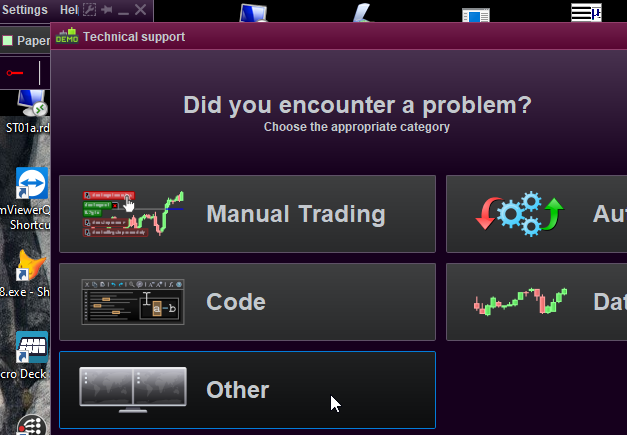
What you could(/should ?) do is have the chart (instrument) of concern on your screen, and make a Technical Report via Help – Technical support in the Main Menu. Use the Other button, and select that instrument of concern. Describe your problem briefly and describe the date/time it happened.
The sent report will end up at PRT itself (not at IG) and they will tell you from there what happened (they can see all via logs). You will also soon get a confirmation from someone at PRT (this includes a ticket number) that the problem will be looked into. Lastly it is a matter of waiting when they do that (may take weeks, may take a few days).
It may be good to know that this will end up at 2nd line support hence people at PRT itself, which is not the case at all for IG support, and which is also not the case when you’d write to PRT (1st line) support. Also, 1st line PRT support will pass on the problem to 2nd line, but this won’t be accompanied by your literal data in use at the moment of “failure”.
In my experience the “data” people at PRT are very keen to sort out what happened, as this is mostly about the decency of the PRT platform which has the highest priority for PRT. *If* the verdict is that IG (and beyond) did something odd, then again my experience tells that this is to be trusted. This is not at all ditching the problem.
PS: Looking at the description of your issue again, to me it looks like there is some bug in the dealing with an erroneous situation which could happen at closing times. Something like : A. a limit (stop) order is not allowed to extend over a trading day (normal trading times) but B. because #A is a bug in itself, the whole environmental situation around your AutoTrade program on the server can not be trusted any more (mind you, by the program itself) and thus s stops the Strategy to be on the safe side.
It is good to know that “unreliable” situations (as how the platform sees it) are dealt with
- aborting a pending order
- resetting the platform.
#1 and #2 can be swapped, according the situation.
The interesting part is #2, because I know this has been added (something like 18 months ago) as a solution to “erroneous situations” regarding orders given to the broker, but what does this mean for a running AutoTrading strategy ?
I had it the other day myself : The broker did not respond within thresholds, and as result the Strategy was stopped. So yes, that simple ! Should not happen – never happened before and never happened since. But at this one time my Strategy put an order (Market, but for Limit the very same applies) the broker was slow in responding, and the platform did not know what to do next. Mind you, if you place a market order yourself and you see nothing happen, what do you do ? you retry (I had this many times with manual trading). Next, you will end up with two orders because all what happened was that the broker is slow in responding. Today this should not happen any more because
– your order will appear grey at first always (grey means : not dealt with by the broker yet);
– the platform will reset when the broker’s response is too slow (reset : the status of all your charts/orders is recollected at the broker).
Now envision this all within the AutoTrading environment. It is easy to see how many things may go wrong or odd or whatever, while your program actually “knows” it handed an order to the broker. The best what could happen is that in a next candle (call of your program) a re-attempt is done (you not understanding why the order wasn’t filled because the limit was reached). But the worst would be that meanwhile the broker processed the order after all and now you’d have two orders (a situation which may be prohibited by (your) settings to begin with).
Solution : stop the Strategy. And that your positions are not exited is just an other setting (under your own control).
And don’t underestimate the oddities at closing times. The possibility exists that very high jumps occur and that you miss them on the chart. This too can be explained (I think) because USA is not stopping for real after (our Dutch) 22:00 and ETH (Extended Trading Hours) begin. But … do you have that switched on ? if not, you won’t see the jumps … You chart will look as if trading stopped at exactly 22:00.
Oh … now I think of it … ETH eh ? OK, this is very very new … does AutoTrading work with that properly ?!? hmm …
Oh … now I think of it … ETH eh ? OK, this is very very new … does AutoTrading work with that properly ?!?
I suppose I am wrong with this suggestion, because ETH trading will be about IBKR and not IG (?).