
Thanks @GraHal.
I can give it a try by removing NOT LONGONMARKET/SHORTONMARKET/ONMARKET to see the behaviour as I don’t take more than one trade at a time on this system. I’ve already in place Defparam CumulateOrders = False.
@PeterSt, sure, I’ve attached with all columns included. The issue is not that. You can clearly see 3 rows for 1h algo and 2 rows for 30mins. The issue I was explaining earlier was that not all stops and limits are being placed. I cannot go lower than 30 mins timeframe for this algo because of limitation of 10k for PRELOADBARS. I would 15m action with PRELOADBARS supporting 20/30k but it is what it is. I understand more PRELOADBARS means bigger memory footprint for the program on PRT servers but why not? I wonder what was the other logic to limit PRELOADBARS to 10k.
JSParticipant
Senior
You say you can’t take a higher time frame than 30 minutes with the maximum PreLoadBars (10,000)…
So, you use an algo/indicator that looks back about 1 year (10,000*30min) in history…?
Yes it is quite obvious. Different algos different methods, some run on short tf, some on higher. If you want to use higher timeframe averages or similar, then you need longer time frame data. Lesser trades but greater reward.
JSParticipant
Senior
Yes, that’s clear… only an Average[10000](Close) (or similar) on a 30 minute time frame is a bit more unusual…but indeed possible…
For the initial issue of no stop loss / target profit set, I think I might have found the issue.
IF NOT LONGONMARKET AND LongCondition THEN
BUY 1.0 CONTRACTS AT myLevel limit
SET TARGET PLOSS lossDistance
SET TARGET PPROFIT profDistance
ENDIF
For the algo using above code, I’ve following setting in place:
- Max Position: 1 Amount/Pt
- Guaranteed stop: No
- Readjust stops: Yes
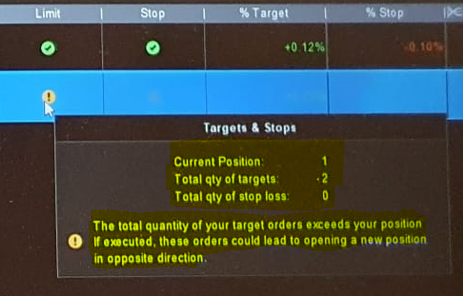
In my open positions window, I noticed the following (see attached):
Under limit, it was showing Caution symbol and related info was:
- Current Position: 1
- Total qty of targets: -2
- Total qty of stop loss: 0
The total quantity of your target orders exceeds your position if executed, these orders could lead to opening a new position n opposite direction.
Now, I am wondering, if I change “SET TARGET PLOSS lossDistance” to “SET STOP PLOSS lossDistance”, will it resolve the issue completely? What am I missing here?
But those who are nevertheless tempted to use a set target loss statement, should NEVER launch it simultaneously with the order entry (buy, sellshort), be it at market or pending. This one is meant to be launched once in real trouble, when loss is already BIGGER than the distance supplied with the set target loss.
ashehzi you are doing what it says NOT to do in
bold in above text.
if I change “SET TARGET PLOSS lossDistance” to “SET STOP PLOSS lossDistance”, will it resolve the issue completely?
Yes try above and let us know.
Yes that is old code and was still running on one of the demos, found the issue and thought to share for the benefit of others. I’ve mostly changed the code to set stop.