STOP LOSS using ATR

Viewing 8 posts - 1 through 8 (of 8 total)

  • Author
    Posts
  • #197222 quote
    deltasystem
    Participant
    New

    Hello,

    I’ve been trying different Stop Loss techniques and I have come up with something using ATR. Ive added it to my code as a trailing stop loss but it seems that it is not be calculated as I want it to be. It seems it is not trailing the highest or lowest price made.I am using a 15 minute time frame. Can anyone help me out here ??

    SET STOP PTRAILING WeightedAverage[14](AverageTrueRange[2](close))*2

    thankyou !

    #197228 quote
    GraHal
    Participant
    Master

    If you insert below in your code, the value will show you the number of points price needs to move before the TS starts to move.

    When Set Stop PTrailing does start to move, it only moves 1 point for every 1 point change in price.

     GRAPH WeightedAverage[14](AverageTrueRange[2](close))*2
    deltasystem thanked this post
    #197229 quote
    deltasystem
    Participant
    New

    Hi GraHal,

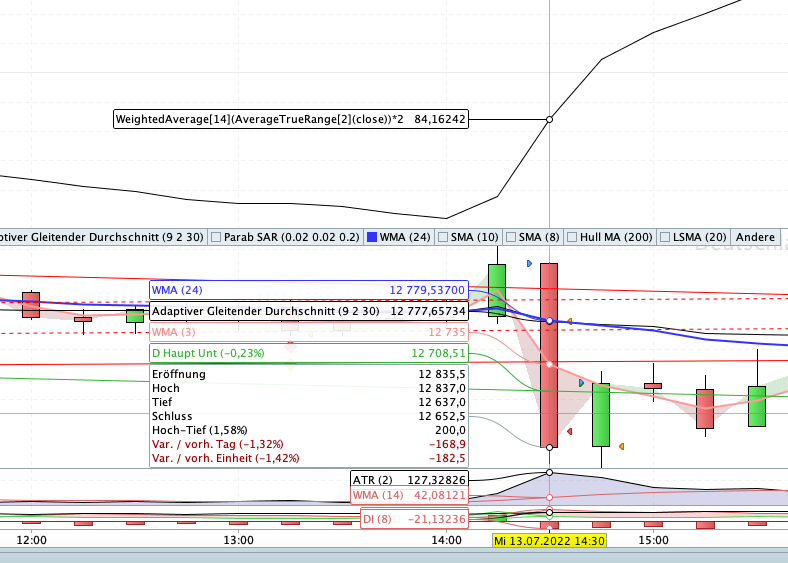
    thank you. As far as I can see the Stop Loss is not moving up or down correctly with new price highs or lows depending on long or short. Ive attached a screen shot. Am I correct in assuming that the stop loss for this marked 15 minute bar will be 104,67 and will only change after the bar has closed? In this case (I went short on the open of the bar at 12653,3) the price then went down to 12631,5 before rising and I was closed out at 12716,5. From my understanding the StopLoss should have trailed 21 points which means it would have bee 83 points from my entry point so around 12736 but this as not the case since I was closed out at 12716,5. Or am I taking the wrong value for the stop loss? Should i be taking the value on the graph of the 15 minute bar before the trade opens?

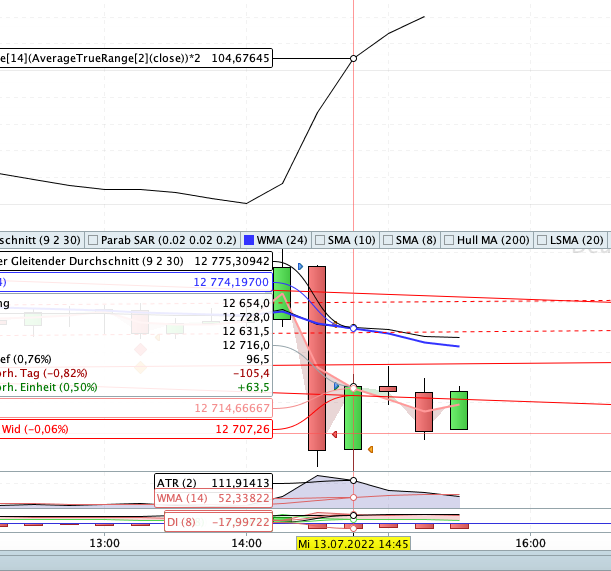
    If you look at the 2nd screenshot I did and the marked bar which is also a trade I cannot understand how the trade as stopped out so much lower than I am assuming the Stop Loss should be. How much should the trailing stop loss have been, max 84 right? Or possibly even less if I am reading wrongly and it should be the value from the bar before.

    I really appreciate your help!

    Screenshot-2022-07-13-at-15.34.57.png Screenshot-2022-07-13-at-15.34.57.png Screenshot-2022-07-13-at-15.47.33.png Screenshot-2022-07-13-at-15.47.33.png
    #197233 quote
    robertogozzi
    Moderator
    Master

    Replacing SET STOP ?TRAILING with a trailing stop code snippet is usually recommended.

    #197236 quote
    deltasystem
    Participant
    New

    I’m sorry I don’t know what a snippet is…

    #197237 quote
    robertogozzi
    Moderator
    Master

    It’s a piece of code that replaces the built-in TRAILING instruction.

    It’s quite easy to use, actually you don’t even need to code, just copy & paste lines 17- 56 (at https://www.prorealcode.com/blog/trading/complete-trailing-stop-code-function/) and append them at the end of your code after removing the SET STOP PTRAILING line.

    This is the code:

    //*********************************************************************************
    //trailing stop function
    trailingstart = 20   //trailing will start @trailinstart points profit
    trailingstep  = 5    //trailing step to move the "stoploss"
     
    //reset the stoploss value
    IF NOT ONMARKET THEN
     newSL=0
    ENDIF
     
    //manage long positions
    IF LONGONMARKET THEN
    //first move (breakeven)
     IF newSL=0 AND close-tradeprice(1)>=trailingstart*pipsize THEN
      newSL = tradeprice(1)+trailingstep*pipsize
     ENDIF
    //next moves
     IF newSL>0 AND close-newSL>=trailingstep*pipsize THEN
      newSL = newSL+trailingstep*pipsize
     ENDIF
    ENDIF
     
    //manage short positions
    IF SHORTONMARKET THEN
    //first move (breakeven)
     IF newSL=0 AND tradeprice(1)-close>=trailingstart*pipsize THEN
      newSL = tradeprice(1)-trailingstep*pipsize
     ENDIF
    //next moves
     IF newSL>0 AND newSL-close>=trailingstep*pipsize THEN
      newSL = newSL-trailingstep*pipsize
     ENDIF
    ENDIF
     
    //stop order to exit the positions
    IF newSL>0 THEN
     SELL AT newSL STOP
     EXITSHORT AT newSL STOP
    ENDIF
    //*********************************************************************************

    You only have to set the two values trailingstart and trailingstep to the ones you prefer.

    GraHal and deltasystem thanked this post
    #197243 quote
    GraHal
    Participant
    Master

    what a snippet is

    Click on below and you will have a pleasant surprise! 🙂

    Snippet Link Library

    deltasystem thanked this post
    #197245 quote
    deltasystem
    Participant
    New

    Wow! thanks a million!

    GraHal thanked this post
Viewing 8 posts - 1 through 8 (of 8 total)
  • You must be logged in to reply to this topic.

STOP LOSS using ATR


ProOrder: Automated Strategies & Backtesting

New Reply
Author
Summary

This topic contains 7 replies,
has 3 voices, and was last updated by deltasystem
3 years, 7 months ago.

Topic Details
Forum: ProOrder: Automated Strategies & Backtesting
Language: English
Started: 07/13/2022
Status: Active
Attachments: 2 files
Logo Logo
Loading...